iPadilla
Participant
June 11, 2021
Question

Update Removed All Brushes

  • June 11, 2021
  • 1 reply
  • 687 views

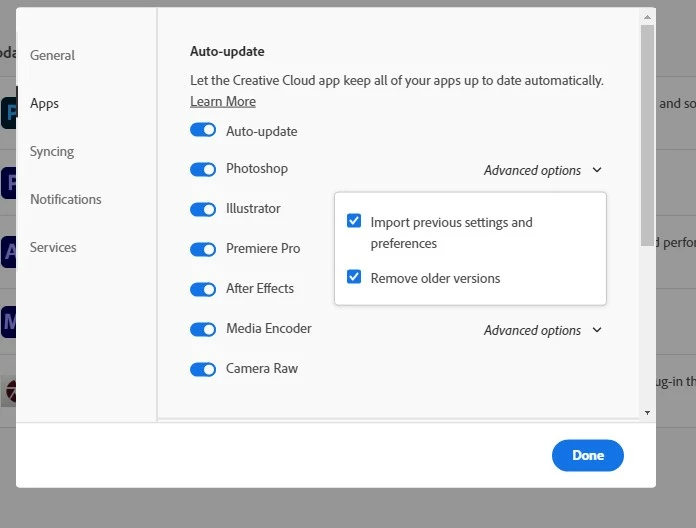
My loaded brush sets and brushes that come with Photoshop CC were removed even though I have all Creative Cloud App settings as:
(checked/yes) Import previous settings and preferences
(checked/yes) Remove older versions.


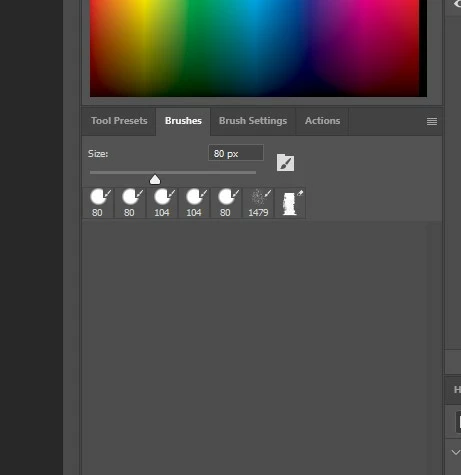
I know where my own brushes are and I can import them again, but I do not know where the basic Adobe brushset went. The update settings are checked properly - are brush sets not included in "settings and preferences"? It remembered my tool presets, actions and last used brushes, but the entire list of brush packs I had imported as well as the basic Adobe brushes that come with Photoshop CC has been wiped clean. 


This topic has been closed for replies.

1 reply

Sahil.Chawla
Adobe Employee
Adobe Employee
June 19, 2021

Hi there,

Sorry to hear about the lost brushes after Photoshop's update. Please try the steps below and let us know how it goes.

  1. Go to this location: C:\Users\username\AppData\Roaming\Adobe\Adobe Photoshop (older version)\Adobe Photoshop (older version) Settings.
  2. Copy everything from the Settings folder and then go to this location: C:\Users\username\AppData\Roaming\Adobe\Adobe Photoshop (new version)\Adobe Photoshop (new version) Settings and paste the content copied from the older settings folder here.
  3. Relaunch Photoshop and let us know if the brushes appear again.

Regards,
Sahil

iPadilla
iPadillaAuthor
Participant
June 19, 2021

The Photoshop 2020 Settings folder only has 3 settings - Photoshop 2021 Settings has all the settings, including Brushes listed (the Brushes.psp file would not open in Photoshop).


(2020 SETTINGS)


(2021 SETTINGS)