
RosaPerry
Inspiring
October 2, 2021
Beantwortet

Updating to 22.5.1 Options for Drawing Mode in Advanced Graphics Processor Settings has disappeared

  • October 2, 2021
  • 2 Antworten
  • 2913 Ansichten

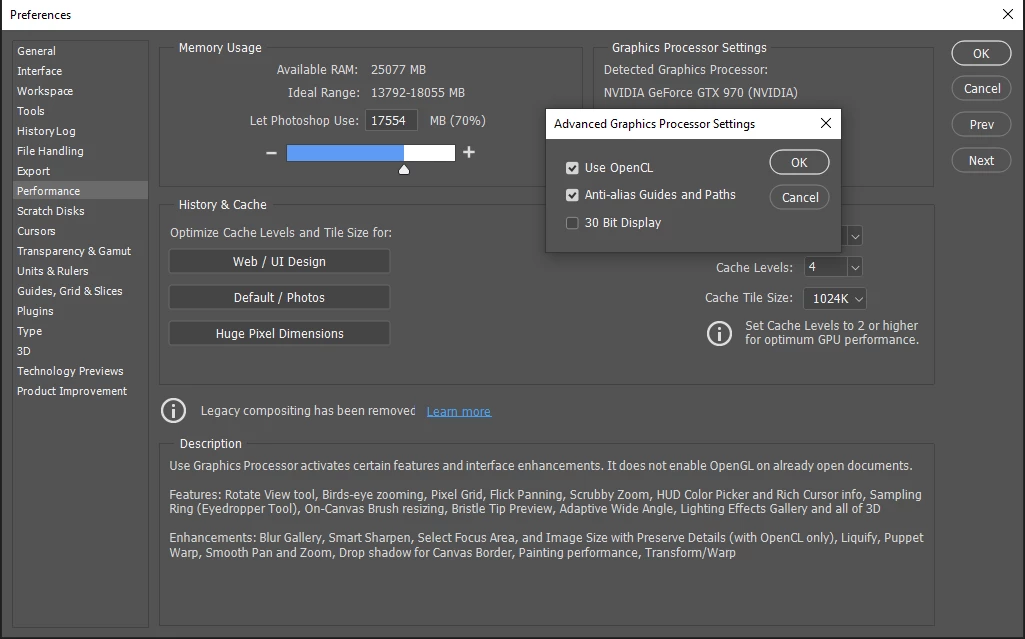
Where are my options for Drawing Mode in Advanced Graphics Processor Settings?

This is all I have (pic below).

It wasn't like this prior to PS 22.5.1 update. I don't have the option of Basic, Normal or Advanced. I know the options were there before the last update because I had changed it.

I have Windows 10 OS up to date.

NVIDIA GeForce GTX 970 up to date.

Also attached, System Info


This PS is so buggy. The Memory Ram allocated by PS is wrong, bug reported and waiting a fix. Transform Handles are sticky, bug reported and waiting a fix, now this.
Please don't tell me to reset preferences etc, as all this was done when reporting Sticky Transform Handles which Adobe now recognises as a bug. 


I don't have this issue in Photoshop v 21.2.12. Is it a bug??  


Dieses Thema wurde für Antworten geschlossen.
Beste Antwort von D Fosse

The whole GPU code is currently migrated from OpenGL to DirectX on Windows and Metal on Mac. There apparently is no such thing as drawing mode there.


OpenGL, once the industry standard, is no longer supported by Apple or Microsoft, so it's removed in chunks..

2 Antworten

User9500
Participating Frequently
October 4, 2021

I have the same issue, assuming it is an issue, when I click 'Advanced Settings' all I see are three checkboxes for Use OpenCL, Anti-Alias, and 30 Bit. 


I have an Nvidia 3080 Ti. Windows 10 21H1 (Build 19043.1237), latest Nvidia studio drivers 472.12.


I'm running on a rather old Intel i7-6950x, not sure if that makes a difference. I'll attach system info

RosaPerry
Inspiring
October 5, 2021

I just found this. I took a screenshot and highlighted it in yellow.
According to Adobe with the August 2021 (v22.5) release, the Advanced Drawing Mode selector has been removed.

So @User9500  here's your answer I think. I just wished we were told something about this.

Hope this answers your query, but I still would like to know why.


Rosa
D Fosse
Community Expert
D FosseCommunity ExpertAntwort
Community Expert
October 5, 2021

The whole GPU code is currently migrated from OpenGL to DirectX on Windows and Metal on Mac. There apparently is no such thing as drawing mode there.


OpenGL, once the industry standard, is no longer supported by Apple or Microsoft, so it's removed in chunks..

Ged_Traynor
Community Expert
Community Expert
October 2, 2021

Hi

No it's not a bug, what you see is correct

RosaPerry
Inspiring
October 2, 2021

@Ged_Traynor  Hi,


It has to be a bug. This same issue happened before and was fixed in January 2021 (version 22.1.1) update.

There is no option for me to go back to Basic or Normal? I click into Advanced Settings and that is all I see as in above picture. There should be an option for me to go back to Basic or Normal like below?  Like in my PS V 21.


This same issue was fixed in January 2021 (version 22.1.1)


Rosa
Ged_Traynor
Community Expert
Community Expert
October 2, 2021

Adobe are removing 3D features in Photoshop, so the options not been available could be related to that

https://community.adobe.com/t5/photoshop-ecosystem-discussions/photoshop-3d-features-are-being-removed/td-p/12322748

I'll tag @J453, maybe he can shed some light on it