
Inspiring
March 6, 2017
解決済み

Urgent - Photoshop CC 2017 just stopped working properly!

  • March 6, 2017
  • 返信数 2.
  • 578 ビュー

Hi, when I launch Adobe Photoshop CC 2017 I have 2 problems.

1. The UI is stuck "above" the screen so I can't see the red yellow and green resize dots.

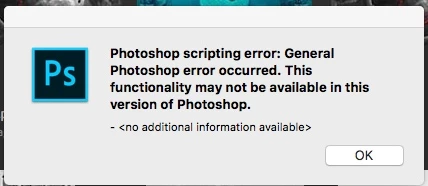
2. I get the following message and none of my files will open from the splash screen. If I go (file > open) then the file opens but the file is hidden or cut off.

Never had problems like this before. What's happening. I need to use Photoshop for work today. Please help.
    このトピックへの返信は締め切られました。
    解決に役立った回答 bzareenk

    Try reinstalling the software, it might solve this issue!

    返信数 2

    bzareenk解決!
    Inspiring
    March 7, 2017

    Try reinstalling the software, it might solve this issue!

    Brad Lawryk
    Legend
    March 6, 2017

    1: You can try going into the preferences and 'Reset Workspaces'. Or follow the instructions in this link:


    How to Move an Off Screen Window Back Onto the Active Mac Screen in OS X

    2: Do you possibly run some older plugins with Photoshop that may be causing a conflict?

    Comp__792作成者
    Inspiring
    March 6, 2017

    Hi, thanks for the reply.

    No I didn't run any plugins or instal anything etc. I used Photoshop yesterday and everything was fine. Today I open it and different story.

    Brad Lawryk
    Legend
    March 6, 2017

    You may find an answer going through the threads with the same problem? Seems a few things can cause this.

    https://forums.adobe.com/search.jspa?q=General+Photoshop+Error+Occurred&place=%2Fplaces%2F1413024&depth=ALL