Inspiring
April 30, 2025
Answered

Use extend script to convert layer masks into images and export

  • April 30, 2025
  • 5 replies
  • 753 views

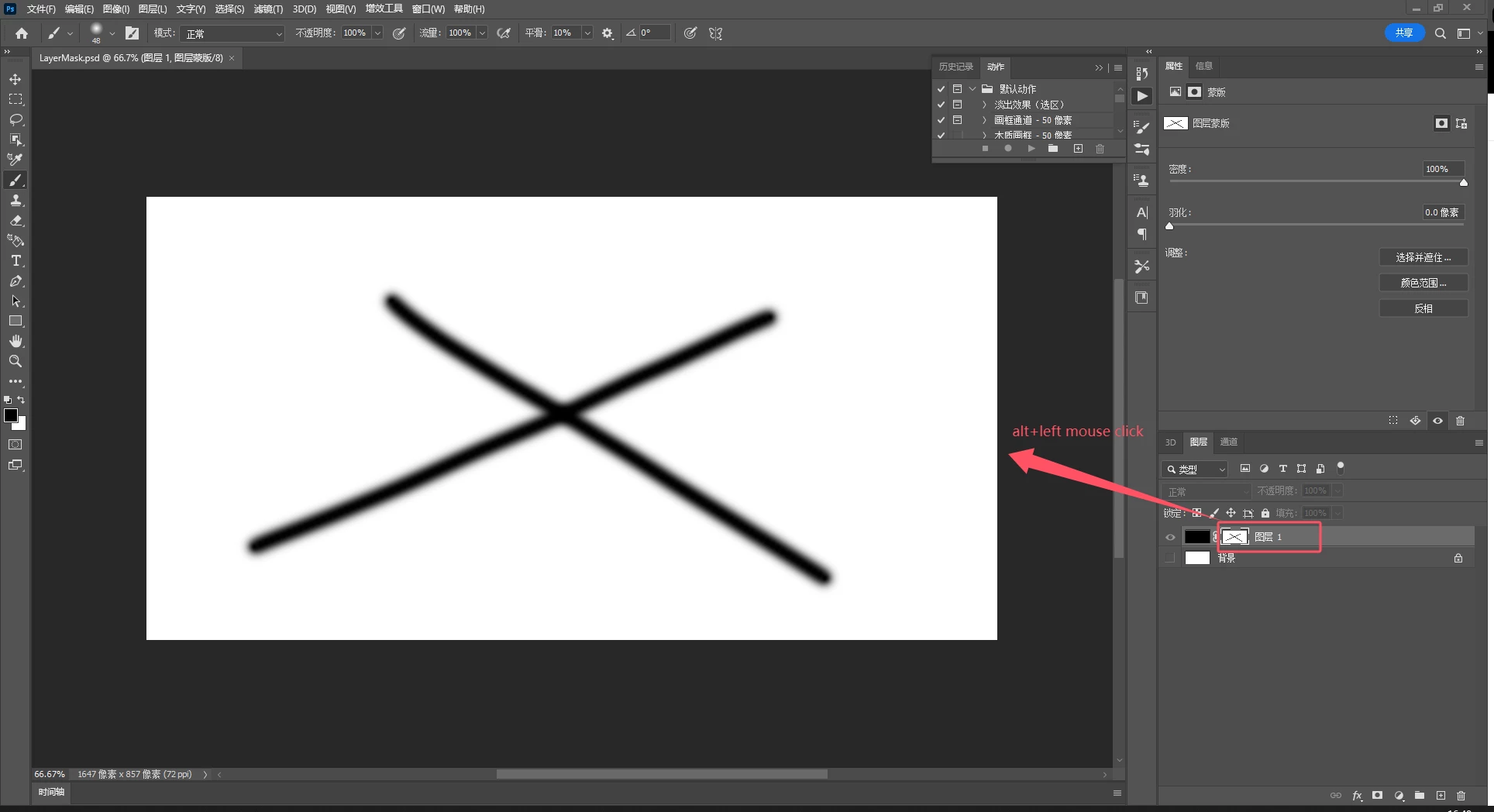
how to Use extend script to convert layer masks(as Figure 2) into images and export


Figure 1
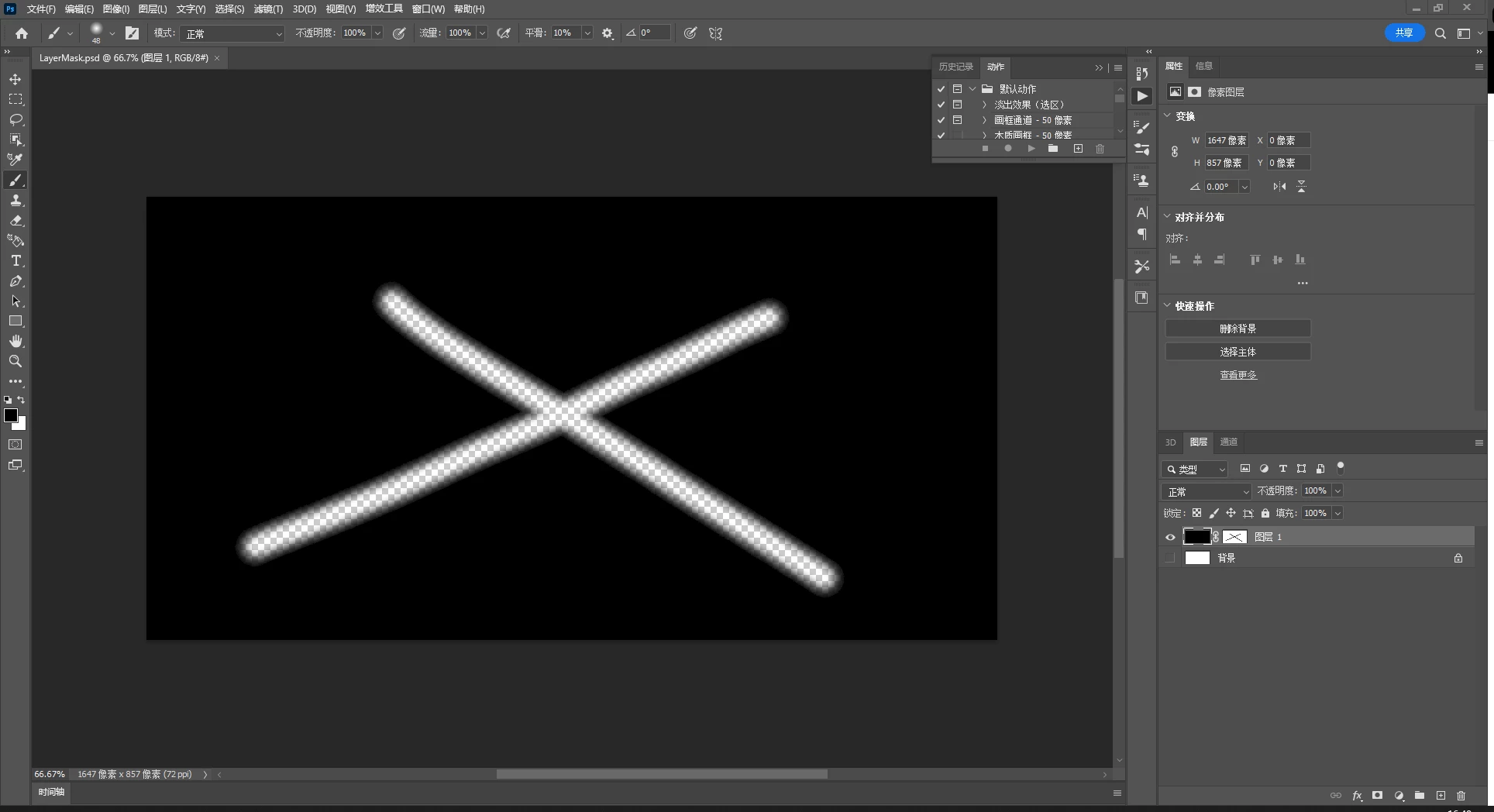
Figure 2
Correct answer c.pfaffenbichler
// create png of layer mask of active layer;
// 2025, use it at your own risk;
main();
function main() {
if (app.documents.length > 0) {
if (hasLayerMask () == true) {
//app.togglePalettes();
var myDocument = app.activeDocument;
var theName = myDocument.name.replace(/.psd|.psb/, "");
try {var basename = docName.match(/(.*)\.[^\.]+$/)[1]} 
catch (e) {var basename = theName};
try {
var docPath = myDocument.path;
}
catch (e) {
var basename = myDocument.name;
var docPath = "~/Desktop"
};
var theId = getLayerId ();
layerMaskCalculationNewFile (theId);
var theCopy = app.activeDocument;
convertToGrayscale ();
//theCopy.convertProfile ("sRGB IEC61966-2.1", Intent.RELATIVECOLORIMETRIC, true, true);
if (File (docPath+"/"+basename+"_"+myDocument.activeLayer.name+".png").exists == false) {
savePNG (docPath, basename, myDocument.activeLayer.name);
theCopy.close(SaveOptions.DONOTSAVECHANGES)
}
else {alert ("file of that name already exists")};
}
}
};
////// channel calculation //////
function layerMaskCalculationNewFile (theId) {
var idchannel = stringIDToTypeID( "channel" );
var idmask = stringIDToTypeID( "mask" );
var idlayer = stringIDToTypeID( "layer" );
var iddocument = stringIDToTypeID( "document" );
    var desc218 = new ActionDescriptor();
    desc218.putClass( stringIDToTypeID( "new" ), iddocument );
        var desc219 = new ActionDescriptor();
            var ref1 = new ActionReference();
            ref1.putEnumerated( idchannel, idchannel, idmask );
            ref1.putIdentifier( idlayer, theId );
            ref1.putName( iddocument , app.activeDocument.name );
        desc219.putReference( stringIDToTypeID( "to" ), ref1 );
        var idsourcetwo = stringIDToTypeID( "source2" );
            var ref2 = new ActionReference();
            ref2.putEnumerated( idchannel, idchannel, idmask );
            ref2.putIdentifier( idlayer, theId );
            ref2.putName( iddocument, app.activeDocument.name );
        desc219.putReference( idsourcetwo, ref2 );
    var idcalculation = stringIDToTypeID( "calculation" );
    desc218.putObject( stringIDToTypeID( "using" ), idcalculation, desc219 );
executeAction( stringIDToTypeID( "make" ), desc218, DialogModes.NO );
};
////// has layer mask //////
function hasLayerMask () {  
var m_Dsc01, m_Ref01;
m_Ref01 = new ActionReference();
m_Ref01.putEnumerated(stringIDToTypeID("layer"), charIDToTypeID("Ordn"), charIDToTypeID("Trgt"));
m_Dsc01 = executeActionGet(m_Ref01);
return m_Dsc01.hasKey(charIDToTypeID("Usrs"));
};
////// function to png //////
function savePNG (docPath, basename, theSuffix) {
var desc10 = new ActionDescriptor();
var desc11 = new ActionDescriptor();
desc11.putEnumerated( stringIDToTypeID( "method" ), stringIDToTypeID( "PNGMethod" ), stringIDToTypeID( "quick" ) );
desc11.putEnumerated( stringIDToTypeID( "PNGInterlaceType" ), stringIDToTypeID( "PNGInterlaceType" ), stringIDToTypeID( "PNGInterlaceNone" ) );
desc11.putEnumerated( stringIDToTypeID( "PNGFilter" ), stringIDToTypeID( "PNGFilter" ), stringIDToTypeID( "PNGFilterAdaptive" ) );
desc11.putInteger( stringIDToTypeID( "compression" ), 6 );
desc11.putEnumerated( stringIDToTypeID( "embedIccProfileLastState" ), stringIDToTypeID( "embedOff" ), stringIDToTypeID( "embedOff" ) );
var idPNGFormat = stringIDToTypeID( "PNGFormat" );
desc10.putObject( stringIDToTypeID( "as" ), idPNGFormat, desc11 );
desc10.putPath( stringIDToTypeID( "in" ), new File( docPath+"/"+basename+"_"+theSuffix+".png" ) );
desc10.putBoolean( stringIDToTypeID( "copy" ), true );
desc10.putBoolean( stringIDToTypeID( "lowerCase" ), true );
desc10.putBoolean( stringIDToTypeID( "embedProfiles" ), true );
desc10.putEnumerated( stringIDToTypeID( "saveStage" ), stringIDToTypeID( "saveStageType" ), stringIDToTypeID( "saveSucceeded" ) );
executeAction( stringIDToTypeID( "save" ), desc10, DialogModes.NO );
};
////// by mike hale, via paul riggott //////
function getLayerId (){
var ref = new ActionReference(); 
ref.putEnumerated(charIDToTypeID("Lyr "), charIDToTypeID("Ordn"), charIDToTypeID("Trgt")); 
d = executeActionGet(ref); 
return d.getInteger(charIDToTypeID('LyrI')); 
};
////// convert to graychannel //////
function convertToGrayscale () {
var desc5 = new ActionDescriptor();
desc5.putClass( stringIDToTypeID( "to" ), stringIDToTypeID( "grayscaleMode" ) );
executeAction( stringIDToTypeID( "convertMode" ), desc5, DialogModes.NO );
};

5 replies

Stephen Marsh
Community Expert
Community Expert
May 2, 2025

@javaer – you now have two scripts to save the layer mask alpha channel as a PNG file.

javaerAuthor
Inspiring
May 6, 2025

Thanks very much for all reply

Stephen Marsh
Community Expert
Community Expert
May 6, 2025
quote

Thanks very much for all reply


By @javaer


You're welecome. P.S. I have also marked the reply from @c.pfaffenbichler as a correct answer as it also meets your requirements.

c.pfaffenbichler
Community Expert
c.pfaffenbichlerCommunity ExpertCorrect answer
Community Expert
May 1, 2025
// create png of layer mask of active layer;
// 2025, use it at your own risk;
main();
function main() {
if (app.documents.length > 0) {
if (hasLayerMask () == true) {
//app.togglePalettes();
var myDocument = app.activeDocument;
var theName = myDocument.name.replace(/.psd|.psb/, "");
try {var basename = docName.match(/(.*)\.[^\.]+$/)[1]} 
catch (e) {var basename = theName};
try {
var docPath = myDocument.path;
}
catch (e) {
var basename = myDocument.name;
var docPath = "~/Desktop"
};
var theId = getLayerId ();
layerMaskCalculationNewFile (theId);
var theCopy = app.activeDocument;
convertToGrayscale ();
//theCopy.convertProfile ("sRGB IEC61966-2.1", Intent.RELATIVECOLORIMETRIC, true, true);
if (File (docPath+"/"+basename+"_"+myDocument.activeLayer.name+".png").exists == false) {
savePNG (docPath, basename, myDocument.activeLayer.name);
theCopy.close(SaveOptions.DONOTSAVECHANGES)
}
else {alert ("file of that name already exists")};
}
}
};
////// channel calculation //////
function layerMaskCalculationNewFile (theId) {
var idchannel = stringIDToTypeID( "channel" );
var idmask = stringIDToTypeID( "mask" );
var idlayer = stringIDToTypeID( "layer" );
var iddocument = stringIDToTypeID( "document" );
    var desc218 = new ActionDescriptor();
    desc218.putClass( stringIDToTypeID( "new" ), iddocument );
        var desc219 = new ActionDescriptor();
            var ref1 = new ActionReference();
            ref1.putEnumerated( idchannel, idchannel, idmask );
            ref1.putIdentifier( idlayer, theId );
            ref1.putName( iddocument , app.activeDocument.name );
        desc219.putReference( stringIDToTypeID( "to" ), ref1 );
        var idsourcetwo = stringIDToTypeID( "source2" );
            var ref2 = new ActionReference();
            ref2.putEnumerated( idchannel, idchannel, idmask );
            ref2.putIdentifier( idlayer, theId );
            ref2.putName( iddocument, app.activeDocument.name );
        desc219.putReference( idsourcetwo, ref2 );
    var idcalculation = stringIDToTypeID( "calculation" );
    desc218.putObject( stringIDToTypeID( "using" ), idcalculation, desc219 );
executeAction( stringIDToTypeID( "make" ), desc218, DialogModes.NO );
};
////// has layer mask //////
function hasLayerMask () {  
var m_Dsc01, m_Ref01;
m_Ref01 = new ActionReference();
m_Ref01.putEnumerated(stringIDToTypeID("layer"), charIDToTypeID("Ordn"), charIDToTypeID("Trgt"));
m_Dsc01 = executeActionGet(m_Ref01);
return m_Dsc01.hasKey(charIDToTypeID("Usrs"));
};
////// function to png //////
function savePNG (docPath, basename, theSuffix) {
var desc10 = new ActionDescriptor();
var desc11 = new ActionDescriptor();
desc11.putEnumerated( stringIDToTypeID( "method" ), stringIDToTypeID( "PNGMethod" ), stringIDToTypeID( "quick" ) );
desc11.putEnumerated( stringIDToTypeID( "PNGInterlaceType" ), stringIDToTypeID( "PNGInterlaceType" ), stringIDToTypeID( "PNGInterlaceNone" ) );
desc11.putEnumerated( stringIDToTypeID( "PNGFilter" ), stringIDToTypeID( "PNGFilter" ), stringIDToTypeID( "PNGFilterAdaptive" ) );
desc11.putInteger( stringIDToTypeID( "compression" ), 6 );
desc11.putEnumerated( stringIDToTypeID( "embedIccProfileLastState" ), stringIDToTypeID( "embedOff" ), stringIDToTypeID( "embedOff" ) );
var idPNGFormat = stringIDToTypeID( "PNGFormat" );
desc10.putObject( stringIDToTypeID( "as" ), idPNGFormat, desc11 );
desc10.putPath( stringIDToTypeID( "in" ), new File( docPath+"/"+basename+"_"+theSuffix+".png" ) );
desc10.putBoolean( stringIDToTypeID( "copy" ), true );
desc10.putBoolean( stringIDToTypeID( "lowerCase" ), true );
desc10.putBoolean( stringIDToTypeID( "embedProfiles" ), true );
desc10.putEnumerated( stringIDToTypeID( "saveStage" ), stringIDToTypeID( "saveStageType" ), stringIDToTypeID( "saveSucceeded" ) );
executeAction( stringIDToTypeID( "save" ), desc10, DialogModes.NO );
};
////// by mike hale, via paul riggott //////
function getLayerId (){
var ref = new ActionReference(); 
ref.putEnumerated(charIDToTypeID("Lyr "), charIDToTypeID("Ordn"), charIDToTypeID("Trgt")); 
d = executeActionGet(ref); 
return d.getInteger(charIDToTypeID('LyrI')); 
};
////// convert to graychannel //////
function convertToGrayscale () {
var desc5 = new ActionDescriptor();
desc5.putClass( stringIDToTypeID( "to" ), stringIDToTypeID( "grayscaleMode" ) );
executeAction( stringIDToTypeID( "convertMode" ), desc5, DialogModes.NO );
};
Stephen Marsh
Community Expert
Community Expert
April 30, 2025

@javaer 


I wrote the following script back in 2022 to save selected layer/s mask to PNG. Rather than copy/new/paste or calculations, it uses the duplicate channel command to a new doc:


/*
Selected Layers Masks to PNG.jsx

https://community.adobe.com/t5/photoshop-ecosystem-discussions/trouble-with-photoshop-layer-masks/td-p/12698065
https://community.adobe.com/t5/photoshop-ecosystem-discussions/use-extend-script-to-convert-layer-masks-into-images-and-export/td-p/15297358

v1.0 - 23rd January 2022
v1.1 - 30th April 2025, Added a check for a selected layer

Note: 
The script is simple - the saved PNG is grayscale mode and is not colour managed. 
PNG files are saved to the active document path, unsaved documents will have the 
PNG file saved to the desktop.
*/

#target photoshop

if (app.documents.length > 0) {

    // Check for selected layer by jazz-y
    s2t = stringIDToTypeID;
    (r = new ActionReference()).putProperty(s2t('property'), p = s2t('targetLayers'));
    r.putEnumerated(s2t("document"), s2t("ordinal"), s2t("targetEnum"));
    if (executeActionGet(r).getList(p).count) {

        // Optionally select all layers, uncomment if reqiured
        //app.runMenuItem(stringIDToTypeID('selectAllLayers'));

        // Process Selected Layers from Jazz-y
        var s2t = stringIDToTypeID;
        (r = new ActionReference).putProperty(s2t('property'), p = s2t('targetLayersIDs'));
        r.putEnumerated(s2t('document'), s2t('ordinal'), s2t('targetEnum'));
        var lrs = executeActionGet(r).getList(p),
            sel = new ActionReference();
        for (var i = 0; i < lrs.count; i++) {
            sel.putIdentifier(s2t('layer'), p = lrs.getReference(i).getIdentifier(s2t('layerID')));
            (r = new ActionReference).putIdentifier(s2t('layer'), p);
            (d = new ActionDescriptor()).putReference(s2t("target"), r);
            //d.putBoolean(s2t("makeVisible"), false);
            executeAction(s2t('select'), d, DialogModes.NO);

            // Raster mask, vector mask not currently supported
            if (hasLayerMask() === true) {

                try {
                    // Use the previously saved path
                    //var docPath = decodeURI(app.activeDocument.path);
                    var docPath = app.activeDocument.path.fsName;
                } catch (e) {
                    // If unsaved, select the desktop
                    var docPath = "~/Desktop";
                }

                // FileName + LayerName + Mask
                var maskDocName = app.activeDocument.name.replace(/\.[^\.]+$/, '') + " - " + app.activeDocument.activeLayer.name + " Mask";

                // Select active layer mask channel
                selectLayerMask(false);

                // Dupe active channel to new doc
                dupeChannel(maskDocName, "currentChannelName");

                // Convert from multichannel mode to something supported by PNG
                app.activeDocument.changeMode(ChangeMode.GRAYSCALE);

                // Save as PNG options
                var pngFile = new File(docPath + "/" + maskDocName + ".png");
                if (pngFile.exists) {
                    // true = 'No' as default active button
                    if (!confirm('File "' + maskDocName + ".png" + '" exists, overwrite: Yes or No?', true))
                        //throw null;
                        throw app.activeDocument.close(SaveOptions.DONOTSAVECHANGES);
                }
                var pngOptions = new PNGSaveOptions();
                pngOptions.compression = 6; // 0 - 9
                pngOptions.interlaced = false;
                app.activeDocument.saveAs(pngFile, pngOptions, true, Extension.LOWERCASE);
                app.activeDocument.close(SaveOptions.DONOTSAVECHANGES);

            }
        }

        // End of script notification
        app.beep();
        alert("Selected layer masks saved to PNG at the following path:" + "\r" + docPath);

    } else {
        alert('One or more layers must be selected!');
    }

} else {
    alert("A document must be open to run this script!");
}


// Functions

function selectLayerMask(makeVisible) {
    var s2t = function (s) {
        return app.stringIDToTypeID(s);
    }
    var descriptor = new ActionDescriptor();
    var reference = new ActionReference();
    reference.putEnumerated(s2t("channel"), s2t("channel"), s2t("mask"));
    descriptor.putReference(s2t("null"), reference);
    descriptor.putBoolean(s2t("makeVisible"), makeVisible);
    executeAction(s2t("select"), descriptor, DialogModes.NO);
}

function dupeChannel(name2, channelName) {
    var s2t = function (s) {
        return app.stringIDToTypeID(s);
    }
    var descriptor = new ActionDescriptor();
    var descriptor2 = new ActionDescriptor();
    var reference = new ActionReference();
    descriptor2.putString(s2t("name"), name2);
    descriptor.putObject(s2t("new"), s2t("document"), descriptor2);
    reference.putEnumerated(s2t("channel"), s2t("ordinal"), s2t("targetEnum"));
    descriptor.putReference(s2t("using"), reference);
    descriptor.putString(s2t("channelName"), channelName);
    executeAction(s2t("make"), descriptor, DialogModes.NO);
}

function hasLayerMask() {
    // From Adobe's Flatten All Masks.jsx
    var hasLayerMask = false;
    try {
        var ref = new ActionReference();
        var keyUserMaskEnabled = app.charIDToTypeID('UsrM');
        ref.putProperty(app.charIDToTypeID('Prpr'), keyUserMaskEnabled);
        ref.putEnumerated(app.charIDToTypeID('Lyr '), app.charIDToTypeID('Ordn'), app.charIDToTypeID('Trgt'));
        var desc = executeActionGet(ref);
        if (desc.hasKey(keyUserMaskEnabled)) {
            hasLayerMask = true;
        }
    } catch (e) {
        hasLayerMask = false;
    }
    return hasLayerMask;
}


Stephen Marsh
Community Expert
Community Expert
April 30, 2025

My initial thoughts... It depends on your files.


Is this only for the active layer?


Or worst case, you're going to need to loop over all layers and layers inside groups or artboards, as the layer mask channel is "latent" and not available in the channels panel until it's parent layer is active.


You will likely wish to double check that the active layer has a mask:


 if (hasLayerMask() === true) {
   // More code
}

function hasLayerMask() {
    // From Adobe's Flatten All Masks.jsx
    var hasLayerMask = false;
    try {
        var ref = new ActionReference();
        var keyUserMaskEnabled = app.charIDToTypeID('UsrM');
        ref.putProperty(app.charIDToTypeID('Prpr'), keyUserMaskEnabled);
        ref.putEnumerated(app.charIDToTypeID('Lyr '), app.charIDToTypeID('Ordn'), app.charIDToTypeID('Trgt'));
        var desc = executeActionGet(ref);
        if (desc.hasKey(keyUserMaskEnabled)) {
            hasLayerMask = true;
        }
    } catch (e) {
        hasLayerMask = false;
    }
    return hasLayerMask;
}


Then activate the mask channel using:

selectLayerCompositeChannel("mask");

function selectLayerCompositeChannel(chanPara) {
    // "RGB" | "mask"
	var s2t = function (s) {
		return app.stringIDToTypeID(s);
	};
	var descriptor = new ActionDescriptor();
	var reference = new ActionReference();
	reference.putEnumerated( s2t( "channel" ), s2t( "channel" ), s2t( chanPara ));
	descriptor.putReference( s2t( "null" ), reference );
	descriptor.putBoolean( s2t( "makeVisible" ), false );
	executeAction(s2t( "select" ), descriptor, DialogModes.NO);
}


You can then script the copy of the channel, create a new document, paste and save... Or use Calculations as suggested by @c.pfaffenbichler or possibly another method to create a new document from the channel content and save into your desired format.

c.pfaffenbichler
Community Expert
Community Expert
April 30, 2025

Copy/pasting would seem wasteful, I would recommend recording Image > Calculations to create a new image and using that code. 


What is the actual scenario? The layer Mask of the selected Layer, all Layer Masks in a file, …? What file format? 

javaerAuthor
Inspiring
April 30, 2025

selected Layer, png
