
Exit
  • Global community
    • Language:
      • Deutsch
      • English
      • Español
      • Français
      • Português
  • 日本語コミュニティ
  • 한국 커뮤니티
12

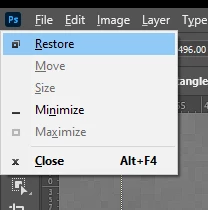
using ALT during resize in scale-from-center-mode keeps trigging the Application Menu

Participant ,
Oct 03, 2023 Oct 03, 2023

Gets doubly-aggrevating when I use space to pan and I keep getting this little guy showing up all the time and the OS alert sound whenever I press any key-stroke mid transformation:
 

ThatRobHuman_0-1696389997221.png


TOPICS
Windows
901
Translate
Report
Community guidelines
Be kind and respectful, give credit to the original source of content, and search for duplicates before posting. Learn more
community guidelines
Adobe
Community Expert ,
Oct 03, 2023 Oct 03, 2023

When I use the Ctrl + T command or the Free Transform function in Photoshop 25.0.0 on Windows 11, I am unable to replicate the issue you’re experiencing. It’s possible that resetting your Photoshop preferences could resolve this problem.


To reset your Photoshop preferences, you can follow these steps:


  • Close Photoshop completely, then reopen it. As you do, hold down Ctrl + Alt + Shift (or Command + Option + Shift on a Mac). If done correctly, you’ll get a dialog box. Choose Yes to delete any user preference changes and restore the defaults.
  • Alternatively, you can go to Edit > Preferences > General (Control-K). Click Reset Preferences on Quit. Confirm your choice, then restart Photoshop.
Translate
Report
Community guidelines
Be kind and respectful, give credit to the original source of content, and search for duplicates before posting. Learn more
community guidelines
Participant ,
Oct 03, 2023 Oct 03, 2023
LATEST

I've already reset my preferences today in pursuit of the AI showcase ad still showing up. It has made no difference.

I will keep working and try to be more precise in what keystrokes I take to replicate the issue.


Translate
Report
Community guidelines
Be kind and respectful, give credit to the original source of content, and search for duplicates before posting. Learn more
community guidelines