

erwinb
Known Participant
April 4, 2023
Answered

Using the GPU does not work in Photoshop, version 24.3.0

  • April 4, 2023
  • 1 reply
  • 866 views

When I activate the option "Use Graphics Processor", the image area flickers at a rapid pace. Instead of the photo, I only see a white area. The rest of the user interface is not affected. If I switch off using the GPU, it works.

If I go back to version 24.2.1, I can activate the option, even with all "Advances Settings" checked, and the display works again.
This topic has been closed for replies.
Correct answer Ged_Traynor

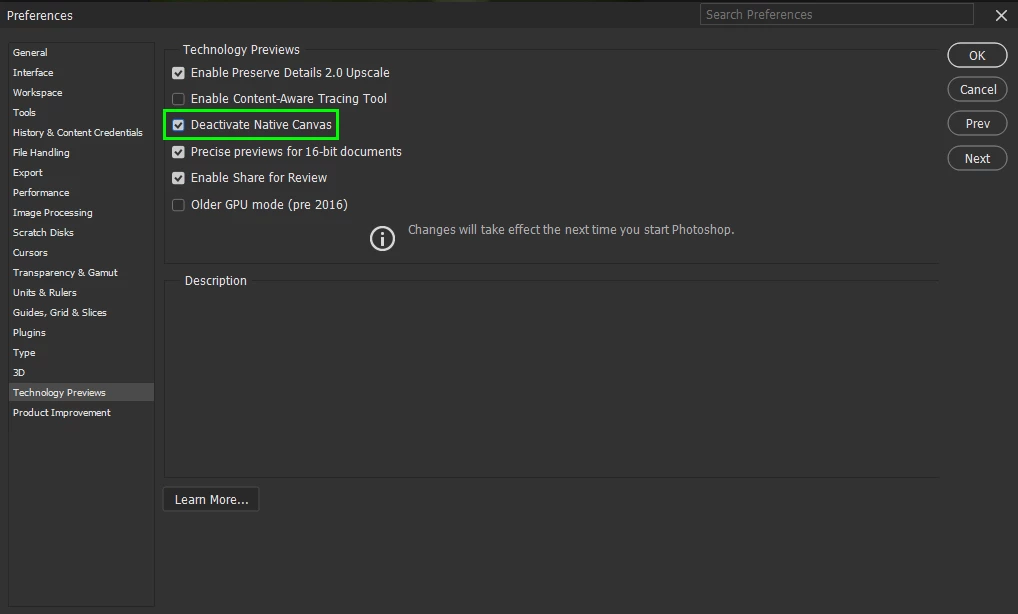
@erwinb go to Edit > Preferences > Technology Previews and enable this option, then restart Photoshop

1 reply

Ged_Traynor
Community Expert
Ged_TraynorCommunity ExpertCorrect answer
Community Expert
April 4, 2023

@erwinb go to Edit > Preferences > Technology Previews and enable this option, then restart Photoshop

erwinb
erwinbAuthor
Known Participant
April 4, 2023

Thanks, that workaround is better. 

Ged_Traynor
Community Expert
Community Expert
April 4, 2023

@erwinb You're welcome