
Inspiring
January 14, 2021
Answered

Value sliders - add an option to adjust between 0-255

  • January 14, 2021
  • 3 replies
  • 1042 views

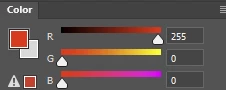
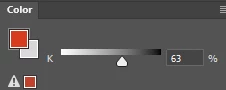
For illustration purposes, say you are painting a greyscale image with a hard brush, using any color picker available in Photoshop. You are limited to 100 values, but the file has 256 available. Why isn't there an option to change sliders from percentage to binary? Color has it, why not value?

There could be several values bracketed within say, 10%, but I just tried this and found that any 10% pick has the same 256 value.
This topic has been closed for replies.
Correct answer JJamie


3 replies

JJamieAuthorCorrect answer
Inspiring
January 14, 2021


D Fosse
Community Expert
Community Expert
January 14, 2021

OK, I get your point. You can't type in the number you want. But if you use the eyedropper on the gray ramp, you get any value in between.


The problem is that this is how grayscale is defined. It's a K number, and K is ink level percentage. Grayscale has traditionally been used as black-plate-only in offset print, and the definition follows from that.


This should make a sensible feature request. Post it over at the feedback forum, which is the official channel, monitored by engineering staff: https://feedback.photoshop.com/topics/photoshop/5f5f2092785c1f1e6cc4086b 

JJamieAuthor
Inspiring
January 14, 2021

Thanks, I'll do that.

If you wonder why I don't use the ramp: the slider shows the current value from which I can choose shadows or highlights. The ramp is guesswork.

D Fosse
Community Expert
Community Expert
January 14, 2021

The K number is a percentage because it's the same as the K in CMYK. Ink levels have always been measured in %.


But you have access to any value in between in the color picker, the color panel etc. In a 16-bit file, that's 0-32768. It just reads out as the nearest % value.


Just as a general warning: you need to consider your destination and pick the appropriate grayscale profile, or you will see gross inconsistencies in tonal values outside Photoshop. Proper grayscale support is pretty much non-existent in any other application or environment. The dot gain profiles are really outdated and will not be correctly treated elsewhere. For screen, use Gray Gamma 2.2. For offset print on the black plate only, use the K component in whatever CMYK profile is used:

JJamieAuthor
Inspiring
January 14, 2021

Hi D Fosse, thank you for your reply which is informative but relates to the world of print. I am a digital artist and nothing I do ever gets printed! I am not convinced that an 8-bit file has access to 256 values from photoshops greyscale field, but even if it does, the slider only has 100 values, and that isn't enough for making subtle adjustments when painting in greyscale. A simple toggle between these representations of greyscale in the slider would be great.

JJamieAuthor
Inspiring
January 14, 2021

The hue-value does not have 256 values either, so what? 

HSB is a different representation for RGB, so it is different


Hi and thanks for your answer which is correct of course, but we are talking about 2 different things here, I am not arguing that HSB or CMYK is displaying incorrectly, I'm pointing out that Photoshop doesn't have a 256-greyscale slider for those of us who want to paint, not edit photos and prep for print.
c.pfaffenbichler
Community Expert
Community Expert
January 14, 2021

Color picker sliders? 

Could you please post a screenshot to clarify what you are talking about exactly? 

JJamieAuthor
Inspiring
January 14, 2021
[cid:77a81dc4-effb-46b1-a32c-5e6deb4b49ad]
[cid:c601091e-bcca-426f-90d2-8da4f90f4c43]
Here you go.