treytallent
Participant
January 11, 2020
Question

Very low and fluctuating FPS when using layer styles

  • January 11, 2020
  • 5 replies
  • 3107 views

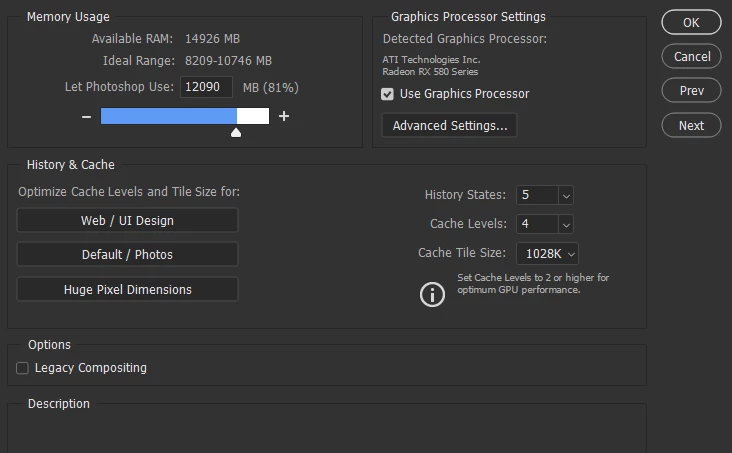
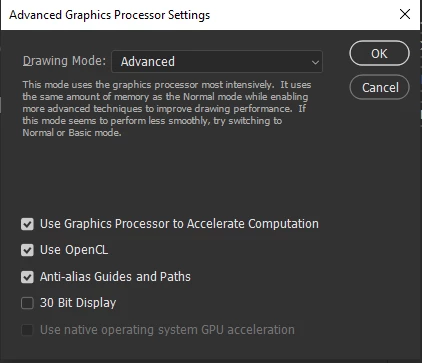
Hi, it seems no matter what I do I can't fix this. Just using 2 layers with simple layer styles such as drop shadow and outer glow cause my photoshop to drop down to several fps, often freezing, before going back to normal after 2-5 seconds. As soon as I rasterize the layers with the effects Photoshop works perfectly. I've tried reinstalling photoshop entirely and switching to an older version as well as reinstalling my drivers to no avail. My PC has a ryzen 5 2600 and rx 580 gpu with 16gb of ram, with the most recent drivers. I really doubt this should be a problem. I've attached my current performance settings. Any help is greatly appreciated 
This topic has been closed for replies.

5 replies

Earth Oliver
Legend
February 16, 2022

Stacked Layer Effect fps has been a problem for decades now. Sad to hear that performance still hasn't been improved.

Inspiring
February 16, 2022

I'm having the same problem.


2000x3000, 300dpi, RGB.


About 18 Layers.

I put 5 layer effects on 2 of the layers, then it started freezing up when I tried to edit one of them. I took a stroke from 2 to 10 and the slider froze up and Photoshop went unresponsive. Couldn't even hide the thing. Took maybe 4 mins to unfreeze. Now it's doing it no mater what parameter I try to adjust.


I didn't notice this before the last update.


Going to dial back to the prev version and see what I get.

Inspiring
February 20, 2022

I dialed it back to the previous version and it's back to normal. 

Guess I'm waiting till the next update. 

Chuck Uebele
Community Expert
Community Expert
January 11, 2020

Ok, total misunderstanding. When you reinstalled, did you reset your preferences? If not, I would try that. Also, have you tried different cache levels? Try 2. Also is there any change if you have "Use Legacy Compositing" checked?

treytallent
Participant
January 11, 2020

Unfortunately I have tried all of those as well and it has not helped 😕😕

Chuck Uebele
Community Expert
Community Expert
January 11, 2020

You mentione fps, so I'm assuming you mean frames per second, correct? So when I say clip, I mean your project in its entirety,  even if it's made up with still frames.

treytallent
Participant
January 11, 2020

Sorry when I used FPS I meant it in the sense of photoshop freezing and having several second delays between my actions before returning back to running at full speed. When I have more than 1 layer with layer effects enabled any action I make on the image (brush strokes, altering an adjustment layer etc.) causes the program to freeze and slow down for several seconds.

Chuck Uebele
Community Expert
Community Expert
January 11, 2020

Are you running the clip several times? With affects and more complicated edited, PS has to build the clip into the cache, to run at full speed. Rendering the clip should produce a normal running clip.

treytallent
Participant
January 11, 2020

Not sure what you mean sorry. I'm working on images not videos if that's what you're referring to by clips