
Inspiring
December 15, 2018
Question

Viewing Photographs in Google Chrome makes Black Areas Pixelated Red

  • December 15, 2018
  • 8 replies
  • 2200 views

Hello

When I view my photographs (edited in ACR) and posted on the web through GOOGLE CHROME all areas of deep black appear as pixelated red (see photograph).
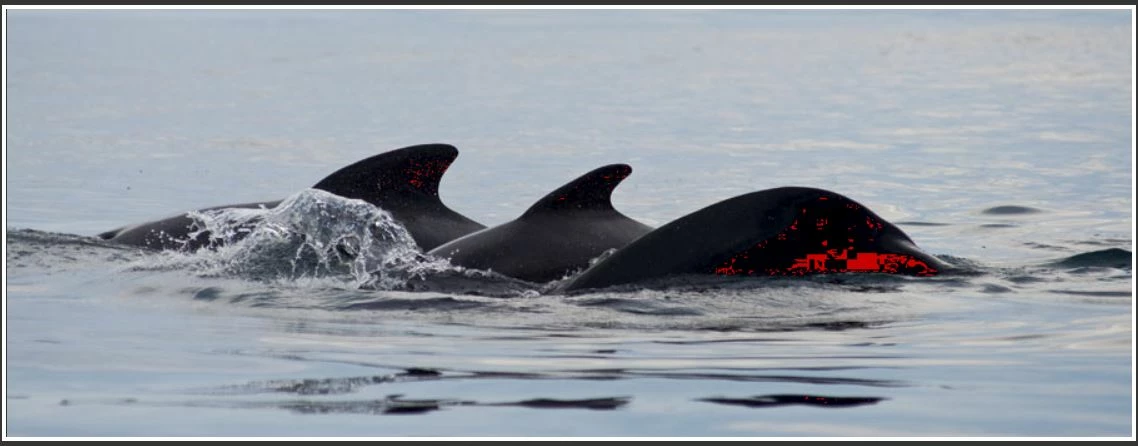
I can solve this problem by going to Google Chrome settings and turn off USE HARDWARE ACCELERATION WHEN AVAILABLE (in the 'System' section), however, this makes all the images appear well over saturated (see 2 photographs).
In fact it looks even more saturated when viewing on the website than the copy I made here.


Do any of you kind people have any knowledge of solving this?
I have posted it on here as it will reach many users who may have experienced the problem.

Many thanks

    This topic has been closed for replies.

    8 replies

    Known Participant
    January 17, 2019

    I have exactly the same problem on Chrome with my Eizo CX241. never found any solution for it.

    I'm using Firefox and Edge with no problem at all. I just decided to uninstall chrome since FF is much better anyway

    Inspiring
    December 16, 2018

    Thank you very much to you good folk for all your help.
    I have a bit of paper from a University to say I am quite good at Marine Biology, but this does not cover computers and colour management!

    Daniel

    I cannot seem to get to Hardware Acceleration settings from either of the descriptions that you and Dave have given.
    Any chance you can give me a more detailed description of buttons to click?
    Also, since talking about this to you, I deleted Kaspersky as I was advised to do and now rely on Microsoft's anti-virus.
    Since doing this the pages in Google Chrome are tedious taking about a minute for each page to load.
    No problem in Internet Explorer and Firefox, just Google Chrome.Another thing - in the other thread I recommended you set ColorNavigator to produce matrix profiles ("gamma value") instead of the default table-based (LUT) profiles. The latter are more complex and can be problematic. You have to do this each time you set up a new target.

    Many thanks Daniel

    Dag

    I have downloaded Firefox as you said and do not have a problem with red pixels in this.
    You mentioned in another thread that I should set it to COLOR MANAGEMENT MODE 1
    May I kindly ask why? and how you do this? I didn't get far on Google!!!

    Also, I know this was on another thread but you mentioned it here:

    "in the other thread I recommended you set ColorNavigator to produce matrix profiles ("gamma value") instead of the default table-based (LUT) profiles. The latter are more complex and can be problematic. You have to do this each time you set up a new target."

    May I kindly ask why use "Gamma Value" and not "LUT"?
    It is just that ColorConfidence who sold me the monitor told me to keep it at LUT.
    Tomorrow I will ask Eizo UK, but from the help you have been giving me, I very much value what you have to say and hence need more to take to them!

    Many thanks Dag.

    D Fosse
    Community Expert
    Community Expert
    December 16, 2018

    Firefox at default settings color manages correctly as long as the file has an embedded profile. But the web is full of untagged stuff without any color profile - and that will display oversaturated on your Eizo. There is no profile to convert from, so it can't convert into your monitor profile.

    Mode 1 addresses this by assigning sRGB to everything if there is no profile present. This ensures the correct conversion into the monitor profile, and correct on-screen representation. This includes html and graphic page elements, not just images - in short, everything displays correctly.

    To do that, type  "about:config"  without the quotes into the address bar and refresh. Scroll down to gfx.color_management.mode, double-click it and change it from 2 to 1.

    As for the profile policy in ColorNavigator, the thing is that LUT profiles are very data-heavy and complex. Some applications may have problems with them and treat them incorrectly. I'm not saying they always do, but they may, and it's a logical first step in troubleshooting. So make a new one, and under "customize profile", change from LUT into Gamma Value.

    This produces a simpler matrix profile, and it should be said that nearly all other calibrators on the planet produce matrix profiles by default. Not all calibrators can make LUT profiles at all, and AFAIK it's not the default anywhere else, except in ColorNavigator. Matrix is just a safer option with less problems.

    Daniel E Lane
    Inspiring
    December 16, 2018

    You can use the hardware acceleration for a system wide acceleration to your GPU, which will override anything you have set in your application. You can also have it set from within an application to have it do so internally. Except the Hardware acceleration within your system is not the same thing as it is within Chrome. Within the Operating System, it is to speed up processes computer wide, making the computer show better on benchmark tests, and work faster with imagery (mostly for gaming), but the acceleration can be used to make a box seem faster to help it sell better due to its higher benchmark numbers. But the hardware acceleration in Chrome doesn't effect images as much. It is used to speed up repetitive tasks the application may have to do because of your work habits and patterns and it essentially helps web pages render faster overall instead of just relying on your CPU to do it all. Yes, it can effect images on a site, but not so much with the colors as is seen here, but rather more in the resolution of the image in the end (sharp/soft/etc). And according to Google Chrome, when the issue seen here happens, they recommend checking on the operating system hardware acceleration as well. Those colors tend to mean your video card isn't functioning correctly, especially in combination with the hardware acceleration within the application. So turning off both is your best bet to help diagnose the issue. Then if you are not happy with how things are working at that time, turn them back on one at a time in order to diagnose any possible issue you may be creating

    Daniel E Lane
    Inspiring
    December 15, 2018
    1. Choose Start > Control Panel.
    2. Double-click Display.
    3. Click the Settings tab.
    4. Click Advanced.
    5. Click the Troubleshoot tab.
    6. Move the Hardware Acceleration slider to None.
    7. Click Apply and then click OK to accept the new setting and close the dialog box.

    That should get rid of the Hardware acceleration on the Operating system side of things. Probably a good idea to check to see if that is running or not since as you say the computer warranty is not going to happen since the company is no more. Hardware acceleration is hard on the computer and will cause things to die faster due to the added strain and heat caused with the acceleration. It may not be running on your computer, but it's pretty common for smaller companies to turn it on to try and make their computers seem faster/better than the hardware alone will allow.

    If you want to turn it off in Chrome to see it it does anything (it probably won't since its there to accelerate repetitive actions), Just go to Chrome > Preferences > scroll down to Advanced Settings > Scroll Down to System > Turn off Hardware Acceleration.

    D Fosse
    Community Expert
    Community Expert
    December 16, 2018

    https://forums.adobe.com/people/Daniel+E+Lane  wrote

    1. Choose Start > Control Panel.
    2. Double-click Display.
    3. Click the Settings tab.
    4. Click Advanced.
    5. Click the Troubleshoot tab.
    6. Move the Hardware Acceleration slider to None.
    7. Click Apply and then click OK to accept the new setting and close the dialog box.

    What are you referring to here? Can you show screenshots of this?

    This is a Chrome issue, probably a buggy video driver or a bug in Chrome's color management, or most likely both - especially if display color management is performed in the GPU (which many applications, including Photoshop, do). There is no reason to involve any system settings (and the above I have never seen).

    Carl, try Firefox. I have never seen anything like this in Firefox.

    Another thing - in the other thread I recommended you set ColorNavigator to produce matrix profiles ("gamma value") instead of the default table-based (LUT) profiles. The latter are more complex and can be problematic. You have to do this each time you set up a new target.

    davescm
    Community Expert
    Community Expert
    December 16, 2018

    Hi Dag

    Those menu options are not there with the current version of Windows 10 and Nvidia drivers.
    To get to Advanced properties you use  Settings > System >Display > Advanced System settings > Display Adapter Properties but you no longer get a "Troubleshooting" option..

    If they are still available but hidden - perhaps Daniel can tell us where.

    Dave

    Daniel E Lane
    Inspiring
    December 15, 2018

    Actually D Fosse, Hardware acceleration is primarily a system wide issue created to try and make a computer run faster, primarily in the GPU. Very common on gaming computers, and it will directly effect how images render. Yes, there is one in Google Chrome as well that tries to do something similar in that browser via their software. Both of those can effect image quality in the browser.

    davescm
    Community Expert
    Community Expert
    December 15, 2018

    Hi Carl

    What color space have you used for your photographs? I ask, as your screenshots have no embedded profile.

    When exporting an image for web use, always convert it to sRGB color space and embed the color profile. Both Photoshop "Export As" and "Save for Web" will give you checkboxes to do that. That should ensure color consistency.

    As for the GPU issues leading to those red marks, if you are using Windows then check the driver manufacturer for an updated GPU driver.

    Dave

    Daniel E Lane
    Inspiring
    December 15, 2018

    what kind of computer are you using and what operating system?

    Daniel E Lane
    Inspiring
    December 15, 2018

    After looking, it almost looks like a color warning that the images dark areas are out of gamut or something. Do you have the latest version of Chrome installed? An older version may not be processing the image correctly. Also, is your computer using hardware acceleration? If so, turn that off and try to load the images again. That can make a difference as well...

    Inspiring
    December 15, 2018

    Thank you Daniel.

    It is a new computer and a new version of Google Chrome.
    My old computer (over 10 years old) with unsupported Google Chrome has no problem!

    May I kindly ask you if you can tell me what computer hardware acceleration is, and how to turn it off on my computer rather than on Google Chrome?

    Many thanks

    D Fosse
    Community Expert
    Community Expert
    December 15, 2018

    CarlRMorgan  wrote

    what computer hardware acceleration is, and how to turn it off on my computer rather than on Google Chrome?

    That's an application-specific setting in Chrome, it has nothing to do with the rest of the system.

    Apparently turning this off also disables Chrome's color management. I take it you're still using the Eizo, in which case that oversaturation is expected.

    I don't use Chrome, but my guess is that this is a video driver bug in combination with Chrome's color management engine. In other words, it's done in the GPU. Some of my co-workers use Chrome, and I've seen these red dots before. They seem to come and go.