
Participant
July 5, 2017
Answered

Vintage version of Photoshop

  • July 5, 2017
  • 1 reply
  • 1598 views

Hello potential helpers!

It's like this, I have a very vintage version of Photoshop, version 4 to be exact. Well since this is a hobby sort of thing I'm not so sure many would like to help. But let me go on...

I've used it since 1997 or so, first with Windows 95, then with Windows 98 and then again of Windows 2000. The 2000 machine finally died after many years of use and I got a new box from my son with Windows 7 on it.

Photoshop 4 would not run of course. I installed Window's version of a Virtual PC and even though that has it's own problems and crashes from time to time, I tolerate it for the use of Photoshop 4 on it. (The ONLY program on it except for Avast free antivirus to stop the virtual PC reminders of no virus protection.)

Here's the question....

Back when and right up to Windows 2000, Photoshop would save my images with a level of 4 and 5, almost automatically. Granted it would default to 4 and for the larger images, (for private web use), I would save them at 5, the thumbnails at 4. Now it's a "crap shoot". Sometimes when I launch everything and get to saving, it tries to always save the images at a level 3. I bump it up to a 4 or 5 depending on the intended use, but on rare occasions Photoshop's saving process does give me the default option to save images at a level 4. Sometimes Photoshop "remembers" that I previously saved an image at a level 4, or so it seems, and defaults to that level, but now it's stuck at saving at a level 3 and I have to always bump it up to a 4 or 5.

Any help or suggestions on how to set the default save level in an INI file?

Cordially,

Gerry
This topic has been closed for replies.
Correct answer Jeff Arola

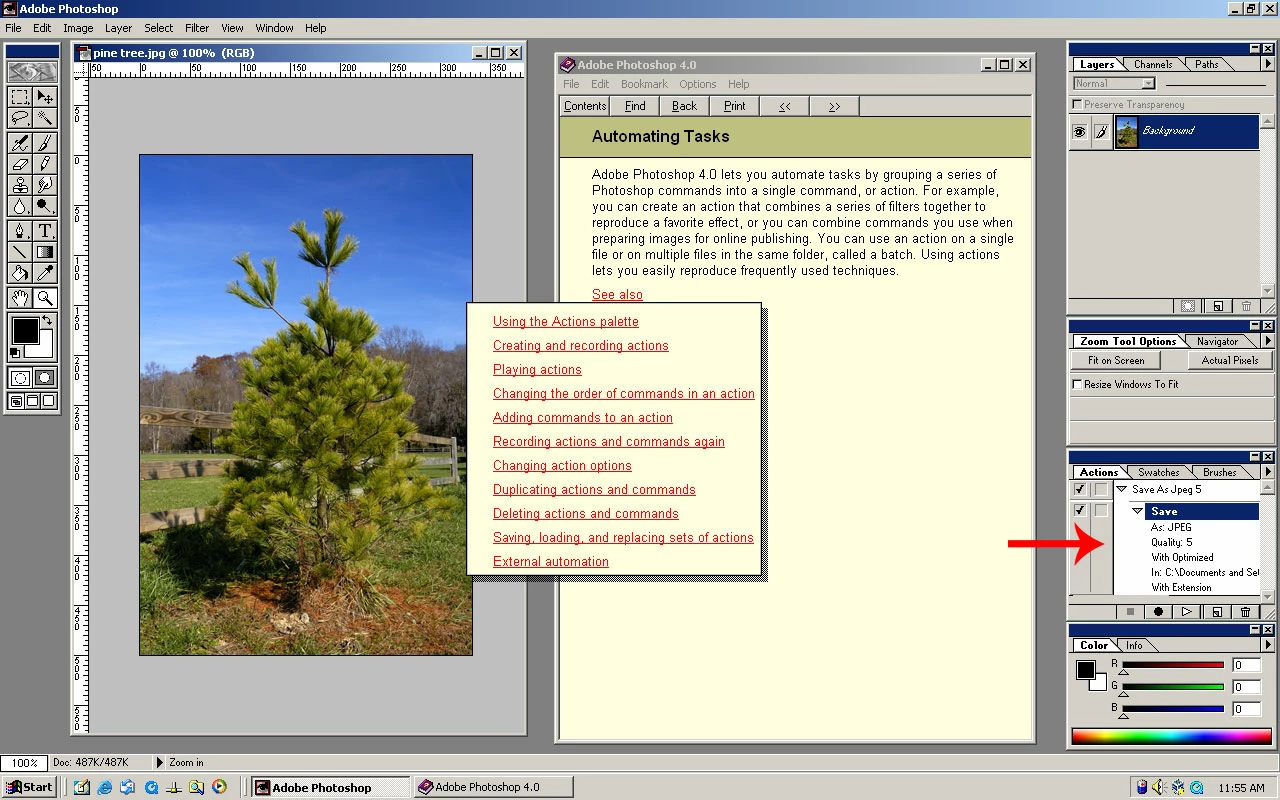
Photoshop 4 has actions (Window>Show Actions) and in Help>Contents>Automating Tasks has a whole section on Actions.

1 reply

Participating Frequently
July 5, 2017

HI,

I am not sure, if there were Actions available in Photoshop 4 but if so, you could create an action for saving the image with level 4 and use this action for saving.

Gerry_DAuthor
Participant
July 5, 2017

I'm not sure, documentation for version 4 is long gone. Maybe the help file?

Anyhow, I just thought of another possibility...

Because of the instability of the virtual machine under Windows 7, I took to pre-processing the images with Photoshop 7 and saving them. I would launch the virtual machine, launch Photoshop 4, if it would work and not crash, then make my thumbnail images and do canvas size to give a 10 pixel white space on the right side and bottom of the images. Then another add-on, (I don't remember it now, maybe something like "alien ware"), to create a drop shadow. Then save the image, (reset them for saving at that point to 4 & 5 level), then drop the images on the E: drive of Windows 7 for my master web files for later incorporating into pages and uploading.

So....

Do you think there a possibility that the operations of Photoshop 7 in resizing and saving, (at a level 6), is predetermining the default save level with Photoshop 4?

Gerry

Jeff Arola
Community Expert
Jeff ArolaCommunity ExpertCorrect answer
Community Expert
July 5, 2017

Photoshop 4 has actions (Window>Show Actions) and in Help>Contents>Automating Tasks has a whole section on Actions.