
Watermark is too big on certain images
I use the image processor in Photoshop to add my watermark to images. I recently got a new watermark and re-created the same action steps that were in my old watermarking actions. However, when I run the image processor on images that i zoomed in and cropped in camera, the watermark comes out Huge, while the non-cropped images, the watermark is placed as it should. Any idea on how to get the watermark to be the regular size on all images?
I have read through different topics here in the community but have not come across one that works. I watched a youtube video on how to properly create and align the watermark but that has not helped.
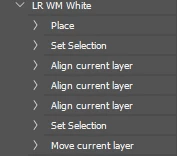
I am working on a windows pc with the latest version of photoshop. Below is an image of my actions used when it worked properly. Any help is appreciated.
 AdChoices