
tomsavvy
Participating Frequently
September 16, 2017
Answered

wedding editing with RAW

  • September 16, 2017
  • 2 replies
  • 712 views

Hi

Working through a batch of wedding edits, I've managed to achieve (at most!) the more subtle tones of a picture, but i'd like to try and produce something that is a little more darker that most wedding photographers are able to achieve. it maybe in RAW editing its toggling vibrance and the black/white sliders, but I'm not sure.

I'd like to get from this (original image):

to this:

or this for outdoors:

Any tips/advice/methods would be much appreciated.

Thankyou
This topic has been closed for replies.
Correct answer D Fosse

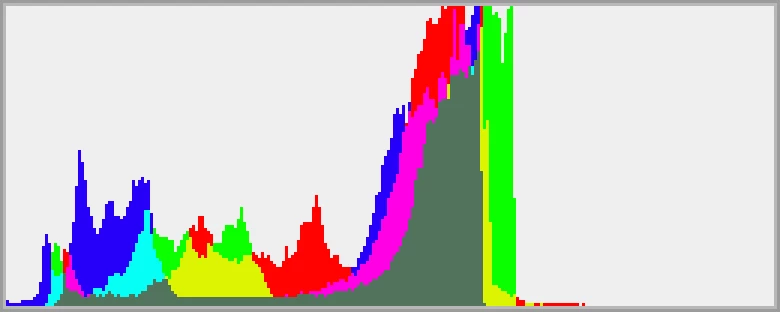
I get that you didn't like the answer you got when you recently posted the exact same question - but it was in fact the correct answer. Here's an enlarged histogram from #3 showing why there is muted highlights:

As for #1, this is just a classic situation of too much contrast in the scene. To keep the window from blowing out, the foreground is severely underexposed by the camera. In a situation like this you would normally use fill flash to bring up the foreground.

2 replies

rob day
Community Expert
Community Expert
September 16, 2017

You can also lock down the middle of the range so you are only affecting quarter tones and highlights. You can do most of the adjustment with the RGB curve and then adjust the other channels to tint as needed:

D Fosse
Community Expert
D FosseCommunity ExpertCorrect answer
Community Expert
September 16, 2017

I get that you didn't like the answer you got when you recently posted the exact same question - but it was in fact the correct answer. Here's an enlarged histogram from #3 showing why there is muted highlights:

As for #1, this is just a classic situation of too much contrast in the scene. To keep the window from blowing out, the foreground is severely underexposed by the camera. In a situation like this you would normally use fill flash to bring up the foreground.

tomsavvy
tomsavvyAuthor
Participating Frequently
September 16, 2017

No I think it was the correct answer. I just felt there were other tweaks involved that I couldn't quite get my head around

Thanks again

D Fosse
Community Expert
Community Expert
September 16, 2017

Here's a typical high-key image with a full 0-255 range:

One single "Levels" adjustment layer, working each channel individually and mostly the output sliders, no other adjustments whatsoever, can turn it into this: