
Mr. Content
Known Participant
February 10, 2023
Answered

what does control t do different?

  • February 10, 2023
  • 3 replies
  • 1082 views

I can modify a click using the option, command, shift, and sometimes a combination of these modifiers. 

So what does control-T do that these modifiers don't? 

This topic has been closed for replies.
Correct answer Conrad_C
quote

I can modify a click using the option, command, shift, and sometimes a combination of these modifiers. 
So what does control-T do that these modifiers don't? 

By @Mr. Content


When you say “I can modify a click,” if you really mean distort a selection, those modifier keys work only when the transform controls are visible around the selection. If the transform controls are not visible, you cannot use those keys to distort a selection.


There is more than one way to make those controls visible, and this is the answer to your question. They are simply different ways to make the same transform controls visible.


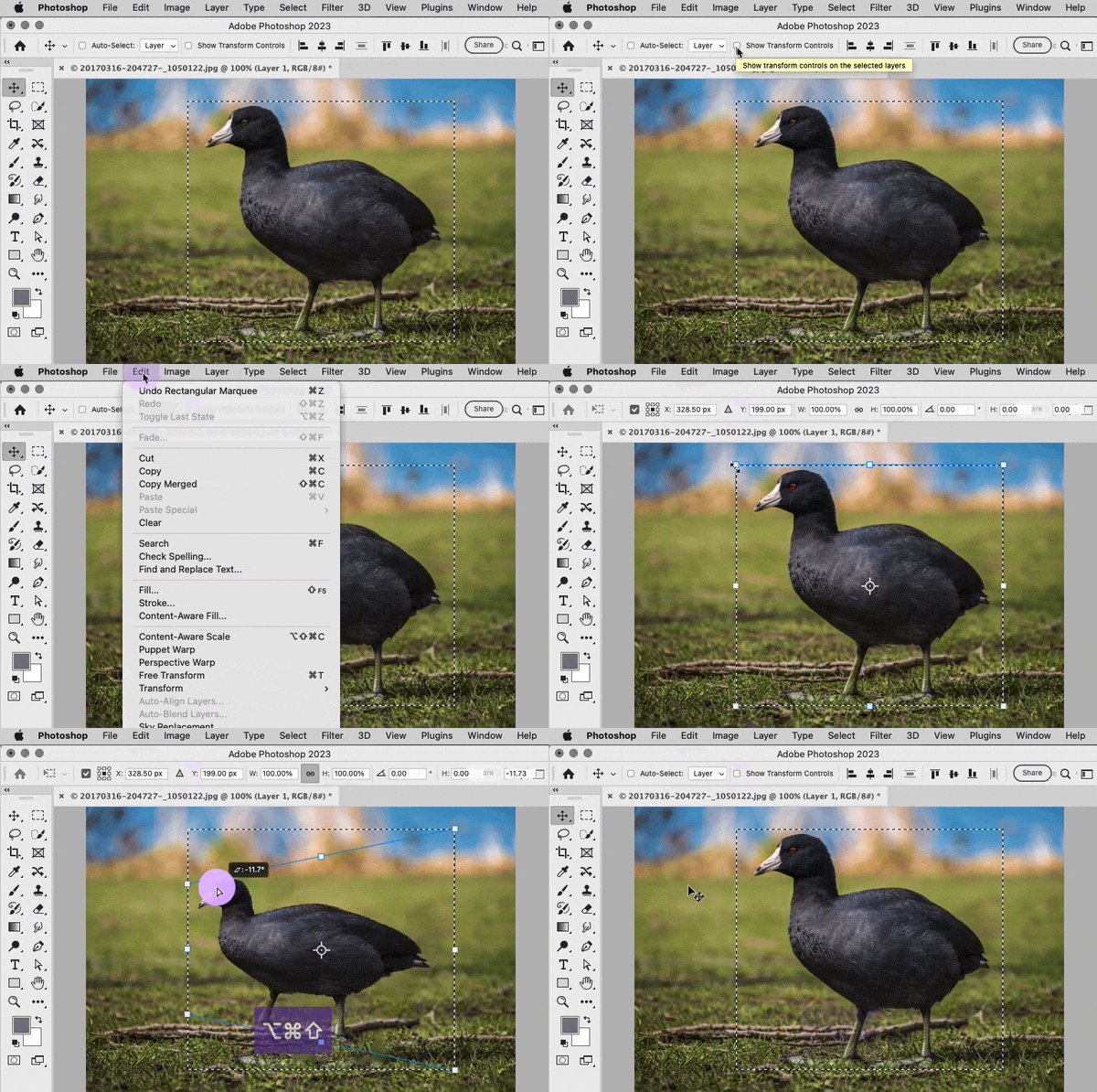
One way is to select Show Transform Controls in the options bar, when the Move tool is active. This is the first part you see in the demo below. If you select Show Transform Controls, you can now use those modifier keys as you drag any handle. What makes this method different is that when Show Transform Controls is active, the controls are always visible when you make a selection. Some people like that, some people don’t. The ones that don’t want to see the handles all the time use the next method.


Another way is to choose Edit > Free Transform, the command with the Control-T (Windows) / Command-T (macOS) keyboard shortcut. This is the second part you see in the demo below. With this method, the transform controls are hidden until you use this command or its shortcut to see them.


So, if you are working with Show Transform Controls on, that might be why you don’t need to use Free Transform (Control-T).
 

3 replies

Conrad_C
Community Expert
Conrad_CCommunity ExpertCorrect answer
Community Expert
February 11, 2023
quote

I can modify a click using the option, command, shift, and sometimes a combination of these modifiers. 
So what does control-T do that these modifiers don't? 

By @Mr. Content


When you say “I can modify a click,” if you really mean distort a selection, those modifier keys work only when the transform controls are visible around the selection. If the transform controls are not visible, you cannot use those keys to distort a selection.


There is more than one way to make those controls visible, and this is the answer to your question. They are simply different ways to make the same transform controls visible.


One way is to select Show Transform Controls in the options bar, when the Move tool is active. This is the first part you see in the demo below. If you select Show Transform Controls, you can now use those modifier keys as you drag any handle. What makes this method different is that when Show Transform Controls is active, the controls are always visible when you make a selection. Some people like that, some people don’t. The ones that don’t want to see the handles all the time use the next method.


Another way is to choose Edit > Free Transform, the command with the Control-T (Windows) / Command-T (macOS) keyboard shortcut. This is the second part you see in the demo below. With this method, the transform controls are hidden until you use this command or its shortcut to see them.


So, if you are working with Show Transform Controls on, that might be why you don’t need to use Free Transform (Control-T).


Mr. Content
Known Participant
February 14, 2023

Yep. you hit the nail on the head. I have shown transform checked and always have. Thanks for that. It is one of those questions that lurk in my mind. 

Community Expert
February 11, 2023

Chris has already shared what Command + T (Mac) =  Control + T (Windows) does as being Free Transform.

Here's a good page on Photoshop shortcuts so you can compare various keyboard combinations:
https://www.lightroompresets.com/blogs/pretty-presets-blog/photoshop-keyboard-shortcuts 

Chris 486
Community Expert
Community Expert
February 11, 2023

Not sure what you tool you are using to compare the transform tool to. Cmnd+T/Ctrl+T is the free transform tool you can read about what it can do here : Use the Free Transform command to apply transformations (adobe.com)