
Participating Frequently
October 20, 2021
Answered

What happened to Auto Levels shortcut?

  • October 20, 2021
  • 2 replies
  • 4439 views

Image > Auto Levels... what happened to it? Was it removed somewhere between CC 2019 and 2021 versions?


I'm running 22.4.3 and checked 22.5.1. Apparently it was replaced with Auto Tone.

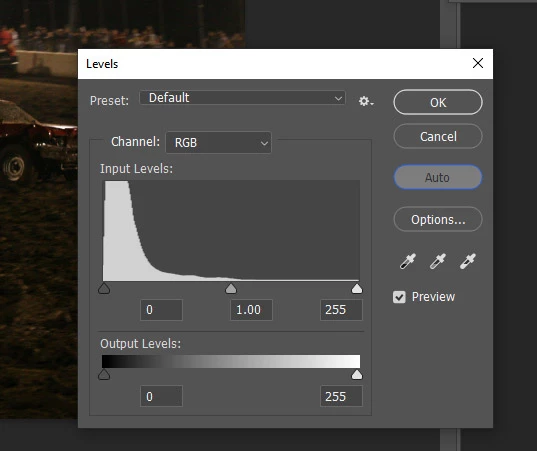
Yes, I can still use the Adjustments panel and click the Auto button on Levels. That is two extra/uncessary clicks. I had a keyboard shortcut for it; is that now impossible?


No, I don't want to record an Action for it. That is more wasted effort & time when dealing with thousands of photos. I need to see if Auto Levels is a suitable adjustment or not for each image. I cannot just blindly bulk process and assume it's a positive adjustment.


Backstory: My Win10 system forcefully updated (no idea how!) all CC apps from the installed 2019 version to the latest 2021 versions even though auto-updates was disabled. Oh, and the CC preferences are now all set to auto-update. Ridiuclous.


Anyway, seems I'm stuck on 2021 now and lost all preferences, shortcuts, actions, etc., from the forced update in middle of the night.
 

This topic has been closed for replies.
Correct answer jazz-y

Regardless of the Auto Tone vs. Auto Levels menu option and their effects, the problem boils down to one simple question:

How do I set a keyboard shortcut that corresponds to the Auto button inside the Levels editor?


The automatic effect of Auto Tone in CC 2021 compared to that effect in CC 2019 (what I thought was named Auto Levels) is not the same. Image > Levels > Auto button IS exactly what I need to happen via keyboard shortcut.

Can anyone help with that? Thank you!


Save this script, put it in the presets\scripts folder, restart Photoshop. The script will appear in the File-> Scripts menu where you can assign a hotkey to it.


s2t = stringIDToTypeID;
(r = new ActionReference()).putEnumerated(c = s2t('channel'), c, s2t('composite'));
(d = new ActionDescriptor()).putReference(c, r);
d.putBoolean(s2t('autoMachineLearning'), true);
d.putBoolean(s2t('autoFaces'), true);
(l = new ActionList()).putObject(s2t('levelsAdjustment'), d);
(d1 = new ActionDescriptor()).putList(s2t('adjustment'), l);
executeAction(s2t('levels'), d1, DialogModes.NO);


2 replies

gener7
Community Expert
Community Expert
October 20, 2021

There never was an Auto Levels menu selection/shortcut* under the image menu. Auto Contrast is similar to Auto Levels in the Levels dialog, but doesn't affect the actual color, rather, just the brightness.


*Not even going back to CS4.

Kukurykus
Legend
October 20, 2021

I think the original user may be right about Auto Levels. I remember I wrote a script about version 22.4.3, the one he mentioned and I am not sure but the 'Auto Tone' was renamed to 'Auto Levels'.


Now to make sure I looked into the script from that time and found when you use:


activeDocument.activeLayer.autoLevels()


 It's going to create Auto Tone history State!


btw. Auto-Levels - what does Photoshop do?

gener7
Community Expert
Community Expert
October 20, 2021

The date on that article is 2001, and up to CS3 there was Image > Adjust > Auto Levels as well as Auto Contrast and Auto Color. (Auto Tone, Contrast, and Color was moved to the Image menu in CS4). So if your Auto Levels script is pointing to Auto Tone, that's it. I just don't remember Auto Levels showing up as a separate menu item recently, but maybe Adobe did play with the idea and dropped it and I have no idea where they did. I'm open to new information.


Anyway, thanks for that, Kukurykus

Kukurykus
Legend
October 20, 2021

What shortcuts you had for Auto Tone and Auto Color and what you have now (on default workspace)?

VFS-JasonAuthor
Participating Frequently
October 20, 2021

Auto Tone default is Ctrl + Shft + L.  That WAS the default shortcut for Auto Levels. The menu option under IMAGE has been replaced by Auto Tone.

Auto Color is still the same as it was before.


There doesn't seem to be any way of creating a shortcut for Auto Levels.

D Fosse
Community Expert
Community Expert
October 20, 2021

You can set the default behavior to anything you want, and assign any shortcut you want.


I don't use these auto functions, so I don't know how "auto levels" is different from "auto color". But I suspect the difference is whether it sets each channel separately, or all of them as a luminance setting. But either way can be set as default, and then you can also specify the precise clipping point.