Inspiring
September 29, 2021
Answered

What happened to essentials classic workspace?

  • September 29, 2021
  • 8 replies
  • 11222 views

Where can I find the essentials classic workspace?  Was it removed?

Correct answer gener7

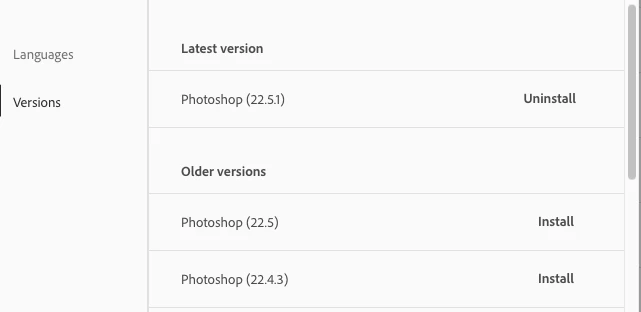
Photoshop 2021 v22.5.1 is the latest. There is no Essentials Classic workspace. If you can remember the version you last saw it, you can roll back to that older version using your CC Desktop app.


Also while newer versions tend to be unevenly distributed, I don't know anything about 23.0.0 at least yet.
 

8 replies

Participant
September 2, 2022

I have been using Photoshop 2022 and have always had the Essentials Classic. Now it's gone. Can anyone help me find it?

Thanks!

davescm
Community Expert
Community Expert
September 2, 2022

As discussed several times in this thread, Photoshop has always had an Essentials workspace but not an Essentials Classic (unless you made it yourself and named it so).

Illustrator has both Essentials and Essentials Classic workspaces though.


Dave

Participant
October 7, 2022

This is completely incorrect.

gener7
Community Expert
gener7Community ExpertCorrect answer
Community Expert
October 7, 2021

Photoshop 2021 v22.5.1 is the latest. There is no Essentials Classic workspace. If you can remember the version you last saw it, you can roll back to that older version using your CC Desktop app.


Also while newer versions tend to be unevenly distributed, I don't know anything about 23.0.0 at least yet.


applephxAuthor
Inspiring
October 7, 2021

Your answer makes sense, unlike Adobe's decision to remove essentials classic.  I am using a beta version (23) I could roll back but it will be delaying the inevatible. 


I'll have to backup all my settings files and manually copy them over.  Hopefully Adobe will allow syncing of workspaces to the cloud or at least a menu shortcut to backup/restore instead of trying to remember/web-search where the directory is every time there is an upgrade (which doesn't always transfer settings) or computer switch.


Thanks again!

davescm
Community Expert
Community Expert
October 7, 2021

There never was an Essentials Classic in Photoshop, unless you made one yourself. The default workspace was, and is, just "Essentials".

Essentials classic appears in Illustrator and InDesign.

Dave

applephxAuthor
Inspiring
October 7, 2021

Thank you all for your help. I am an advanced user and have spent hours reconfiguring and saving workspaces. I usually back them up then copy them over but it is not always pratical if I change computers or work locations unexpectedly.


The suggestions of doing what normally works as shown in the aformentioned screenshots. Is not working. See my initial response screenshot as well as this one which you can see shows no "essentials classic" option.

jane-e
Community Expert
Community Expert
October 7, 2021

Hi @applephx 


You can find the Essentials Classic Workspace in both Illustrator and InDesign. If you want one with that name in Photoshop, first arrange your panels as you wish, then go to Window menu > Workspace >  New Workspace to create a custom workspace.


~ Jane


applephxAuthor
Inspiring
October 7, 2021

Thank you all for your help.  I am an advanced user and have spent hours reconfiguring and saving workspaces.  I usually back them up then copy them over but it is not always pratical if I change computers or work locations unexpectedly. 


The suggestions of doing what normally works as shown in the aformentioned screenshots. Is not working.  See my initial response screenshot as well as this one which you can see shows no "essentials classic" option.


CShubert
Community Manager
Community Manager
October 7, 2021

Hi,

Here is a tutorial doc on how to manage your workspace(s). All the tools you used in your other workspace are available and you should be able to simply create what you want.
https://helpx.adobe.com/photoshop/using/workspace-basics.html

Will this help you to get back to your working flow?

Thank you,

applephxAuthor
Inspiring
October 7, 2021

Does anyone have a solution for this??  Any adobe representatives on here?

CShubert
Community Manager
Community Manager
September 29, 2021

Hi,

What OS are you on, you tagged both?

On Mac OS, Ps v22.5.1, it is where it has always been.  If you are not seeing it, try restarting Photoshop and see if it reappears. 


applephxAuthor
Inspiring
September 29, 2021

Windows 10 Pro 21H1 (BUILD 19043.1237)

josephlavine
Community Expert
Community Expert
September 29, 2021

What version of PS are you running? If you go Windows > Workspace it should still be visable.

warmly/j

applephxAuthor
Inspiring
September 29, 2021

Photoshop 23.0.0  This is the menu: