
Participant
October 31, 2020
Answered

What happened to the Line tool, it is broken!
  • October 31, 2020
  • 4 replies
  • 2159 views

I have Photoshop 22 that was auto-updated and now the Line tool is different.

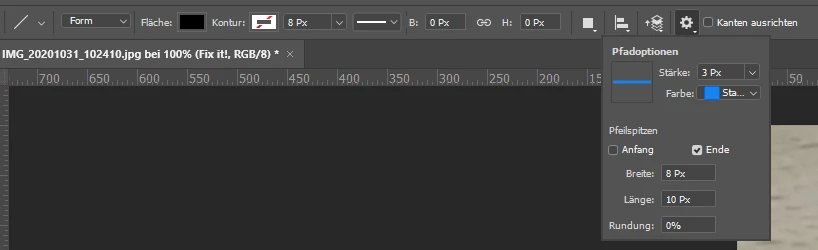
There is no line thickness value anymore and the arrow values changed from percentage values to pixel values. When I draw a line all I can see is the arrow head, not the line itself.


BTW: "* Topics help users find your post. Please select one or more topics."


Not very helpful! I flashed the Post button... Sorry but Adobe's usability department was fired I guess at least two years ago.

This topic has been closed for replies.
Correct answer davescm

The line tool has changed. It used to draw a rectangle which caused confusion to some users. It now draws a line so no fill is applicable. You control the thickness with the stroke value. Just make sure that stroke is set to centre or outside. If set to inside it won't draw.

Dave

4 replies

Participant
December 14, 2020

THIS IS TERRIBLE! I use the line tool quite often for work. An 8px thick colored line with a 2px black stroke. The removal of this function is catastrophic. WTH am i supposed to do now? Why would Adobe break this?

davidg37413998
Participant
March 17, 2021

I agree this change is terrible and makes the line tool very complicated. 

jane-e
Community Expert
Community Expert
March 17, 2021

@davidg37413998 


What version of Photoshop are you using?


Adobe has restored the previous behavior in 22.3 allowing you to draw a pixel line which is really a rectangle in addition to using the new vector version that behaves like all other drawing software.


~ Jane

Barb Binder
Community Expert
Community Expert
October 31, 2020

Hi @McDev1873501:


FWIW, you can disable auto-update in the CC Desktop app.


To adjust the line weight, use Set Shape Stroke Style text box, to the right of Stroke color.


Not sure why you are only seeing the arrow head and not the line itself. I am using the same settings that I see in your screen shot. 


My 2¢: the Line tool finally works like have I always thought it should. I draw a lot of lines (in In, Ai and Ps) and have always struggled with lines in Photoshop. 


~Barb 

~Barb at Rocky Mountain Training
JJMack
Community Expert
Community Expert
October 31, 2020

Yes you now have options to stroke Arrowheads inside,  or  stroke Arrowheads and line outline with single width stroke, or  stroke Arrowheads outside single width stroke  and  the line with double width stroke. You have a 50% chance of hitting your target.  When you do it will be without an arrow shaft.


JJMack
JJMack
Community Expert
Community Expert
October 31, 2020

It seem like Adobe want to make Photoshop users into Indesign and XD users. There are a great number of un-happy Photoshop users.

JJMack
davescm
Community Expert
Community Expert
October 31, 2020

Or they could be responding to feedback and feature requests

Dave

Semaphoric
Community Expert
Community Expert
October 31, 2020

Like they did with the Proportional Scaling thing? 😉

davescm
Community Expert
davescmCommunity ExpertCorrect answer
Community Expert
October 31, 2020

The line tool has changed. It used to draw a rectangle which caused confusion to some users. It now draws a line so no fill is applicable. You control the thickness with the stroke value. Just make sure that stroke is set to centre or outside. If set to inside it won't draw.

Dave