
Exit
  • Global community
    • Language:
      • Deutsch
      • English
      • Español
      • Français
      • Português
  • 日本語コミュニティ
  • 한국 커뮤니티
7

What is going on with the gradient tool???

New Here ,
Dec 02, 2023 Dec 02, 2023

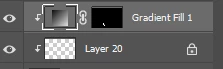
I used to be able to lock a layer and use the gradient tool and it would lock on to the layer like the brush tool or fill tool would, but now it makes an entirely new layer and won't lock on to what I want. It's super frustrating... Is there a way to just go back to the old graidnet tool? I also hate the new options it's giving me. Screenshot 2023-12-02 161403.png
TOPICS
Windows
446
Translate
Report
Community guidelines
Be kind and respectful, give credit to the original source of content, and search for duplicates before posting. Learn more
community guidelines
Adobe
Community Expert ,
Dec 02, 2023 Dec 02, 2023

image.png


Use the drop down and select Classic gradient, but do try and get to grips with the new tool.  It is way more powerful.  At least check out this video


Translate
Report
Community guidelines
Be kind and respectful, give credit to the original source of content, and search for duplicates before posting. Learn more
community guidelines
New Here ,
Dec 02, 2023 Dec 02, 2023

It's on classic. I really don't care for all the new fancy things they've added to the tool, I just want the ability to use it like the old versuion that would  stay on a locked layer!!

Translate
Report
Community guidelines
Be kind and respectful, give credit to the original source of content, and search for duplicates before posting. Learn more
community guidelines
Community Expert ,
Dec 02, 2023 Dec 02, 2023

The fancy things are certainly useful, but the implementation is horrendous. You can have a Classic Gradient and/or in the Classic method. Oh, and you can lose control of the Foreground color in your Gradient, too.


All this broken stuff lately makes me wonder what's going on with Adobe these days.

Translate
Report
Community guidelines
Be kind and respectful, give credit to the original source of content, and search for duplicates before posting. Learn more
community guidelines
Community Expert ,
Dec 03, 2023 Dec 03, 2023
LATEST

Could you please post screenshots with the pertinent Panels (Toolbar, Layers, Properties, Options Bar, …) visible? 

Why do you lock the Layer you want to create a Gradient on? 

Translate
Report
Community guidelines
Be kind and respectful, give credit to the original source of content, and search for duplicates before posting. Learn more
community guidelines