Participant
June 21, 2017
Answered

What is the Double Overlapping Box Icon mean in the Layers Panel?

  • June 21, 2017
  • 1 reply
  • 21404 views

I was given a Photoshop File from a friend that has something I don't know about.

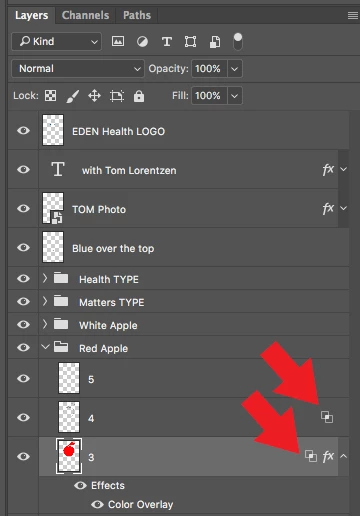
In the Layers Panel, on one of the layers, to the far right, there is a double overlapping box icon.

When I click on it nothing happens, and I can't figure out how to access it or what it is.

Can someone direct me for help?

Thanks

Joseph

    This topic has been closed for replies.
    Correct answer davescm

    Hi

    You will see it if one of the "Advanced" blending options is set (such as "knockout", "blend if" etc.). Right click the layer and choose blending options to check.

    Dave

    1 reply

    davescm
    Community Expert
    davescmCommunity ExpertCorrect answer
    Community Expert
    June 21, 2017

    Hi

    You will see it if one of the "Advanced" blending options is set (such as "knockout", "blend if" etc.). Right click the layer and choose blending options to check.

    Dave