
Inspiring
September 18, 2023
Answered

What is this? (Photoshop tips)

  • September 18, 2023
  • 1 reply
  • 1434 views

When I open up Photoshop CC I get a screen that says "Suggestions" and then under that "Tips" and it starts off with a picture of a guy with blotchy, acne-covered skin and the caption "Smooth Skin".   And a button that says "Try It Now".   So I click the button and it opens a JPEG of the image along with a dialog box labeled "Discover" that has stuff in it like "Layer basics" and "Work with layers" and other elementary stuff. 


See attached image.


The caption "Smooth Skin" suggests that I'm going to get a tutorial about how to smooth skin, like maybe a workflow.   But I don't see one.  Am I overlooking it?   What is Adobe doing here?   Thanks in advance.
This topic has been closed for replies.
Correct answer J E L

How did you get that?    Since posting this, "Smooth Skin" has been replaced by "Blur Background" (why did it change?) , so using that, when I click the Try It Now button I get the same thing I got when I clicked that button with "Smooth Skin" which is the "Discover" panel with a bunch of generic topics, nothing called "Smooth Skin" or "Blur Background". (see attached)


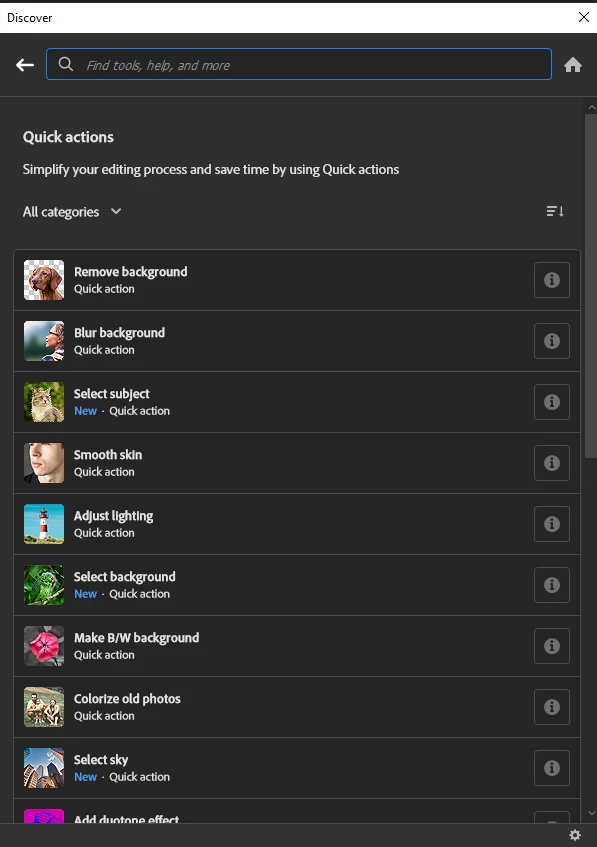
For me, it's under Quick actions:

1 reply

Kevin Stohlmeyer
Community Expert
Community Expert
September 18, 2023

@peternelson these are built in tutorials available for you. You can hide suggestions using the top right navigation. Clicking in the Discover panel starts the tutorials for the subject.

Inspiring
September 18, 2023

There was nothing obvious in the Discovery panel related to the "Smooth Skin" topic.  There was generic layer stuff  and obviously smoothing skin probably involves the use of layers, but so does practically everything in Photoshop.


My question is, when I see one of these headings, what is it?   Is there, in fact, a "smooth skin" or "remove background" (another heading I've seen there) tutorial or workflow associated with it, and how do I get there by clicking on the image?   Or is it just some kind of clickbait?

Kevin Stohlmeyer
Community Expert
Community Expert
September 18, 2023

It's not clickbait. If you have a image open with the Discover Panel - it has various items like tutorials, help articles and in this case "Smooth Skin" is a Quick Action you can run to automate. When I clicked "Smooth Skin" it opened up and added a smart filter for the Neural Filter along with Related tutorials (Remove spots and imperfections)