
williamh28333347
Participating Frequently
July 16, 2018
Answered

What on earth would cause this inaccurate preview and export?

  • July 16, 2018
  • 2 replies
  • 636 views

Hello - I'm toying with a small image. A few hours ago I exported it as JPEG after dragging the image layer about 25px down so there was a white gap at the top.

Flash-forward to now, where I cannot add a smaller 5px gap in the same image without the preview and the exported JPEG showing something closer to 25px. I say something closer because it actually does seem to decrease the gap, but it decreases it maybe 5px, with the remaining 20px gap intact in the export. Here is a screen capture. I just reinstalled using the latest version, closed everything, rebooted, and now back on this same PSD, same behavior.
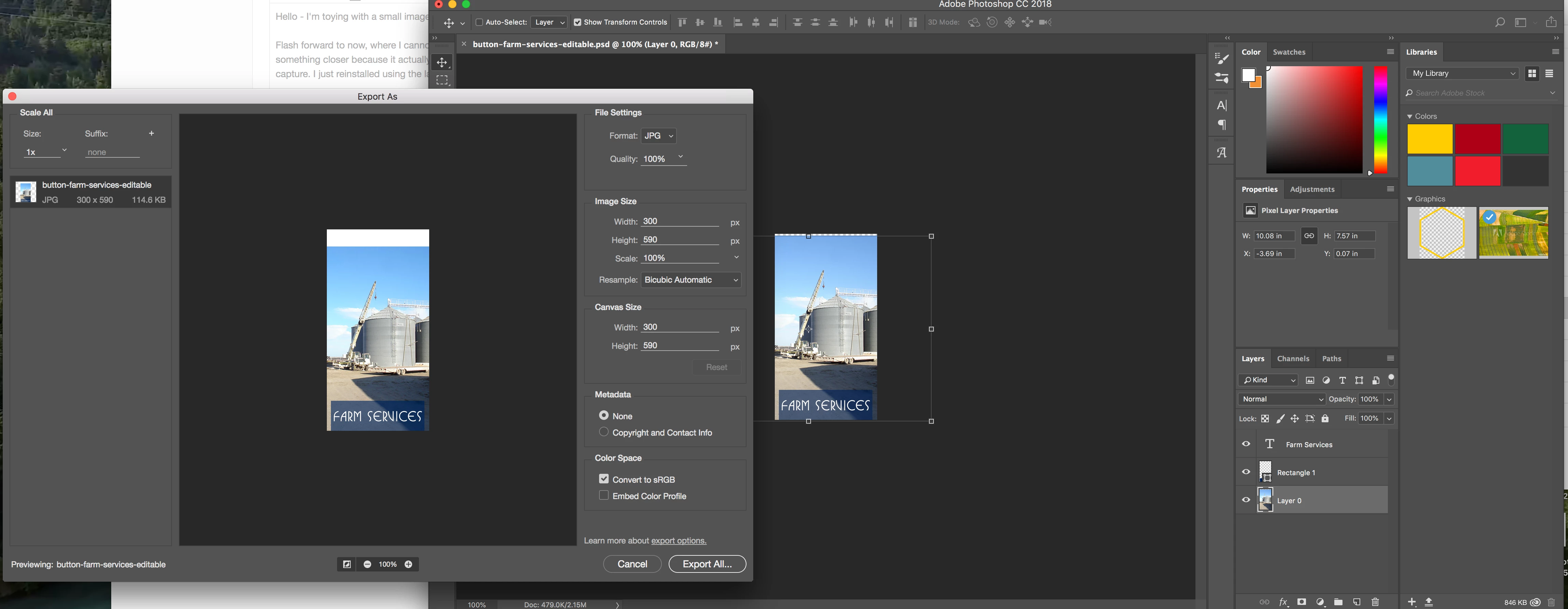
Any ideas?

Thank you

Bill

    This topic has been closed for replies.
    Correct answer c.pfaffenbichler

    Can you provide the file?

    What happens if you manually amend the Canvas Size in the Export dialog?

    Does Save for Web (cmd-alt-shift-S) work as expected?

    2 replies

    Mike_Gondek10189183
    Community Expert
    Community Expert
    July 16, 2018

    The number should be about 560 not 590 pixels high after analyzing a screenshot. Appears somehow the wrong number is getting in there.

    I see your reset button is greyed out so you should  be to the canvas size already, but just pointing out that button so you keep an eye on that.

    Channels, paths or overflow type/shapes should not be causing this, so am not sure what is. If you can post the file via dropbox or similar, we should be able to better assist.

    c.pfaffenbichler
    Community Expert
    c.pfaffenbichlerCommunity ExpertCorrect answer
    Community Expert
    July 16, 2018

    Can you provide the file?

    What happens if you manually amend the Canvas Size in the Export dialog?

    Does Save for Web (cmd-alt-shift-S) work as expected?

    williamh28333347
    Participating Frequently
    July 16, 2018

    Hi and thanks for your time!

    I tried supplying the PSD. Apparently that's not allowed. I'm a forum newb - how do I do it?

    The CMD + Option + Shift + S did indeed give me a Save interface I had never seen before and it worked once I changed from gif to jpeg. The gap is accurately represented.

    Strangely though, other PSDs are now doing the same thing when I simply Export As - why is that process wrong? Any idea? I've created my web images the same way for several years without any of this strange gapping issue.

    Thanks

    Bill

    williamh28333347
    Participating Frequently
    July 18, 2018

    Ok same  is happening to me with this file, so is not your install or computer but something about that file.

    I was able to resolve, by making a new 300 x 545 document, and dragging the 3 layers, then add shift and drop onto new document.

    Not sure what is causing 545 to go to 590, but ruling out

    • slices
    • channels
    • paths
    • font
    • pixel aspect ratio
    • layer comps

    I even merged the layers together as one to simplify, and still could not fix your original file.

    Is this happening to other files, anything special you might know about these such as are these .psd exported from another app, or do you have a photoshop plug in?


    Thanks - no, I created them all in a single session in Photoshop and the PSDs were then loaded again a day later to make modifications, and the fun started...I did confirm that all the images I created that day exhibit the same issue. But like you, I can create from scratch and seem to be OK.