
Participant
February 11, 2022
Question

What should I do with my brush settings?
  • February 11, 2022
  • 3 replies
  • 444 views


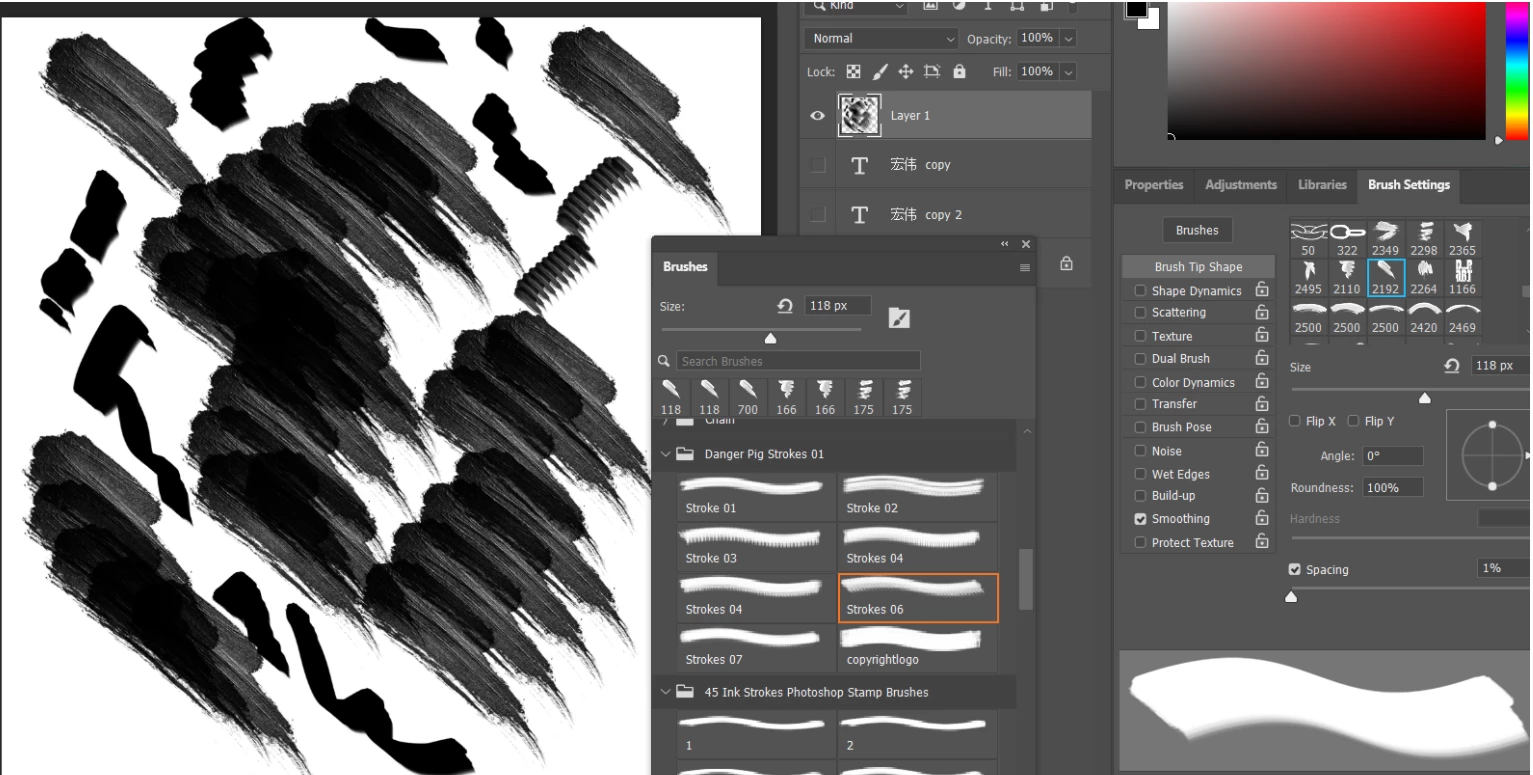
It's been happening for quite a long time but I didn't really mind until today when I had just downloaded some brush stroke brushes and plopped them into PS, but why is the texture repeating? Therefore I can't make any clean, singular strokes and I have no idea which settings i should adjust. It's been happening with almost every texture brush there is.


This topic has been closed for replies.

3 replies

Mohammad.Harb
Community Expert
Community Expert
February 16, 2022

Redefine the brush stroke. edit -> define brush preset

Leslie Moak Murray
Community Expert
Community Expert
February 12, 2022

In the brush panel, select "Shape Dynamics" and make sure the Angle Jitter is set to 0:


Trevor.Dennis
Community Expert
Community Expert
February 11, 2022

the screen shot looks like brush spacing is set to about 25%, which is the default.

We can see that you actually have spacing set to 1% though, so unless you have changed the spacing after laying down those strokes, something is broken.

I would suggest resetting the brush tool as a first step.

If that does not fix it, make sure spacing is set to 5% or lower.

Are you using mouse or tablet, and if tablet which one?


If you are using a tablet which API are you using?

If you are using Windows then that will either be WinTab or Windows Ink.  Windows Ink is the way to go nowadays.


If still in trouble:

what operating system are you using?

What Photoshop version?

Do other brush sets have the same problem?  (You can see I installed the same set to test it)

Another other info that might help?


Participant
February 12, 2022

Thank you for the response. So is that particular brush's default mode is just a repeated series of the same texture instead of a singular stroke? Resetting the tool just transforms the brush into a normal rounded brush, and setting the spacing to 5% didn't really do much either.


What I want to know is whether or not the repeated textures is the just how the brush is, or there's a problem in the settings, what do you think? 


As you can see some brush sets look and work as expected. If I may ask, how do I determine which API I am currently using right now? And yes I am using a drawing tablet.


I'm using Windows 10 and PS CC 2020.


Trevor.Dennis
Community Expert
Community Expert
February 12, 2022

Hi again.


Resetting the Brush tool takes you back to its default settings including the default hard round preset.  I think it also sets brush spacing to 25% which is nearly always to coarse IMO.  10% is OK but 5% is better so long as your system specs are up to it.  The bottom line is if you can make a sweeping line that covers the entire document without lag then you are good to go.  If lag is annoying then increase brush spacing.


You are describing the Danger Pig Strokes presets as texture presets, which they are not in the sense that Photoshop uses the 'texture' descriptor.  Try this little test with me.


I've made some strokes using varing shades of grey throughto black and used the smudge tool to run the tones into one another. Note that they layer is otherwise filled with white.

Do something like this, then with that layer selected go Edit > New Brush Preset.


Stamping down with a single mouse click gives you the same effect you sampled

The spacings below are  25%, 50% and all the way down to 10%.  You can see what is happening.


Now using that same preset I have used Brush Settings panel to add in turn

Size Jitter

Angle Jitter

Scatter

And finaly Hue Jitter.  

Have a play and see what you can come up with.  You can't break anything and you'll understand how the brush engine works.  Remember these are exactly the same tools that Kyle Webster used to make his incredible range of presets.