January 15, 2018
Answered

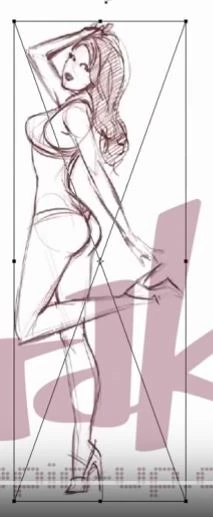
What tool is this? (Square with an X in the middle)

  • January 15, 2018
  • 3 replies
  • 3957 views

This is from an older version of PS, can someone tell me what it is and if I can use it in CS201x?

    This topic has been closed for replies.
    Correct answer Trevor.Dennis

    JHFerry  wrote

    .  What would be the reason he is doing this instead of free transform?  Is he doing each image on its own layer?

    It's not an either/or situation.  The video creator will have made the layers Smart Objects so (s)he could use Free Transform multiple times without compromising image quality.  The diagonal simply indicates that the layer being transformed is a Smart Object.

    Answer #3 mentions Placed objects.  There is an option in Preferences to have Placed objects automatically made Smart Objects or not.  I leave it at its default which is 'yes'.

    BTW  I am going to add a slight NSFW warning to your video because of its content.  The emphasis is on 'slight' but you need to warn people when posting such content.

    3 replies

    priyankas72354167
    Adobe Employee
    Adobe Employee
    January 15, 2018

    Hi

    This is the Placed Embedded and Placed Linked features in the Edit menu of Photoshop in which you see the cross in the middle.

    If you want to place any other picture on a working document in Photoshop then you can use this feature.

    Please check the below link

    Work with Smart Objects in Photoshop

    January 15, 2018

    Its interesting.  Let me link the video.

    https://www.youtube.com/watch?v=pGrVlI04D6Q&t=150s

    [Mod note:  The above video is ever so slightly NSFW]

    I am doing gesture drawing exercises and came across this.  Its sped up so I could not see why the author was converting each drawing to smart objects when it looks like he was just trying to organize them.  What would be the reason he is doing this instead of free transform?  Is he doing each image on its own layer?

    Trevor.Dennis
    Community Expert
    Trevor.DennisCommunity ExpertCorrect answer
    Community Expert
    January 15, 2018

    JHFerry  wrote

    .  What would be the reason he is doing this instead of free transform?  Is he doing each image on its own layer?

    It's not an either/or situation.  The video creator will have made the layers Smart Objects so (s)he could use Free Transform multiple times without compromising image quality.  The diagonal simply indicates that the layer being transformed is a Smart Object.

    Answer #3 mentions Placed objects.  There is an option in Preferences to have Placed objects automatically made Smart Objects or not.  I leave it at its default which is 'yes'.

    BTW  I am going to add a slight NSFW warning to your video because of its content.  The emphasis is on 'slight' but you need to warn people when posting such content.

    Omar.Fathy
    Community Expert
    Community Expert
    January 15, 2018

    That is mean that your image is a Smart object layer.

    That is mean more but the most important that you can't directly edit this image.

    To be able to edit it Right Click on this layer in Layers panel and choose Rasterize Layer but you will lose the advantages the Smart Objects.

    January 15, 2018

    I'm guessing it is the free transform tool, I like the X in the middle, can you still use it that way?