Participating Frequently
February 11, 2024
Answered

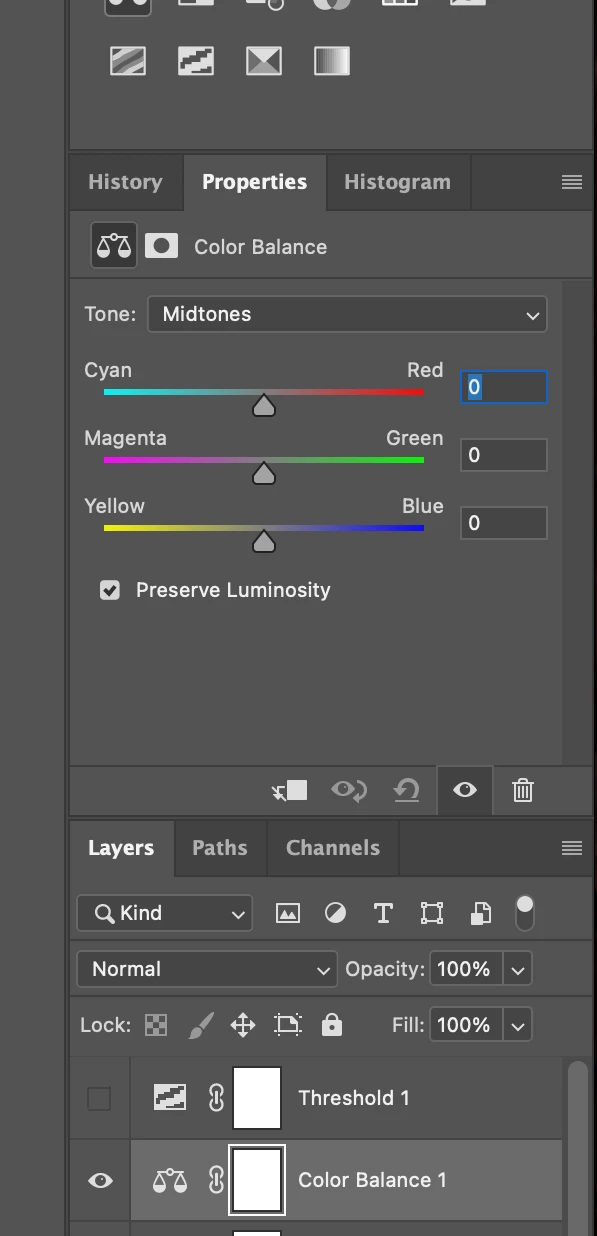
When I click on an adjustment, there is always a blue box around a number active.

  • February 11, 2024
  • 3 replies
  • 367 views

When I click on an adjustment, there is always a blue box around a number active. I never had this before,any suggestions to change it? 
This topic has been closed for replies.
Correct answer Stephen Marsh

@Johannes Matt258354117oh3 – Thanks for adding the screenshot, it does help!


I can't reproduce this on my installation, a new Color Balance adjustment layer doesn't have any fields active.


I have to click within a field to make it active and then I can use the tab or shift+tab key to cycle between fields.


It may be that you need to back up all of your custom actions, brushes and other presets and reset your preferences.


EDIT: With the adjustment layer active, in the Properties panel, click on the menu and untick "Auto-Select Parameter" to turn this off.

3 replies

Stephen Marsh
Community Expert
Stephen MarshCommunity ExpertCorrect answer
Community Expert
February 11, 2024

@Johannes Matt258354117oh3 – Thanks for adding the screenshot, it does help!


I can't reproduce this on my installation, a new Color Balance adjustment layer doesn't have any fields active.


I have to click within a field to make it active and then I can use the tab or shift+tab key to cycle between fields.


It may be that you need to back up all of your custom actions, brushes and other presets and reset your preferences.


EDIT: With the adjustment layer active, in the Properties panel, click on the menu and untick "Auto-Select Parameter" to turn this off.

Participating Frequently
February 14, 2024

Yes! That's it, "auto-select parameter" was enabled. Thank you very much!

kglad
Community Expert
Community Expert
February 11, 2024

in the future, to find the best place to post your message, use the list here, https://community.adobe.com/

p.s. i don't think the adobe website, and forums in particular, are easy to navigate, so don't spend a lot of time searching that forum list. do your best and we'll move the post (like this one has already been moved) if it helps you get responses.


<"moved from cc desktop">
Participating Frequently
February 14, 2024

Thank you!


kglad
Community Expert
Community Expert
February 11, 2024

is this a photoshop question?

Participating Frequently
February 11, 2024

Don't know, Tools setting? 

kglad
Community Expert
Community Expert
February 11, 2024

what adobe app are you using?
