
Participant
October 23, 2019
Answered

When I click on one type layer, it jumps to another :-(

  • October 23, 2019
  • 1 reply
  • 1838 views

Hope someone has an answer for a relatively new PS user! I have Photoshop CC 2018 and use Windows. I am trying to edit a type layer and when I go to select it the layers panel on the right, everything looks great. But once I click on the type layer I want to fix within my image, it keeps jumping to a different type layer. It's driving me crazy - can anyone help?
    This topic has been closed for replies.
    Correct answer Bojan Živković11378569

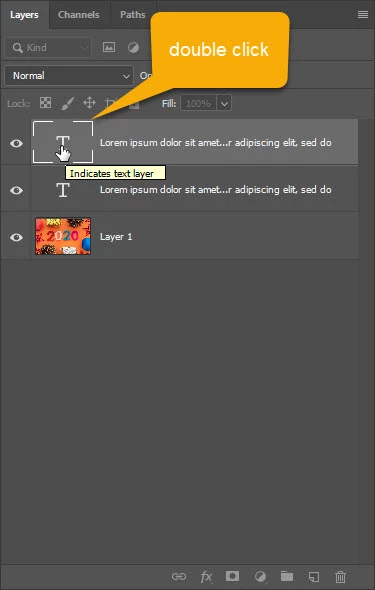
    Can you try with this: double click on type layer thumbnail to select text - it is thumbnail with letter T in the Layers panel. 

    I gues you have type layers close one to another and when you try to click one text it actually selects another which is on top or something similar. 

    1 reply

    Bojan Živković11378569
    Community Expert
    Community Expert
    October 23, 2019

    Can you try with this: double click on type layer thumbnail to select text - it is thumbnail with letter T in the Layers panel. 

    I gues you have type layers close one to another and when you try to click one text it actually selects another which is on top or something similar. 

    Participant
    October 23, 2019

    Hi Bojan - I have been trying that but unfortunately, it keeps jumping to another. Wait - it worked! Thank you so much.