Participant
January 26, 2023
解決済み

When I open a RAW file in Photoshop, the white balance information in the photo is lost.

  • January 26, 2023
  • 返信数 4.
  • 1972 ビュー

When I open a RAW photo in Photoshop, I can correct the color temperature in the camera RAW filter. If the color temperature of the photo is 4550, I can correct the color temperature based on the value of 4550. However, after I open the photo with the RAW filter on, and then correct the photo with the camera RAW filter again, the color temperature of the photo is set to 0, not 4550.


Also, after I put on the RAW filter and open the photo, when I optically correct the photo with the RAW filter again, I have a problem that I cannot use the correction method using the profile.


So, after opening the photo with the RAW filter as shown in the video below, I want to be able to correct it based on the original color temperature value of the photo even when I open the photo with the RAW filter again and correct it. And I want to be able to calibrate the optical part too using the profile.
このトピックへの返信は締め切られました。
解決に役立った回答 TheDigitalDog

On top of all the excellent answers here, let me add the CCT WB value is rather meaningless anyway.

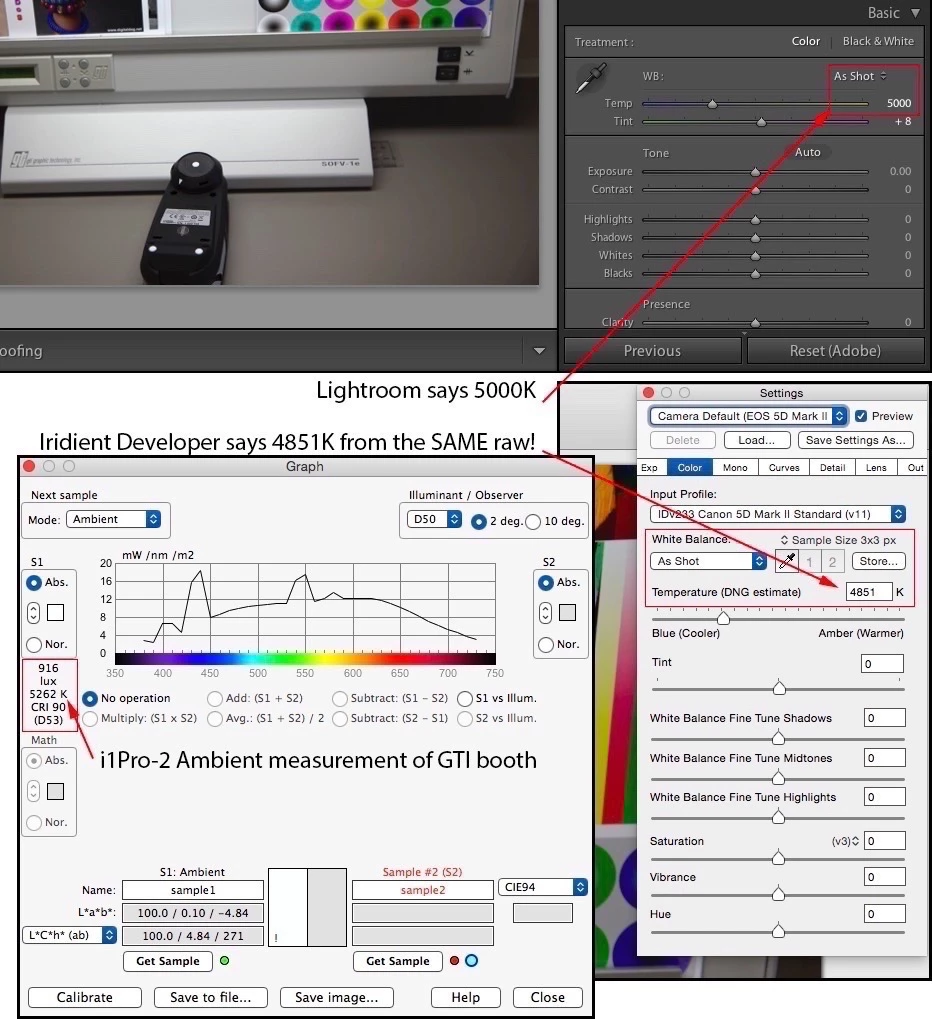
CCT Kelvin defines a large number of possible colors for one. Each raw processor will report differing values from the same raw image as well. I've measured a light source with a Spectrophotometer below, and you can see what it actually measures and what two raw converters report (one being Adobe's) is different. The numbers reported don't really matter; the color appearance in a raw converter and how you want it to appear is important. 


http://digitaldog.net/files/CCTandRaw.jpg

返信数 4

TheDigitalDog
TheDigitalDog解決!
Inspiring
January 26, 2023

On top of all the excellent answers here, let me add the CCT WB value is rather meaningless anyway.

CCT Kelvin defines a large number of possible colors for one. Each raw processor will report differing values from the same raw image as well. I've measured a light source with a Spectrophotometer below, and you can see what it actually measures and what two raw converters report (one being Adobe's) is different. The numbers reported don't really matter; the color appearance in a raw converter and how you want it to appear is important. 


http://digitaldog.net/files/CCTandRaw.jpg

Author “Color Management for Photographers" & "Photoshop CC Color Management/pluralsight"
D Fosse
Community Expert
Community Expert
January 26, 2023

And to be clear, there is no clearly defined color temperature even in the raw photo. The number is just the amount of compensation applied, to achieve a natural-looking color balance, according to various algorithms.


There is nothing that actually measures the color of the light in the scene.


That's why you will also get different temperature/tint-values in different raw processing engines - and that includes the camera firmware. They may all look neutral, but the numbers still be different because they're all different processing engines and different compensation needed.

Legend
January 26, 2023

A rendered file doesn't have a color temperature, while a RAW file does have one assigned as a part of processing. This is why you don't see a temp once you are in Photoshop.

davescm
Community Expert
Community Expert
January 26, 2023

Adobe Camera Raw and the Camera Raw Filter are two similar looking but separate parts of the Photoshop environment.


Adobe Camera Raw works on raw files and allows you to select a colour temperature for the conversion.

The Camera Raw Filter works on open RGB files (which may or may not have been converted from raw files) and the colour temperature adjustment always starts at 0 and allows you to 'warm up' or 'cool down' the image.


If you think you will want to go back to the original conversion and change it then open the image via camera raw as a smart object in Photoshop (to do that Shift +Click on the open button in Camera Raw). Then when you subsequently click on the smart object, Adobe Camera Raw will open (not the filter) and allow you to readjust the colour temperature for the conversion from raw.


Dave

Michael Bullo
Community Expert
Community Expert
January 26, 2023

Fantastic post Dave

davescm
Community Expert
Community Expert
January 27, 2023

Thank you Michael 🙂

Dave