
Participating Frequently
July 28, 2017
Answered

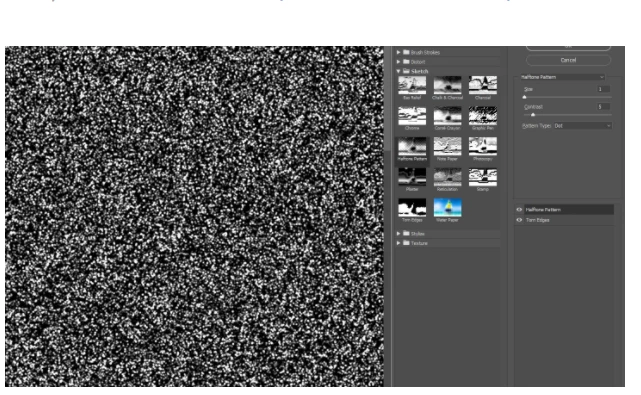
When i open filter gallery, they are all black...I can't see the photo in the samples and even if I choose one, the result is a black image.

  • July 28, 2017
  • 3 replies
  • 5615 views

CC version

using latest update but has been happening for awhile as I don;t use this too often

thanks for your help
    This topic has been closed for replies.
    Correct answer davescm

    Can you show us the layer you are using this on without the filter - I can just make out that you have applied two filters, Torn Edges and Half Tone pattern, but without seeing the image before it is difficult to tell whether it is working or not.

    Dave

    3 replies

    c.pfaffenbichler
    Community Expert
    Community Expert
    July 28, 2017

    And as Halftone Pattern uses the Foreground and Background Colors please include the Toolbox.

    And please don’t downsample the screenshot.

    davescm
    Community Expert
    davescmCommunity ExpertCorrect answer
    Community Expert
    July 28, 2017

    Can you show us the layer you are using this on without the filter - I can just make out that you have applied two filters, Torn Edges and Half Tone pattern, but without seeing the image before it is difficult to tell whether it is working or not.

    Dave

    Participating Frequently
    July 28, 2017

    thanks for noticing that. For some reason those two were applied and it made the whole thing black. when i removed them all is fine. the torn edge seems to do it.

    THANK YOU ALL

    davescm
    Community Expert
    Community Expert
    July 28, 2017

    Glad you got sorted

    Dave

    c.pfaffenbichler
    Community Expert
    Community Expert
    July 28, 2017

    Instead of want you have posted so far please post a meaningful screenshot – one that includes all pertinent UI elements like Toolbox, Options Bar, Layers Panel, Channels Panel etc.

    What are the Foreground- and Background Colors?

    Does turning off »Use Graphics Processor« in the Performance Preferences (Photoshop > Preferences > Performance > Graphic Processor Settings) and restarting Photoshop have any bearing on the issue?