
Inspiring
March 10, 2023
Answered

When I put a photo in photoshop the the colors are horrible.

  • March 10, 2023
  • 2 replies
  • 2420 views

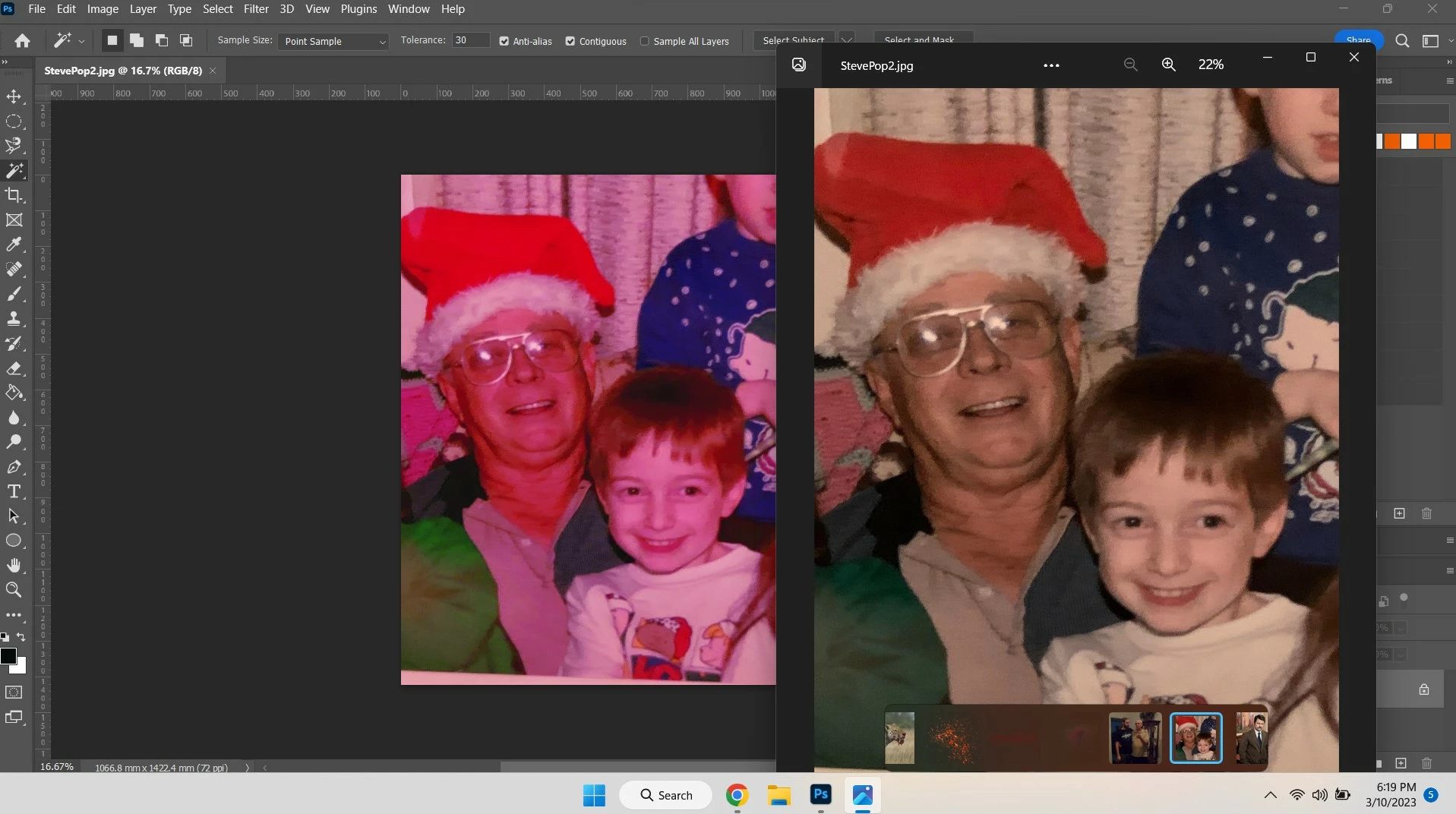
When I open a photo in Photoshop (and Illustrator for that matter) the colors of the photos are almost pastel looking. When I print the photos they look just like the original. The reason I'm putting the photos in Photoshop is to edit them. If they open like this I cannot edit them. This started about a couple months ago and I don't know why. I made no changes, it just happened. In the attached screenshot the original is the one on the right. Please help.
This topic has been closed for replies.
Correct answer D Fosse

If it's not the GPU, it has to be the monitor profile. It's one of those two.


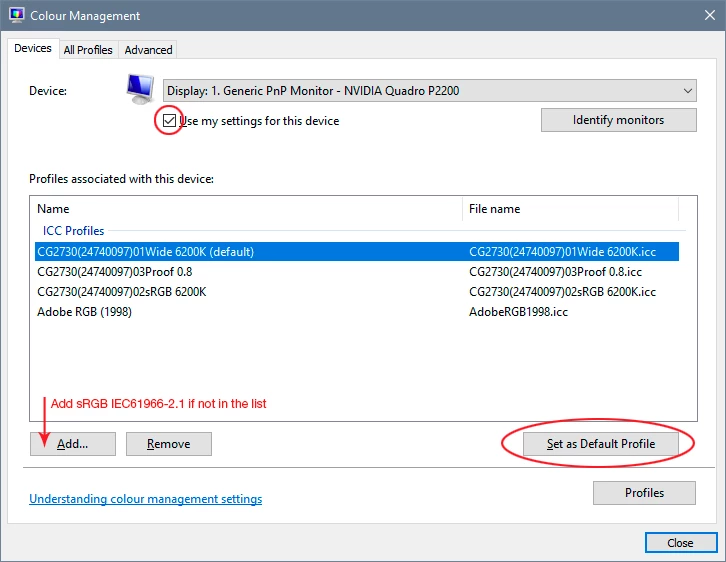
If you don't have a calibrator, replace your current monitor profile with sRGB IEC61966-2.1. It won't be entirely accurate, but better than a defective profile.


Open Search and type Color Management (or "Colour" if UK English  version of Windows). This brings up the color management dialog in Windows, where you can change the monitor profile (screenshot below).


The thing is that many monitor and laptop manufacturers distribute profiles through Windows Update, and these profiles are surprisingly often defective in various ways. You'd think they'd get it right, but they often don't, and I don't know why Microsoft still allows this.


Relaunch Photoshop when done, it loads the profile at application startup.


2 replies

D Fosse
Community Expert
D FosseCommunity ExpertCorrect answer
Community Expert
March 11, 2023

If it's not the GPU, it has to be the monitor profile. It's one of those two.


If you don't have a calibrator, replace your current monitor profile with sRGB IEC61966-2.1. It won't be entirely accurate, but better than a defective profile.


Open Search and type Color Management (or "Colour" if UK English  version of Windows). This brings up the color management dialog in Windows, where you can change the monitor profile (screenshot below).


The thing is that many monitor and laptop manufacturers distribute profiles through Windows Update, and these profiles are surprisingly often defective in various ways. You'd think they'd get it right, but they often don't, and I don't know why Microsoft still allows this.


Relaunch Photoshop when done, it loads the profile at application startup.


Inspiring
March 12, 2023

There were no profiles at all in there so I added the one you said. After restarting the pic loaded correctly! I use Photoshop and Illustrator to fool around with sublimation. Now I need to learn how to get the designs I make in Illustrator to print the same as I see on the monitor. That's a battle for another day. Thank you for your time!


TheDigitalDog
Inspiring
March 12, 2023
quote

There were no profiles at all in there so I added the one you said.


By @Isabella5C81

There's always some profile being used. But anyway, what did you add and where? It needs to be a profile that defines your actual display. 

Author “Color Management for Photographers" & "Photoshop CC Color Management/pluralsight"
TheDigitalDog
Inspiring
March 11, 2023

First, try disabling GPU in the Photoshop preferences (Performance tab). Also try the Preferences > Technology Previews... and enable "Older GPU mode (pre 2016)" - Restart Photoshop.. Any better?


If turning OFF GPU works, it's a GPU bug and you need to contact the manufacturer or find out if there's an updated driver for it. This is why disabling GPU is an option as more and more functionality moves to the GPU in newer versions of many Adobe products.


Also see: 

https://helpx.adobe.com/photoshop/kb/photoshop-cc-gpu-card-faq.html

https://helpx.adobe.com/photoshop/kb/acr-gpu-faq.html


If not, recalibrate and build a new ICC display profile, the old one might be corrupted. If you are using software/hardware for this task, be sure the software is set to build a matrix not LUT profile, Version 2 not Version 4 profile.


Author “Color Management for Photographers" & "Photoshop CC Color Management/pluralsight"
Inspiring
March 11, 2023

Thank you for the quick reply. Turning off GPU did not work and neither did enable "Older GPU mode (pre 2016)". I followed one of the links and it said to check GPU compatibility under "help". It told me that I needed to update my graphics driver. I went to Intel's website and updated. Still the same issue. You said "recalibrate and build a new ICC display profile, the old one might be corrupted. If you are using software/hardware for this task, be sure the software is set to build a matrix not LUT profile, Version 2 not Version 4 profile." That is a little over my head, I'm a novice. 

TheDigitalDog
Inspiring
March 11, 2023

If you open this document does it look odd like the other image?


http://www.digitaldog.net/files/2014PrinterTestFileFlat.tif.zip

Author “Color Management for Photographers" & "Photoshop CC Color Management/pluralsight"