
Answered
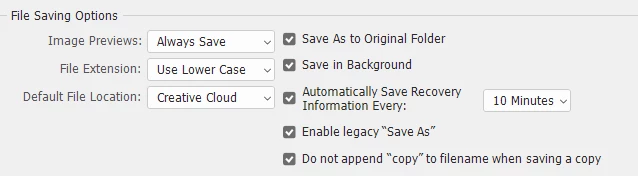
When "save as" the current file won't overwrite; but still keeps it's original name.
I use Photoshop 22.5.1 on Mac Big Sur 11.5.2.
When I'm working in a file and I use "save as" to overwrite a file, it won't update the file i'm working in.
So for example I'm working in a file named untitled.psd, and I "save as" newfile.psd. The open file I'm working in is still named untitled.psd. I have to close that file, go to finder en open newfile.psd to make sure I'm working in- and saving the correct file.
I have this for a while now, working in Mac Catalina. Hoping that when I updated to Big Sur the problem would be fixed. But I still have the same problem. Please help!! Because this is really anoying and a big problem for my job.
 AdChoices