
jamesk7408665
Participant
October 25, 2017
Answered

When trying to move a layer PS jumps to the background layer every time (HighSierra)

  • October 25, 2017
  • 2 replies
  • 4873 views

Hi - as mentioned above in the layers panel when I select a layer and try and move it with the move tool PS jumps to the bottom layer and that moves instead. I have to manually select the object / layer to move. Any solutions? (this with 2018, I installed 2017 as well, same issue)

Thanks!
    This topic has been closed for replies.
    Correct answer barbara_a7746676

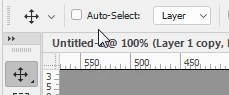
    When the Move tool is selected, do you see Auto-Select turned on in the Options bar? If so, remove the checkmark.

    2 replies

    Participant
    March 28, 2020

    Thank you for the answer! I have been struggling with this for days.

    Inspiring
    June 29, 2023

    In photoshop there is very little that is intuitive in my experience

    barbara_a7746676
    Community Expert
    barbara_a7746676Community ExpertCorrect answer
    Community Expert
    October 25, 2017

    When the Move tool is selected, do you see Auto-Select turned on in the Options bar? If so, remove the checkmark.

    jamesk7408665
    Participant
    October 25, 2017

    That's it!!!! thank you so much (am on a big deadline )