
Question
Where are Abstract and DeviceLink profiles for Color Lookup in PS CC 2019?
I am running Photoshop 20.0.5 on latest Windows 10 pro.
I have unistalled, rebooted and installed again.
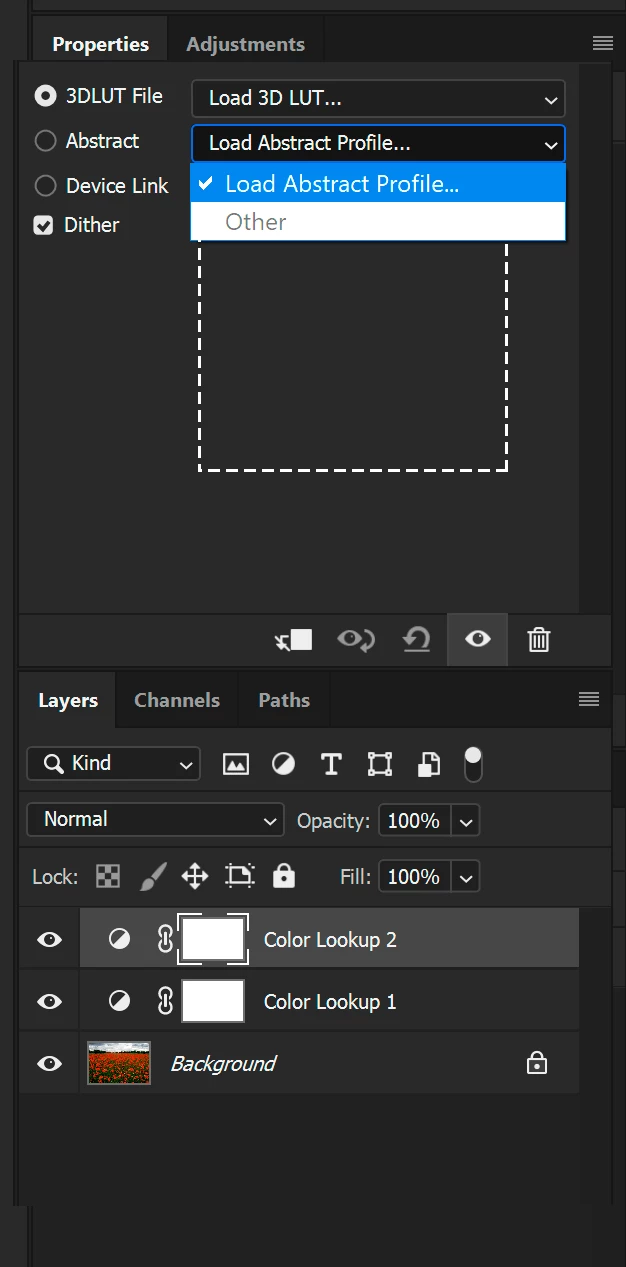
When I create a Color Lookup adjustment layer, I noticed Abstract profiles (settings) are missing and have to search for them not in Presets of Photoshop but in C:\Program Files (x86)\Common Files\Adobe\Color Profiles. Any rational explanation?
Well, I copy this folder to Photoshop>Presets, where I can easier and logically remember where to find them.
- The problem is that when I wish to select a profile I have to load it, one by one. and after doing it, they do not stick or remain listed in the drop down window, as my snapshot shows.
And what about any DeviceLink profiles, are they not available for Windows 10? I am unable to find any on my PC.
 AdChoices