
Legend
June 23, 2019
Question

Where are Abstract and DeviceLink profiles for Color Lookup in PS CC 2019?

  • June 23, 2019
  • 2 replies
  • 16096 views

I am running Photoshop 20.0.5 on latest Windows 10 pro.

I have unistalled, rebooted and installed again.

When I create a Color Lookup adjustment layer, I noticed Abstract profiles (settings) are missing and have to search for them not in Presets of Photoshop but in C:\Program Files (x86)\Common Files\Adobe\Color Profiles. Any rational explanation?

Well, I copy this folder to Photoshop>Presets, where I can easier and logically remember where to find them.

  • The problem is that when I wish to select a profile I have to load it, one by one. and after doing it, they do not stick or remain listed in the drop down window, as my snapshot shows.

And what about any DeviceLink profiles, are they not available for Windows 10? I am unable to find any on my PC.
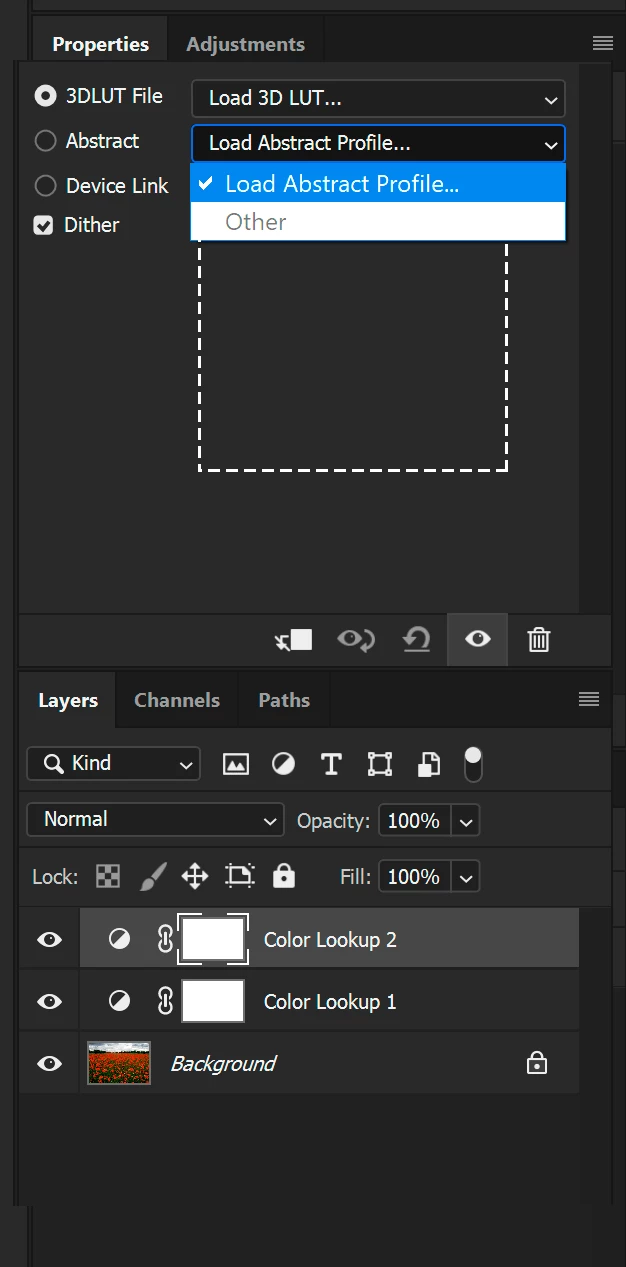
2 replies

Participant
February 9, 2021

as Dave said ...

Copy all the ICC files from C:\Program Files (x86)\Common Files\Adobe\Color Profiles , then paste them into C:\Windows\System32\spool\drivers\color

I did it and now I find all the Presets for Abstract and Device Link where they must be

Thank you

Participating Frequently
April 2, 2021

Thanks DamianoSECD!  After much time and frustration, that finally fixed things for me.


Bob_Hallam
Legend
June 24, 2019

Hi Fredrico,

On a Mac, they are all listed if they are in the proper folders.  Seema a weak response I know, but since I'd expect a PC to and Mac to be similar It might be that during the load and navigate process you find that PS is looking in a different folder then just move your Luts there.   Sometimes in the past New installs referred to the old folders and sometimes not on the next one.  So that may be the case here

ICC programmer and developer, Photographer, artist and color management expert, Print standards and process expert.
davescm
Community Expert
Community Expert
June 24, 2019

Hi

They are listed correctly in the Color Lookup dropdown here, (using Windows 10) and a quick disk search found them stored in 3 locations :

C:\Windows\System32\spool\drivers \color

C:\Program Files\Common Files\Adobe\Color\Profiles

C:\Program Files (x86)\Common Files\Adobe\Color\Profiles

Dave

Legend
June 24, 2019

Try copying them into the system color folder and see if they show. I don't know why I have them in three places. I suspect they have been installed with more than one Adobe application.

Dave


Thanks again Dave,

Adobe places them in three places even installing only PS.

And each folder has a differnt function. Do not understand why the Color Profiles subfolder is not inside PS>Presets (contains the abstract profiles).

Not sure which is the system color folder you refer to in your last answer.


I have uninstalled, clean any folder left out, rebooted and install again.

Abstract 15 ?) and Device link (1 ?) profiles are loaded and work.

BUT If I remember correctly the drop down menus showed all available, or at least all loaded individually.

In my case the list is limited to the one currently used or (alternatively) I can load any other or the same used in other Color Lookup adjustment layer. It's a real nuisance, and makes comparisons impractical. Not sure it is been always this way.

Please see the attached capture. Cannot go further.

Could you please check in a current Windows 10 system? Thanks again.