


- Home
- Photoshop ecosystem
- Discussions
- Re: Where can I find the hex code in Photoshop 202...
- Re: Where can I find the hex code in Photoshop 202...

Copy link to clipboard
Copied
In the Photoshop 2020 this lovely hex code in the bottom has disappear and I wonder why? I really need this when I'm working with the color.
I have only RGB code and before I also have hex code in the bottom to see the right color. I am working with color in Photoshop and find this disappointment when hex code disappear. Can I search or in the settings area find a way where I can show hex code again?


 1 Correct answer


@ktgilead If you are working in an 8 bit/channel or 16 bit/channel document, use the eyedropper tool to get the color picker and read off the hex code. That is it.
Be aware though, that the hex code you read is dependant on the colour profile of your document. The same colour will have different Hex codes in sRGB, AdobeRGB, ProPhoto etc When using a Hex code for entry elsewhere you really need to know which profile the entry field expects the Hex codes to be referenced to. Most, incorrectly, do
...

Explore related tutorials & articles
 35
Replies
35
35
Replies
35

Copy link to clipboard
Copied
Are you working in 8 bit or 16 bits/channel ?
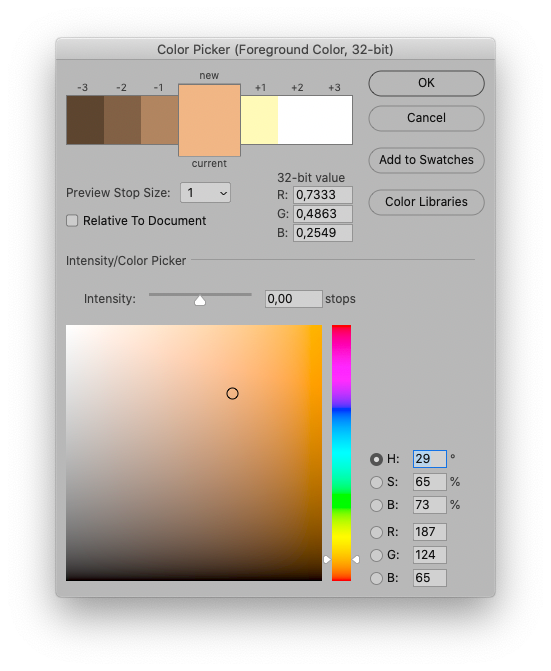
If you are in 32 bit linear then a different colour picker is used and hex codes would be completely meaningless* in such a colour space.
* Actually Hex codes without the context of a particular color space are meaningless anyway and should be dropped from all color pickers. They are just RGB numbers in base16 and do not describe a particular colour unless they are accompanied by "in xxxxx color space"
Dave
Copy link to clipboard
Copied
Thank you for replaying Dave! And also of what you think here about the ability of hex code. Thank you once again.

Copy link to clipboard
Copied
This is absolutely ridiculous. Every single question I look up on the internet has been answered by some "expert" trying to tell people they're asking the wrong question. I wish you people would stop wasting people's time. If you don't know the answer, DON'T ANSWER!!
To find the hex of a color in the new photoshop, click the eyedropper and select a color. Then click the hamburger icon on the top right. Toward the bottom of the list there an option to copy the hex color to your clipboard.

Copy link to clipboard
Copied
Please don’t arrogate to tell valuable Forum contributors who have helped thousands of Photoshop users what to do.
Copy link to clipboard
Copied
Please don't tell me what to do.
Copy link to clipboard
Copied
So you think you telling others what to do (or not) is fine, but you on the other hand should not be subjected to such recommendations?
So let me simply suggest that you inform yourself about this Forum.
https://community.adobe.com/t5/using-the-community/adobe-support-community-guidelines/td-p/4788157
And as for the original post:
The original poster mentioned that the hex-indication was missing.
They did not specifically mention that they were talking about the Color Picker, but it does not seem like an unreasonable assumption (what with the »in the bottom«) and as @davescm mentioned a possible reason for that could be the image’s bit depth.
Which interface element do you think the original poster was referring to?
Copy link to clipboard
Copied
Interesting that the original poster who asked the question found the replies useful and had the courtesy to thank folk who replied, but @Deleted User seems to think he/she knows more about the question being asked than the person who asked it.
Dave
Copy link to clipboard
Copied
Not to mention that
»Then click the hamburger icon on the top right.«
does not seem to contain any mention of which Panel or some such they are referring to specifically; probably the Color Panel, but still …

Copy link to clipboard
Copied
They were much more helpful than you two top contributors have been in this thread so far. So thank you, deleted user!
Copy link to clipboard
Copied
They were much more helpful than you two top contributors have been in this thread so far. So thank you, deleted user!
By @jelmerl93620403

Who are »they«? Where did you get »top contributor«? Who is the »deleted user«?

Copy link to clipboard
Copied
Yes, Dave is right. Hex code is a bad habit, a leftover from the old days before modern color management was invented. It will not give you accurate color unless you also specify a color space like sRGB, Adobe RGB etc.
It wasn't any more accurate back then, but as long as everyone stayed within an sRGB environment, using CRT monitors, it would at least be ballpark. It still is, but you can't even think about any other color space than sRGB. Then the numbers go off the map.
My theory is that hex gained widespread use because it looks geekish and computer-like, so it gives a sense of "precision". Which is utterly false. As Dave says, it's just base 16 RGB numbers.
Copy link to clipboard
Copied
Thank you also D_Fosse for your answer and your thought about this.

Copy link to clipboard
Copied
@D Fosse wrote:
Hex code is a bad habit, a leftover from the old days before modern color management was invented.
I remember when Adobe first added hexadecimal codes to Photoshop. I'm thinking PS6, but I could be wrong. In those days, web colors had to either be one of a limited number of words (red, teal, violet...) or it had to be in hex. Before PS had a text box for the hex codes, we had to go to the web, get the codes for the color, and then put the number into Notepad where we were typing the HTML code line by line.
This was in the days of 256 colors on monitors, 216 of which were the same on both PCs and Macs.
Things change over the years. Monitors display more colors; we have color management, and there are more ways to input colors when creating XHTML.
This is from https://www.w3schools.com/html/html_colors.asp
"HTML colors are specified with predefined color names, or with RGB, HEX, HSL, RGBA, or HSLA values."
@davescm wrote:
Actually Hex codes without the context of a particular color space are meaningless anyway and should be dropped from all color pickers.
I vividly remember being thrilled when hex first showed up in the color pickers! It made our web work so much easier! All the same, in my opinion its useful life is long since over and I don't remember when I last used it.
On the other hand, if Adobe were to drop hex from the color pickers, how many angry folks do you think we would hear from who still use an outdated workflow? And remember that W3Schools includes hex.
I don't think it can be dropped.
~ Jane
Copy link to clipboard
Copied
I've nothing against Hex numbers Jane - they are just numbers after all, and base 16 can be a handy shorthand for entry of those numbers.
The problem is that whilst most folk know that RGB 115,20,32 does not define a specific colour unless given the context of a particular colour space, they don't always realise that Hex 731420 is equally vague and does not define a specific colour unless given the context of a particular colour space.
Dave
Copy link to clipboard
Copied
Are people using hexadecimal for purposes other than html and css, Dave?
~ Jane
Copy link to clipboard
Copied
We see it here quite often in questions like:
I have entered my hex code but see the wrong colour.
I have picked a hex code but it looks different on my website.
The problem is the same, and is that the source and definition docs are in differing colour spaces. The same colour in different colour spaces uses different values i.e. different hex codes. Similarly, the same values (hex codes) in different colour spaces results in different colours.
As a practical example, if I use a colour picker on a photograph opened in Photoshop in the Adobe RGB color space and use the picked hex code on a website in CSS I will get a different displayed colour. That is due to my source hex code being referenced to Adobe RGB whilst the website is unreferenced or referenced to sRGB.
So it is not the numbers that are the issue. It is using them without reference or conversion to the destination colour space.
Dave
Copy link to clipboard
Copied
People think hex is a color definition, because it looks like one. That's a problem.
Copy link to clipboard
Copied
Thanks, Dave and Dag. I hadn't kept up with how folks were (mis)using hexadecimal these days due to misunderstanding it.
~ Jane

Copy link to clipboard
Copied
Thanks for this response, Jane. I'm using Photoshop to find hex codes from images specifically for a CSS tool I need to use for my job.
Hex certainly isn't best, but some of us are stuck using it.

Copy link to clipboard
Copied
Export web images with color space converted to sRGB. Use this online RGB to Hex code converter.
Hope that helps.

Copy link to clipboard
Copied
@Torrence21922080vti0 wrote:
I'm using Photoshop to find hex codes from images specifically for a CSS tool I need to use for my job.
If you just need to get the hex color values used in an image, can you use the Info panel set to Web Color, as shown in the demo below? And if you want to copy the color values to the clipboard, will it work for you to right-click the Eyedropper tool on the color and choose Copy Color’s Hex Code, also shown?
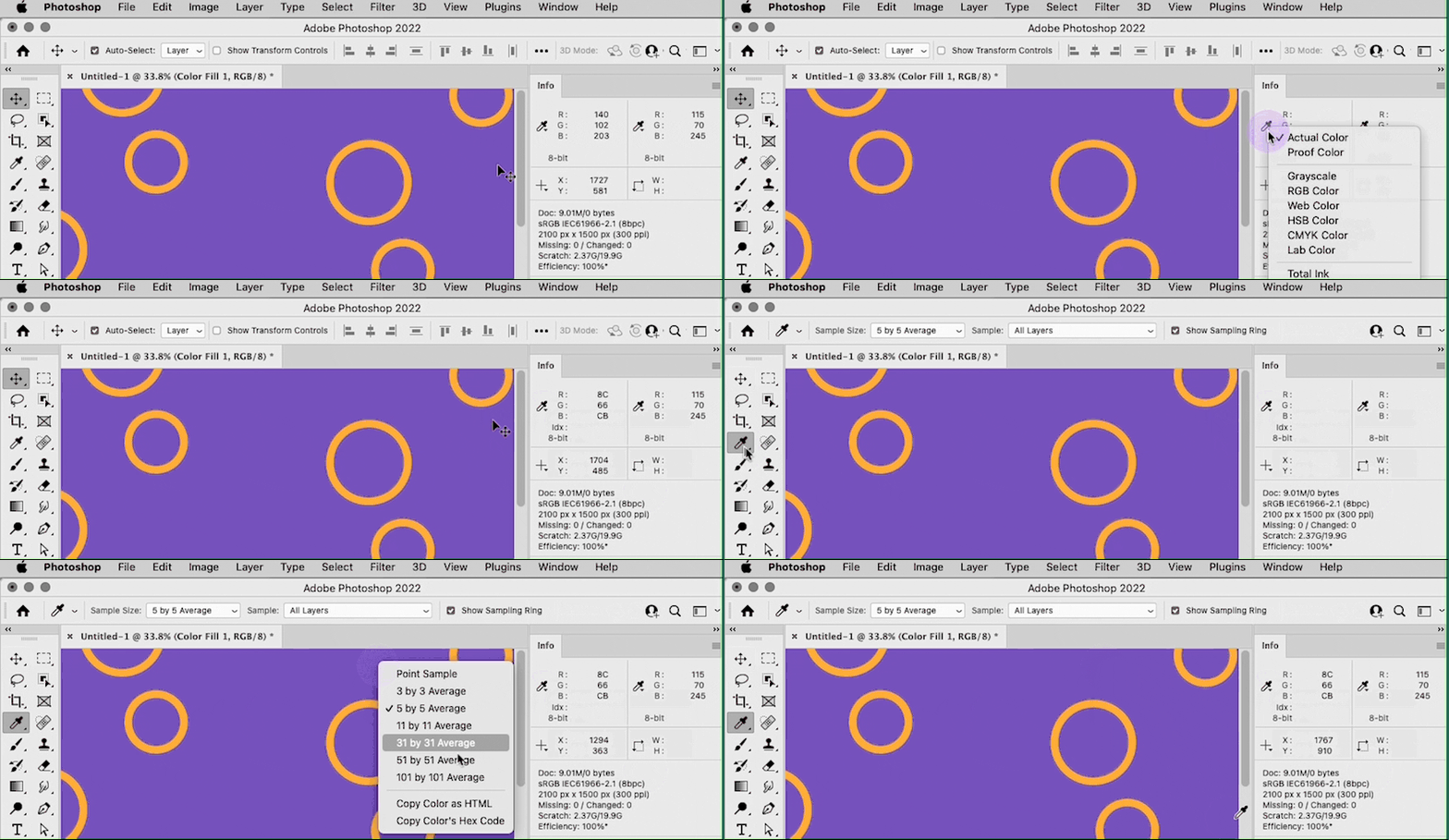
For web work, this probably works most consistently when the document being sampled is in sRGB.
@Torrence21922080vti0 wrote:
Hex certainly isn't best, but some of us are stuck using it.
One thing that really changed how I specify web color is finding out that hex is not the only way to do it. The CSS standard totally accepts color specified as RGB, so if all you have is an RGB value, you can simply save a step and enter the RGB value directly, for example:
rgb(255, 99, 71)
Although I am not a web designer by trade, so far I have never broken website CSS by entering colors as RGB instead of hex.
Copy link to clipboard
Copied
Some online site building platforms accept only HEX color values. Usually the inferior ones. 👿
Otherwise, colors in CSS can be specified by any of these values.
- Hexadecimal colors
- Hexadecimal colors with transparency
- RGB colors
- RGBA colors
- HSL colors
- HSLA colors
- Predefined/Cross-browser color names (brown, coral, navy...)
Copy link to clipboard
Copied
OK, now that you mention it…I have run into some Wordpress themes where the fields in the custom builder UI only accept colors as hex, which is annoying. It’s when I can enter the color code as raw CSS that it hasn't been a problem.
Copy link to clipboard
Copied
Yep, using the eyedropper tool then using the overflow menu to copy as HTML works really well. Depending on the application, I can get away with RGB/CMYK values, but it doesn't always publish properly. Using hex has been the most reliable option.

-
- 1
- 2

Find more inspiration, events, and resources on the new Adobe Community
Explore Now
 AdChoices