
phillipjamesONE
Participant
September 10, 2022
Answered

Where did Faux Bold and Italic go on Photoshop 23.5.0 on Mac?

  • September 10, 2022
  • 2 replies
  • 554 views

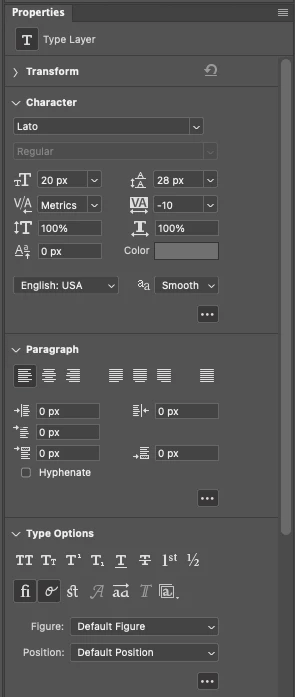
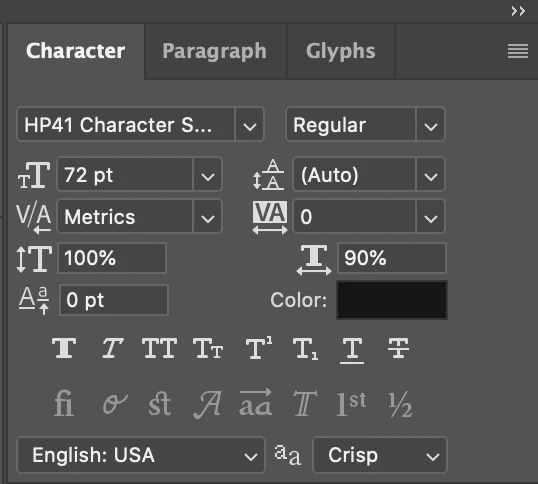
These were quite useful, and now I don't seem to have them. Anyone know where they went? It was very nice to be able to bold/italicize single words in a text box, especially for fonts that didn't have bold or italic versions. The weird thing is, I can copy/paste from text boxes that were made prior to the upgrade (that have a bolded word for example) and modify them and they keep the original properties.


This topic has been closed for replies.
Correct answer Meisterstück Solitaire

That looks like the "Properties" panel.  Faux Bold and others are on the "Character" panel:


2 replies

Meisterstück Solitaire
Inspiring
September 10, 2022

That looks like the "Properties" panel.  Faux Bold and others are on the "Character" panel:


phillipjamesONE
Participant
September 11, 2022

oh how silly of me. not sure why it closed and the properties was open..... I saw all the same stuff...  Thank you.

c.pfaffenbichler
Community Expert
Community Expert
September 10, 2022

Please post a meaningful screenshot that includes the pertinent Panels like the Character Panel.