
Participant
May 6, 2020
Answered

Where did my hex codes go in Photoshop?

  • May 6, 2020
  • 2 replies
  • 6821 views

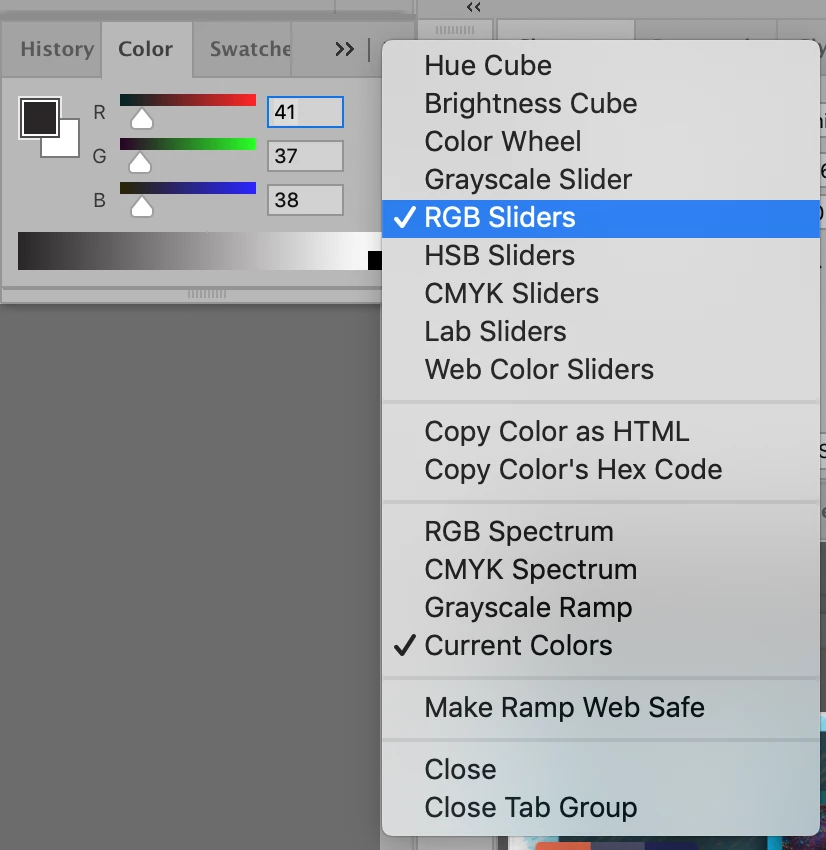
I opened Photoshop today (Macbook Pro 10.14.6/Adobe CC, current) and my hex code box was just gone. I looked at every view, and they're not included. It appears I have to click on the hamburger menu and copy the hex codes or double click on the swatch. But there's nowhere to input them. Please tell me this is a glitch. I copy hex codes all day long. Disappointed to lose this quick feature. Can anyone explain the reasoning behind it? 
 

Correct answer Chuck Uebele

Use web color sliders.

2 replies

Chuck Uebele
Community Expert
Chuck UebeleCommunity ExpertCorrect answer
Community Expert
May 7, 2020

Use web color sliders.

sideliner
Known Participant
September 22, 2021

This now requires 3 fields to be input, instead of the old single field where you could just paste a complete code.

Cumulatively this wastes a lot of time.

sideliner
Known Participant
September 22, 2021

i.e. pasting an entire hex code only works in foreground color picker: not in the RGB / web color sliders.

Akash Sharma
Legend
May 7, 2020

Hi there,


Sorry that the Hex Code window in Photoshop is missing. 

Are you working with a 32 bit color picker? If so, change to 8 bit or 16 bit mode for the normal picker.

It happened with me once and it was set 32 bit/channel accidentally. After I switched to 8 bit/channel, the Hex code fields appeared.


Thanks,

Akash

Participant
June 26, 2024

This answer helped me. My color picker lost the hex code input- turns out I was in 32 bit mode. Going to Image > Mode > 16 Bits/Channel brought back the hex input for me. Thank you, 4 years later.