Inspiring
March 10, 2025
Answered

Where is Dehaze?

  • March 10, 2025
  • 3 replies
  • 1310 views

Is this gone now? Can't find it. thanks!

Correct answer Semaphoric

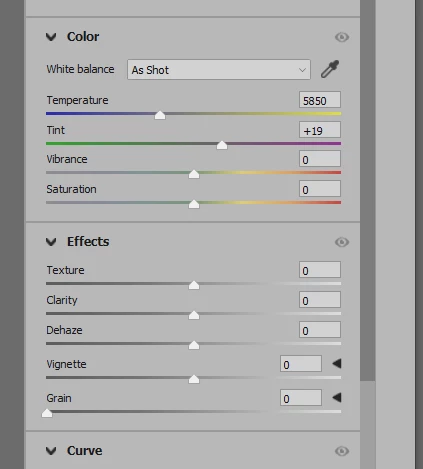
Vibrance and Saturation are in the Color section, and Dehaze is in the Effects section.
 

3 replies

larry45Author
Inspiring
March 11, 2025

Conrad, yes ACR, but can't find it there anymore... maybe more hidden? It used to be there as a slider, right near Vibrance and Saturation. I don't see it anywhere now.

Semaphoric
Community Expert
SemaphoricCommunity ExpertCorrect answer
Community Expert
March 11, 2025

Vibrance and Saturation are in the Color section, and Dehaze is in the Effects section.


larry45Author
Inspiring
March 11, 2025

Thanks Semiphoric-- whew I did not have to reset preference as advised by "community expert" before you... 

Conrad_C
Community Expert
Community Expert
March 10, 2025

It can’t be found in Photoshop and has never been in the menus or panels in Photoshop itself. Dehaze is a feature in the Adobe Camera Raw plug-in that comes with Photoshop. Dehaze is found in Camera Raw both when you use it as a plug-in for converting raw images, and also when you use it as a layer filter (Filter > Camera Raw Filter).

Peru Bob
Community Expert
Community Expert
March 10, 2025

Try Camera RAW.