Exit
  • Global community
    • Language:
      • Deutsch
      • English
      • Español
      • Français
      • Português
  • 日本語コミュニティ
  • 한국 커뮤니티
0

Where is option 'paste into place' gone in Photoshop 2022?

Participant ,
Apr 02, 2022 Apr 02, 2022

I have to change some psd lay-outs and I want to replace existing images by new onces.

So to paste those images into the old onces is a great and fast way to work but that option seems to be disappearded as I only see 'paste' when I scroll in newer versions. (Photshop2022-MacCatalina)

Thanks for any tip! 

TOPICS
macOS
1.6K
Translate
Report
Community guidelines
Be kind and respectful, give credit to the original source of content, and search for duplicates before posting. Learn more
community guidelines

correct answers 1 Correct answer

Community Expert , Apr 02, 2022 Apr 02, 2022


Hi Jane, I don't see that option??? only 'place'! strange.

Find it: it's cmd/alt/shift ! 

By @spyderABC


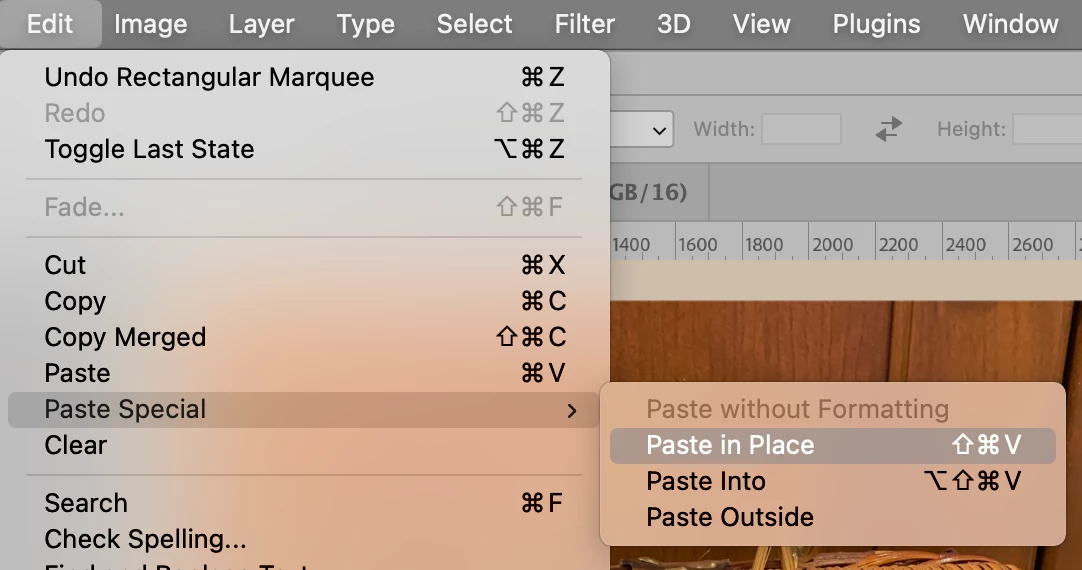
Can you show a screenshot of your Edit menu?
janee_1-1648908759960.png


Paste Special should be under Paste. If it is not

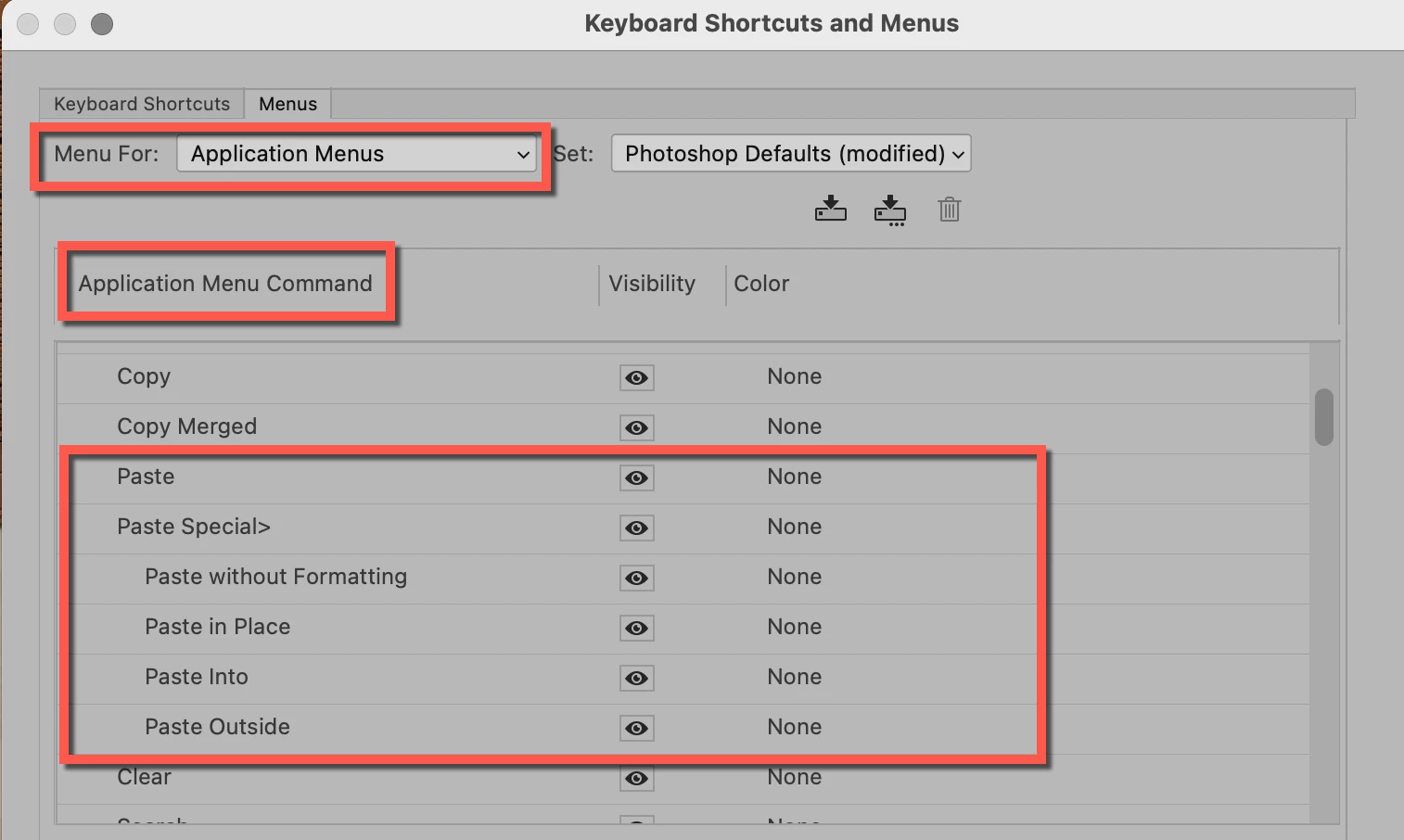
  • Go to Edit menu > Menus
  • In "Menu For:" (top left) > confirm "Application Menus
  • In the "Application Menu Command" area, you will see all the menu names. Expand the Edit menu
  • Scroll to the Paste Commands. Do see Paste Special here? If the eyeball for viewing is unchecked, click to enable it.
...
Translate
Adobe
Community Expert ,
Apr 02, 2022 Apr 02, 2022

@spyderABC 


Did you look in the submenu for Edit > Paste Special?


BFDEDED5-E98E-43A2-9542-9834265CC443.jpeg


Jane

Translate
Report
Community guidelines
Be kind and respectful, give credit to the original source of content, and search for duplicates before posting. Learn more
community guidelines
Participant ,
Apr 02, 2022 Apr 02, 2022

Hi Jane, I don't see that option??? only 'place'! strange.

Does it need a shortkey?


Find it: it's cmd/alt/shift ! 


Thanks a lot and have a nice day !!!!!

Translate
Report
Community guidelines
Be kind and respectful, give credit to the original source of content, and search for duplicates before posting. Learn more
community guidelines
Community Expert ,
Apr 02, 2022 Apr 02, 2022


Hi Jane, I don't see that option??? only 'place'! strange.

Find it: it's cmd/alt/shift ! 

By @spyderABC


Can you show a screenshot of your Edit menu?

janee_1-1648908759960.png


Paste Special should be under Paste. If it is not

  • Go to Edit menu > Menus
  • In "Menu For:" (top left) > confirm "Application Menus
  • In the "Application Menu Command" area, you will see all the menu names. Expand the Edit menu
  • Scroll to the Paste Commands. Do see Paste Special here? If the eyeball for viewing is unchecked, click to enable it. If you don't see it, then share a screenshot of what you do see.
    janee_2-1648909156434.png


"Find it: it's cmd/alt/shift !"

Also notice that the keyboard shortcut is not "Command Alt Shift". Keyboard shortcuts can be changed, but not to those three keys alone.

  • Mac: Cmd+Shift+V
  • Win: Ctrl+Shift+V
    janee_3-1648909337928.png


If you still don't see Paste in Place, go to Photoshop menu > About Photoshop and tell us the version you are using.

janee_4-1648909758923.png


Jane


Translate
Report
Community guidelines
Be kind and respectful, give credit to the original source of content, and search for duplicates before posting. Learn more
community guidelines
Participant ,
Apr 02, 2022 Apr 02, 2022

Hi I received the solution in Dutch and it seems to be a whole other way of approaching:


https://www.youtube.com/watch?v=QE1bnzPLUHQ&list=PLgNLp3Uk3VDBPWoXD3V5wEhgIi8dDxnIL&index=9


Translate
Report
Community guidelines
Be kind and respectful, give credit to the original source of content, and search for duplicates before posting. Learn more
community guidelines
Participant ,
Apr 02, 2022 Apr 02, 2022

Thanks for the replies !

Problem is solved!

Translate
Report
Community guidelines
Be kind and respectful, give credit to the original source of content, and search for duplicates before posting. Learn more
community guidelines
Community Expert ,
Apr 02, 2022 Apr 02, 2022
LATEST


@spyderABC wrote:

Thanks for the replies ! Problem is solved!


You're welcome, Spyder. Can you tell us what solved it for you?


Jane


Translate
Report
Community guidelines
Be kind and respectful, give credit to the original source of content, and search for duplicates before posting. Learn more
community guidelines

