Known Participant
November 10, 2021
Answered

Where is the arch tool?

  • November 10, 2021
  • 3 replies
  • 15310 views

I just updated to Photoshop 23.0.1. I cannot find the arch, arc and others effects (such as wave etc.) Can someone please tell me where I can find it? I've search everywhere.

Thanks!

This topic has been closed for replies.
Correct answer c.pfaffenbichler

No. I haven't. Or I still wouldn't be here.


Instead of invoking the transformation from the menu one can also hit cmd-T and switch between transforming and warping by hitting th ebutton in the Options Bar.


Edit: 

• Invoke Free Transform

• Switch to Warp
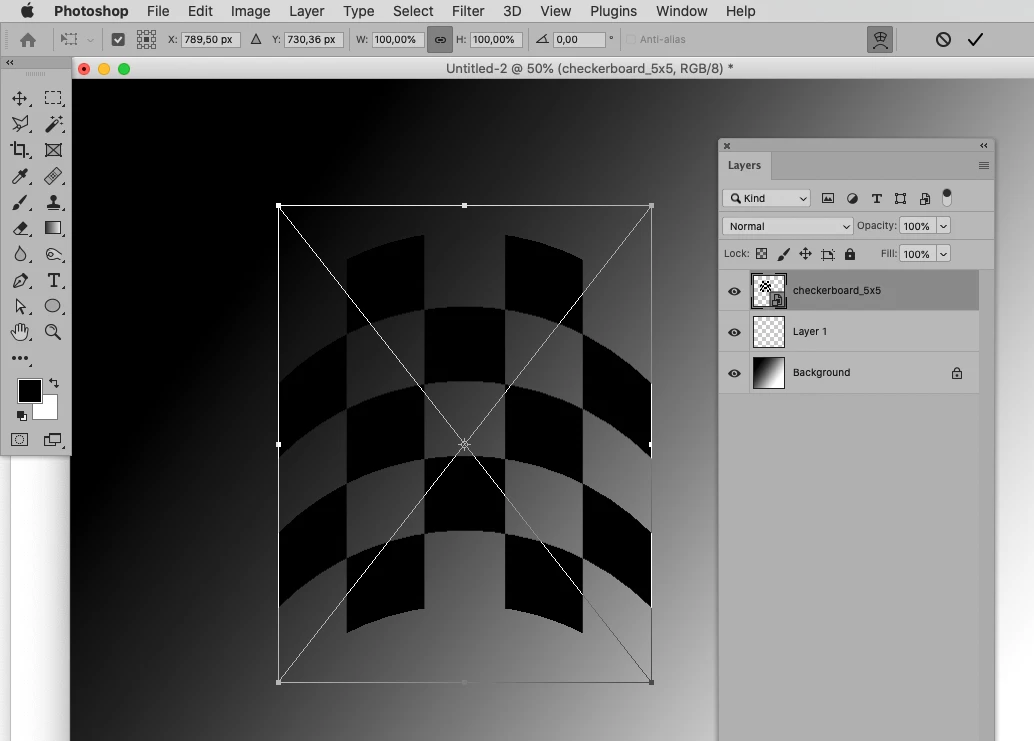
• Edit Warp 

3 replies

PECourtejoie
Community Expert
Community Expert
November 18, 2021

Hello, if you mean for the text tool, you need to type some text first, then are able to use the warp text feature from the option bar, just after the color well.

Known Participant
November 18, 2021

No I don't mean for text tool. I'm rendering fabrics on clothes and most of the time I can use the warp tool, but sometimes Arc or Arch works better, because it has to be exact proportions. I just know that Photoshop used to have it, but now they don't seem to have it anymore unless it's hidden under a different menu.

c.pfaffenbichler
Community Expert
c.pfaffenbichlerCommunity ExpertCorrect answer
Community Expert
November 18, 2021

No. I haven't. Or I still wouldn't be here.


Instead of invoking the transformation from the menu one can also hit cmd-T and switch between transforming and warping by hitting th ebutton in the Options Bar.


Edit: 

• Invoke Free Transform

• Switch to Warp

• Edit Warp 

Bob_Hallam
Legend
November 18, 2021

Those tools are under Type and will effect a Type layer.  

ICC programmer and developer, Photographer, artist and color management expert, Print standards and process expert.
Ranjisha Sengupta
Legend
November 10, 2021

Hi there,

As you are looking for the the Warp features, you may follow the below mentioned steps and try.

You can go to Edit> Transform > Warp
Once the warp is applied, just below the menu bar you will notice "Warp", that is where you would get the drop downs with the effects.


Let us know if that helps.


Thanks,

Ranjisha

Known Participant
November 18, 2021

Sorry just getting back to this. I ended up going a different route. Warp is more of a freehand tool and doesn't work as smooth as the arc and arch tool. What I was talking about is this:

This is Illustrator, but Photoshop used to have this too. Where you can go into the effect menu > choose warp > choose arc.

c.pfaffenbichler
Community Expert
Community Expert
November 18, 2021

Say what? How is Warp not smooth? 

Also: In Photoshop »Tool« has a specific meaning, Arc and Arch do not qualify for that term. 


When one applies Warp on a Smart Object or Type Layer it stays editable.