Known Participant
October 27, 2024
Answered

Where is the Remove Tool?

  • October 27, 2024
  • 2 replies
  • 2200 views

Adobe says my Photoshop is up to date. A tutorial says to "Select Remove tool from the toolbar, nested under Spot Heeling Brush tool." The Remove tool is not there. How do I get it to show up?

This topic has been closed for replies.
Correct answer jane-e

@WallyD3 


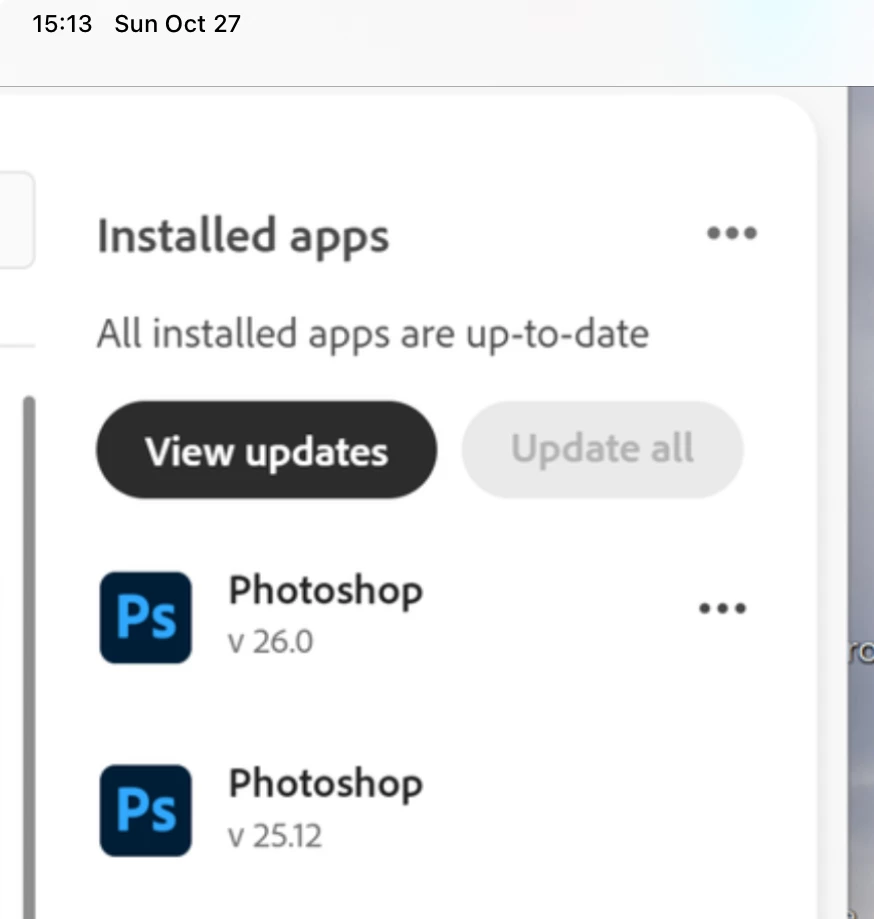
Your screenshot says you have both 25.12 and 26.0 installed. You may have opened the older version. Try opening v. 26 from the CC app and see if that works for you.
 

Jane

2 replies

Ged_Traynor
Community Expert
Community Expert
October 27, 2024

@WallyD3 what exact version of Photoshop do you have, have you tried restoring the toolbar defaults, also make sure you're in the essentials workspace

WallyD3Author
Known Participant
October 27, 2024

I think I've found the problem. Adobe says all my apps are up to date and shows that I have Photoshop 26.0 (see screen shot). In reality, I have Photoshop 25.12.0 on my computer. How do I get Adobe to update the Photoshop on my computer?

jane-e
Community Expert
jane-eCommunity ExpertCorrect answer
Community Expert
October 27, 2024

@WallyD3 


Your screenshot says you have both 25.12 and 26.0 installed. You may have opened the older version. Try opening v. 26 from the CC app and see if that works for you.


Jane

kglad
Community Expert
Community Expert
October 27, 2024

in the future, to find the best place to post your message, use the list here, https://community.adobe.com/

p.s. i don't think the adobe website, and forums in particular, are easy to navigate, so don't spend a lot of time searching that forum list. do your best and we'll move the post (like this one has already been moved) if it helps you get responses.


<"moved from cc desktop">