michellem27028141
Participant
April 26, 2020
Answered

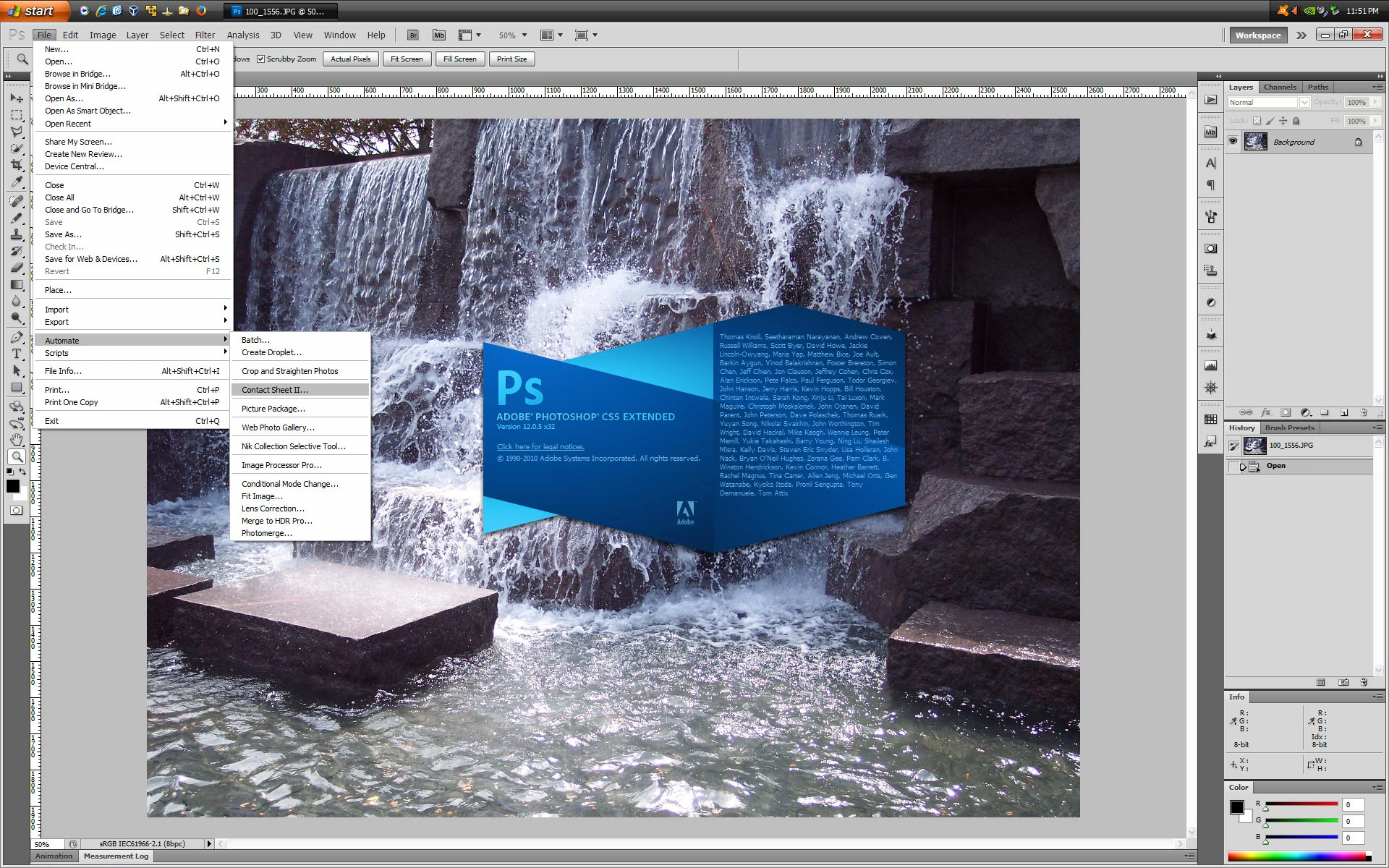
Where or how do I get the Contact Sheet II plug in?

  • April 26, 2020
  • 7 replies
  • 11996 views

How or where do I get the Contact Sheet II plug in? 

This topic has been closed for replies.
Correct answer Jeff Arola

You need to install the optional plugins for photoshop cs5 and then Contact Sheet II will be available under File>Automate in the 32 bit version of photoshop cs5. Be sure and read the enclosed pdf for directions on how to install.


https://supportdownloads.adobe.com/detail.jsp?ftpID=4688


https://supportdownloads.adobe.com/product.jsp?product=39&platform=Windows


7 replies

naomifm
Participant
March 13, 2024

I cant get these links to open, is it because CS5 is too old? Is there a workaround to be able to get a contact sheet option?


Jeff Arola
Community Expert
Community Expert
March 13, 2024

naomifm,


What operating system are you using?


Do you have Photoshop CS5 (ps ver 12.0) or CS5.1 (ps ver 12.1)?

In Photoshop CS5 go to Help>System Info and read the top line Adobe Photoshop Version.

Participant
June 6, 2024

Links above are dead. Would really like to get those plugins for Contact Sheet.

Please help.

Mahalo,

bc

Adobe Photoshop Version: 12.0.4 (12.0.4x20110407 [20110407.r.1265 2011/04/07:02:00:00 cutoff; r branch]) x64
Operating System: Windows NT
Version: 6.2
System architecture: Intel CPU Family:6, Model:14, Stepping:9 with MMX, SSE Integer, SSE FP, SSE2, SSE3, SSE4.1, SSE4.2
Physical processor count: 8
Processor speed: 2808 MHz
Built-in memory: 16259 MB
Free memory: 5312 MB
Memory available to Photoshop: 10763 MB
Memory used by Photoshop: 60 %

Participant
August 20, 2022

where do i get contact sheet 2 i am on the latest veresion of adobe cc please

Jeff Arola
Community Expert
Community Expert
August 20, 2022

In photoshop look under File>Automate>Contact Sheet II

Participant
January 7, 2022

Does anyone have this plugin? The links below are disables and I am trying to do a project on CS5, I know its old but its what I have. i cant find the plug in anywhere

Derek Cross
Community Expert
Community Expert
January 7, 2022

If you want the plugin for Contact Sheet II and if it was available in CS5 it would be under: File > Automate.

Jeff Arola
Community Expert
Community Expert
April 28, 2020

Just wanted to make a correction to add that the optional contact Sheet II plugin for cs5 does work in the 64 bit version as well.

It's on the mac side that the optional plugins like Contact Sheet II only work when photoshop cs5 is run in 32 bit mode.


Jeff Arola
Community Expert
Jeff ArolaCommunity ExpertCorrect answer
Community Expert
April 27, 2020

You need to install the optional plugins for photoshop cs5 and then Contact Sheet II will be available under File>Automate in the 32 bit version of photoshop cs5. Be sure and read the enclosed pdf for directions on how to install.


https://supportdownloads.adobe.com/detail.jsp?ftpID=4688


https://supportdownloads.adobe.com/product.jsp?product=39&platform=Windows


michellem27028141
Participant
April 27, 2020

thank you...issue resolved

Derek Cross
Community Expert
Community Expert
April 26, 2020

That's a very old version of Photoshop -- I think Contact Sheet II came in with CS6.

Derek Cross
Community Expert
Community Expert
April 26, 2020

File > Automate

michellem27028141
Participant
April 26, 2020

I realize that’s where it should be but it isn’t there 

Derek Cross
Community Expert
Community Expert
April 26, 2020

Which version of Photoshop?