

Farrellart
Known Participant
January 27, 2019
Answered

Where's step backward?

  • January 27, 2019
  • 3 replies
  • 10591 views

Hi all

I have just recently updated to cc2019 - which I am not enjoying as Adobe seem to making pointless changes for the sake of changing things.

I am a digital artist and draw rapidly and make mistakes or adjustments so there the step backward command is very useful as I can go back quite a few times using Alt+Ctrl+Z. Now in cc2019 this command only steps back once, the same as undo.

Is there a way to key bind back to the 'step backward' command. It seems to have disappeared which is spoiling my workflow.

Thanks in advance.
    This topic has been closed for replies.
    Correct answer

    Hi

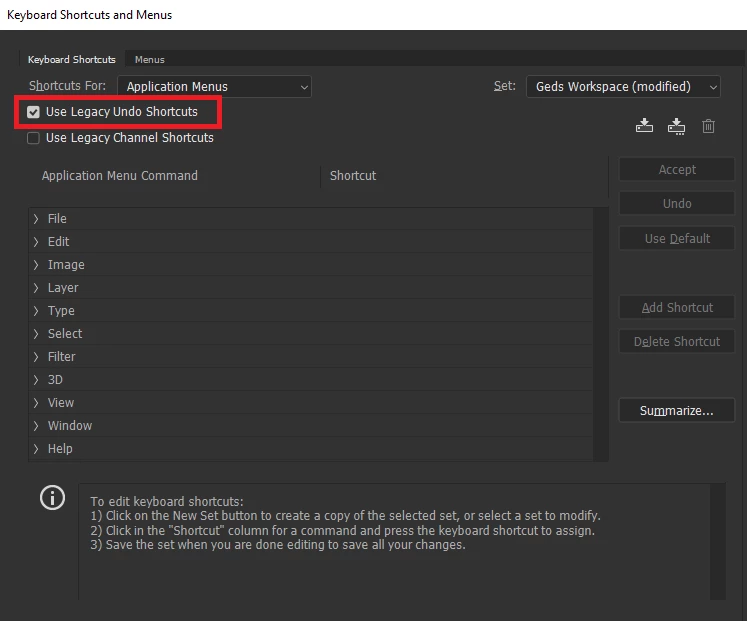
    Go to Edit > Keyboard shortcuts and enable this option

    3 replies

    Farrellart
    Known Participant
    January 27, 2019

    Thank you Ged and Jane.....this was driving me nuts as I had all my hardware buttons mapped on the Wacom tablet! resolved!!

    jane-e
    Community Expert
    Community Expert
    January 27, 2019

    Hi Farrell,

    You can do what Ged said or you can learn how the undo/redo/step backward has been remapped, plus the other new features:

    New and enhanced features | Latest release of Photoshop CC

    Jane

    Correct answer
    January 27, 2019

    Hi

    Go to Edit > Keyboard shortcuts and enable this option

    Participant
    August 29, 2022

    Thank you!