Inspiring
January 7, 2017
Answered

Where's the Stroke Thumbnail Preview for .TPL Files?

  • January 7, 2017
  • 2 replies
  • 2052 views

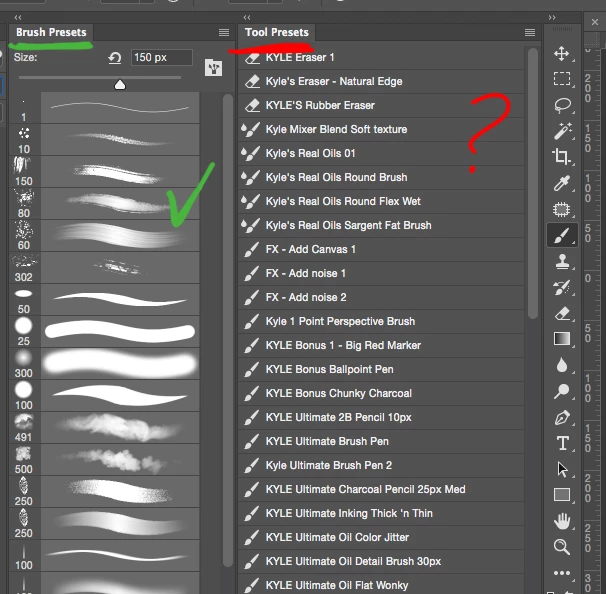
In my "Brush" Presets I can choose to select "Stroke Thumbnail" so I can see the brush stroke. (very helpful)
In the "Tool" Presets I don't see the option for "Stroke Thumbnail". Why is this? Can I not see the brush stroke for .tpl files? This would be disappointing.

    This topic has been closed for replies.
    Correct answer Trevor.Dennis

    I've become a big fan of the recently released BrushBox, which lets me put bush and tool presets in the same folders, and makes it simple to define those presets.  It does not give a stroke preview, so we don't see the affects of pen pressure, but we do have a thumbnail, and we can control the size of the thumbnails from the slider third in from the left at the bottom of the panel.  It's not perfect yet.  A folder created inside BrushBox can not easily be saved, closed, and reopened, but they are working to respond to user requests. 
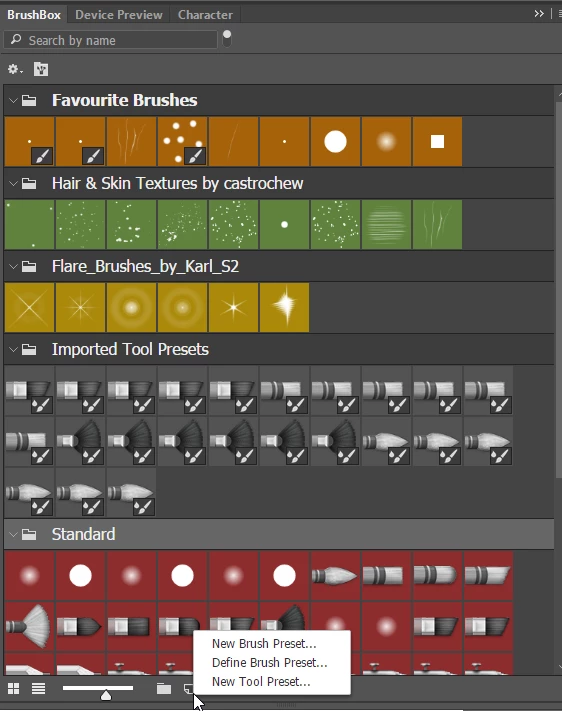
    Incidentally, seeing you are a fan of Kyle Webster's brushes, Kyle has written a nice testimonial for BrushBox

    BrushBox - A better preset manager for Adobe Photoshop

    http://derrickb.net/brushbox/BrushBox%20FAQ.pdf

    2 replies

    Trevor.Dennis
    Community Expert
    Community Expert
    January 31, 2017

    Derrick and Leda certainly seem to have put enormous effort into making Brushbox what has become an indispensable tool for me now.  They listen to feedback, and Derrick does his best to implement user requests and ideas wherever he can.  It's sort of like how the Photoshop Development team would be if allowed to work to their own priorities.     

    All those logistical features are a great and help with your workflow, but it is the ease with which we can now mix brush and tool presets that makes it for me.  You start with a favourite brush set (hair and skin brushes by Castrochew are my favourite set) and then modify some of those brushes, and two mouse clicks later you have it as a new brush (in a new folder, but you can quickly drag it back to the original folder if you like).  Then make a few additional brushes and add them to the same set with two mouse clicks as before.  I have a range of tapering brushes with various values for size and opacity fade [1] that do great eye lashes and eyebrows for instance, that compliment the hair & skin brushes so I have expanded that set.  I have brushes with an irregular outline with lots of angle, and a touch of size and scatter jitter, that do rough edges.  I used to remake those brushes every time I needed them.  Now I have them in a nice OCD row.  It's not just that it is quick and easy.  It means you end up doing things you normally would get round to, and it feels good.

    It speaks volumes that Kyle Webster has endorsed BrushBox.  It does not get any better than that.

    [1]  It took me a wee while to work out how Fade works, but the value you put in the Fade field refers to the number of times the brush stamps down, so the same brush with a 5% spacing will fade out in half the distance than if spacing was set to 10%.  Unless you are using HUGE brushes, the default spacing for most brushes is much higher than it needs to be with today's computers.

    That's me for today.

    Trevor.Dennis
    Community Expert
    Trevor.DennisCommunity ExpertCorrect answer
    Community Expert
    January 7, 2017

    I've become a big fan of the recently released BrushBox, which lets me put bush and tool presets in the same folders, and makes it simple to define those presets.  It does not give a stroke preview, so we don't see the affects of pen pressure, but we do have a thumbnail, and we can control the size of the thumbnails from the slider third in from the left at the bottom of the panel.  It's not perfect yet.  A folder created inside BrushBox can not easily be saved, closed, and reopened, but they are working to respond to user requests. 

    Incidentally, seeing you are a fan of Kyle Webster's brushes, Kyle has written a nice testimonial for BrushBox

    BrushBox - A better preset manager for Adobe Photoshop

    http://derrickb.net/brushbox/BrushBox%20FAQ.pdf
    Comp__792Author
    Inspiring
    January 7, 2017

    Thanks. I use Brush Gordon. Does similar to BrushBox but does not support .tpl files as of yet.

    So are you saying it's only possible to see a stroke preview with .abr brushes and not with .tpl brushes?

    Jeff Arola
    Community Expert
    Community Expert
    January 8, 2017

    While it's not possible to see the stroke thumbnail in the Tool Presets panel, you can see the stroke thumbnail for the selected tool preset at the bottom of the Brush panel.