Participating Frequently
April 2, 2017
Answered

White Balance info missing from metadata

  • April 2, 2017
  • 2 replies
  • 3295 views

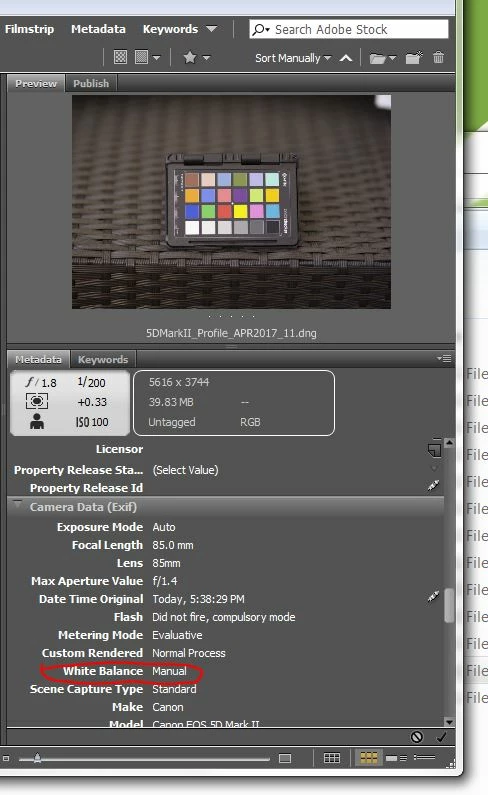
Why doesn't Adobe Bridge and ACR show the in-camera white balance selection in the metadata. See below. I shot this with Shade WB selected in camera. The metadata should show "Shade", not "Manual."

    This topic has been closed for replies.
    Correct answer Stephen Marsh

    Have you changed the WB setting in the past, or is this image straight out of the camera with no processing preset applied?

    Open an image into ACR that is listed as Manual WB.

    Take note of the temperature and tint slider values.

    Then select Shade from the list of WB presets and note the temperature and tint values.

    How much do they vary and which of the two do you consider to be the correct value when looking at the colour values for the neutrals in the colour checker image (i.e. one setting should be more neutral across the tonal range than the other)?

    2 replies

    Participant
    September 27, 2023

    Unfortunately, the answer to your question is quite simple.  Adobe's Bridge software simply does NOT recognize which white balance setting that the camera was shooting in.  It's been like this for YEARS.  
    I can grab a free program off the internet that will tell me precisely the camera's WB setting (e.g. cloudy, flourescent, etc), but Bridge software fails at this simple task.
    It would be nice if Adobe would FIX this problem with their software.  It's very frustrating, trying to teach a class of photography students about the CAMERA's WB setting, and then pull up students' images in Bridge, and we're unable to ascertain such simple EXIF data.

    D Fosse
    Community Expert
    Community Expert
    September 27, 2023

    @b6C2A 


    The white balance setting in the camera won't be numerically replicated in ACR. That's not how raw processing works.


    ACR and the camera processing are two entirely different processing engines. They won't necessarily produce the same result from the same numbers.


    By design, ACR emulates the visual white balance from the camera processing - but that means the numbers will usually be dfferent! That's a choice they made (and the right one). If they had decided to just keep the numbers, the visual white balance would be off most of the time.


    Keep in mind that white balance is not an absolute number. There's nothing that measures the actual color of the light source. The white balance numbers you see, are the amount of correction needed to produce a neutral-looking result.

    Stephen Marsh
    Community Expert
    Stephen MarshCommunity ExpertCorrect answer
    Community Expert
    April 2, 2017

    Have you changed the WB setting in the past, or is this image straight out of the camera with no processing preset applied?

    Open an image into ACR that is listed as Manual WB.

    Take note of the temperature and tint slider values.

    Then select Shade from the list of WB presets and note the temperature and tint values.

    How much do they vary and which of the two do you consider to be the correct value when looking at the colour values for the neutrals in the colour checker image (i.e. one setting should be more neutral across the tonal range than the other)?

    Stephen Marsh
    Community Expert
    Community Expert
    April 2, 2017

    I just looked at some old files in my collection…

    For the Olympus DSLR shots in question, the metadata placard shows a “sun” icon… The Filter panel shows “daylight” under white balance – however the Metadata panel > Camera Data (Exif) lists the WB value as Manual. It also appears that the Metadata panel > Camera Data (Exif) will list the Light Source which may or may not help to identify the WB.