
Participant
March 30, 2023
Answered

white flashing canvas

  • March 30, 2023
  • 4 replies
  • 4388 views

Hi community, After the last update Photoshop opens but when I open an image I get a white flashing canvas. All tools work well its only the canvas. When I move the cursor over the canvas, it flashes more intensely. never had any problems before. Working on windows 10
This topic has been closed for replies.
Correct answer Ged_Traynor

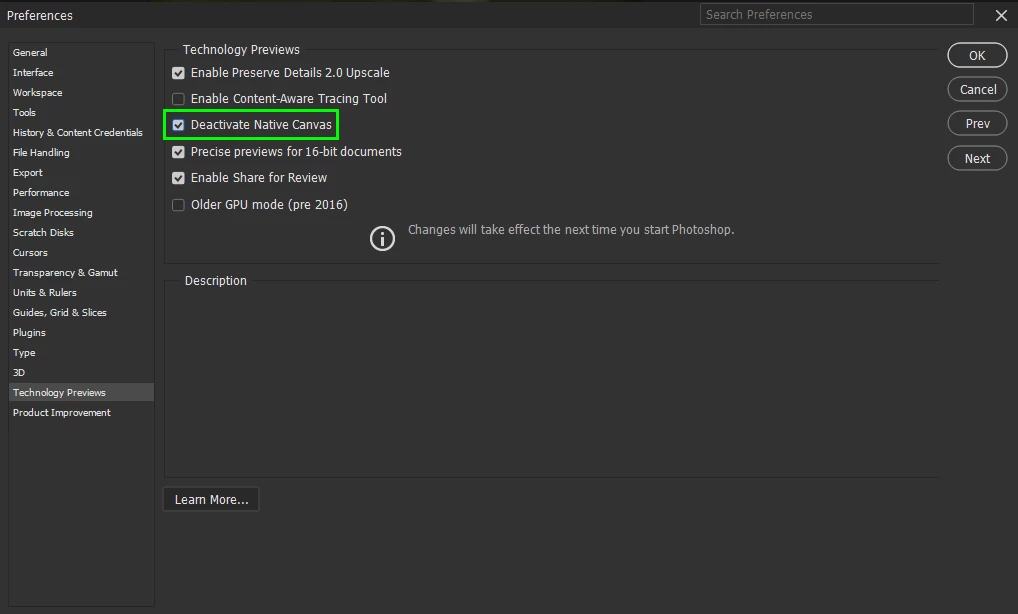
@CornReclame go to Edit > Preferences > Technology Previews and enable this option, then restart Photoshop

4 replies

Participant
June 2, 2023

I hope you can help me, it turns out that recently, when working with artboards, when performing a normal dragging of text or image, is replaced by white squares filling and covering where objects move. I have already done several things, even reinstall windows from scratch and the same thing keeps happening to me, also remove the GPU acceleration, uncheck the G-SYNC and still the same, I hope someone can help me. Attached video to make it clear what I mean.


Bojan Živković11378569
Community Expert
Community Expert
June 2, 2023

Can you post Help > System Info, copy content and paste it here in reply.

Ged_Traynor
Community Expert
Community Expert
March 30, 2023

You're welcome 🙂

Participant
March 30, 2023

Thank you Ged, it works. 

Ged_Traynor
Community Expert
Ged_TraynorCommunity ExpertCorrect answer
Community Expert
March 30, 2023

@CornReclame go to Edit > Preferences > Technology Previews and enable this option, then restart Photoshop

Participant
April 14, 2023

Thank you, that solved my problem instantly.