

lesnicole
Inspiring
July 25, 2022
Answered

White Square Appears and can't gid rid of it.

  • July 25, 2022
  • 3 replies
  • 9581 views

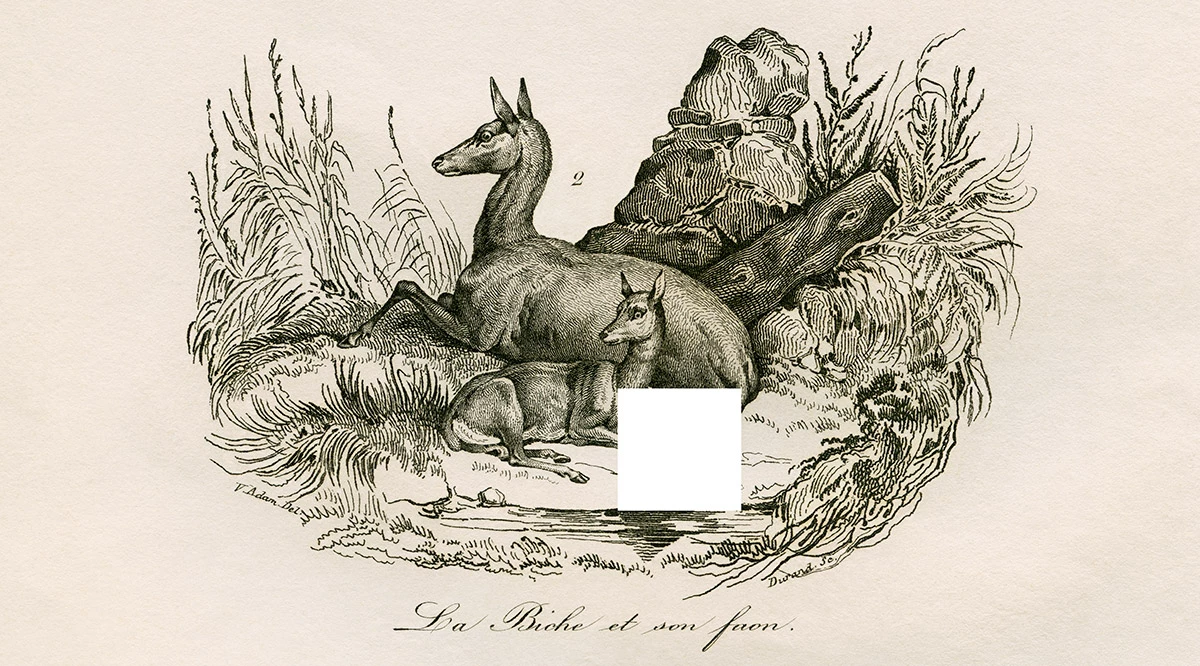
A white square has appeared on my file and I can't get rid of it. Stays when I zoom in or out. Still there when I open and close. I tried to saving a copy in a different format (Tiff) and it's still there. I spent many hours retouching this scan. I can rescan that area and align and match the color - but it's a hassle. Wondering if there is an explaination for why this happened or how to fix it?


I'm on an iMac, IOS 12.4, Photoshop 23.4.2 (just updated. Was using the release just before this one when the problem occurred.)
This topic has been closed for replies.
Correct answer davescm

Hi

It looks like it has been a glitch during the edit (Photoshop works in 'tiles'). If something like that appears during editing, do not Save (Ctrl/Cmd+S). By all means Save As with a new name to try and preserve your edits and, if it is just in the preview, it would vanish on re-opening. However if it is in the edit, rather than just the on screen preview, then saving over the original makes the change permanent.

 If you have saved it into the original, then you are indeed left with scanning and replacing the area.


Dave

3 replies

davescm
Community Expert
davescmCommunity ExpertCorrect answer
Community Expert
July 25, 2022

Hi

It looks like it has been a glitch during the edit (Photoshop works in 'tiles'). If something like that appears during editing, do not Save (Ctrl/Cmd+S). By all means Save As with a new name to try and preserve your edits and, if it is just in the preview, it would vanish on re-opening. However if it is in the edit, rather than just the on screen preview, then saving over the original makes the change permanent.

 If you have saved it into the original, then you are indeed left with scanning and replacing the area.


Dave

Jumpenjax
Community Expert
Community Expert
July 25, 2022

I like the guidance that Dave has given .When working in photoshop you should always duplicate the original. If you have saved the file already, just in case it is a glitch. Close photoshop and reboot the computer . If none of the above checked off and you still have the problem, Do you still have the original graphic? That you can try to replace the background? Or in worse cas senecio start a new file all together.


Lee- Graphic Designer, Print Specialist, Photographer
Derek Cross
Community Expert
Community Expert
July 25, 2022

Just to check the obvious, you looked in the Layers panel to see if you've inadvertently added a white square on top of the image?

lesnicole
lesnicoleAuthor
Inspiring
July 25, 2022

Yes. 🙂 There is no layer with a white square on it. It's a 1 layer file.

MarekMularczyk
Community Expert
Community Expert
July 25, 2022

Is this white square only showing on this image?

Does it show on other images you open in Photoshop?


Adobe Community ExpertAdobe Certified Professional
lesnicole
lesnicoleAuthor
Inspiring
July 25, 2022

Just that one file.

MarekMularczyk
Community Expert
Community Expert
July 25, 2022

Hmmm.

I assume you have a layered document. Have you checked the layers? Maybe it's a part of one of the layers so it could be removed?


Adobe Community ExpertAdobe Certified Professional