Inspiring
March 5, 2025
Question

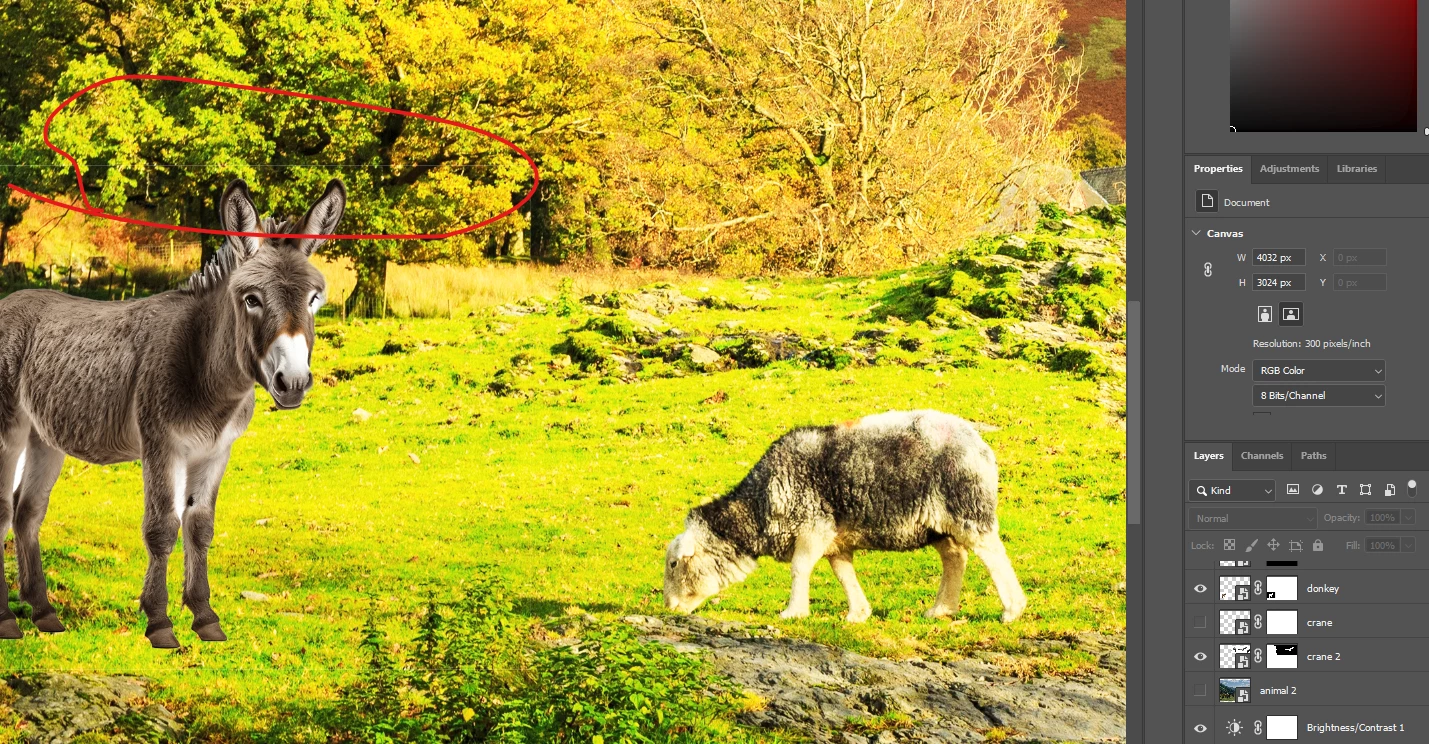
white thin border when making a mask

  • March 5, 2025
  • 1 reply
  • 338 views

how do I avoid this white thin line which I get each time I create a mask on an image in illustrator.

 

1 reply

Sameer K
Community Manager
Community Manager
March 5, 2025

Hey, @hendy_5450. Welcome to the Photoshop Community. I'll help you figure this out. 

The UI is from Photoshop. How did you create the mask for the layer that has the mule? Does this happen with all layers? 


In most cases, you can use the Brush tool & draw with Black, or white and point at the mask layer to hide or reveal part of the image via masking. Please head here to get started with masking workflows: https://adobe.ly/3XuIlnA


Let me know how it goes. Thanks!

Sameer K

(Type '@' and type my name to mention me when you reply)

Inspiring
March 10, 2025
yes,
that what i've been doing for the past ten years,
no other option to get the border away in the first place?
c.pfaffenbichler
Community Expert
Community Expert
March 10, 2025

The Layer Mask of the Layer »donkey« seems to have been created imprudently in two ways: 

• Firstly it apparently started with Reveal All instead of Reveal Selection or Hide All, meaning that transformations can result in semi-transparent pixels on the edges. 

• Secondly the Mask is applied to a Smart Object instead of in the Smart Object, meaning that repeated transformations in the containing document would degrade it.