Known Participant
April 27, 2017
Answered

Why am I being warned about ColorSync and referred to nonexistent controls?

  • April 27, 2017
  • 2 replies
  • 21496 views

Hi all.

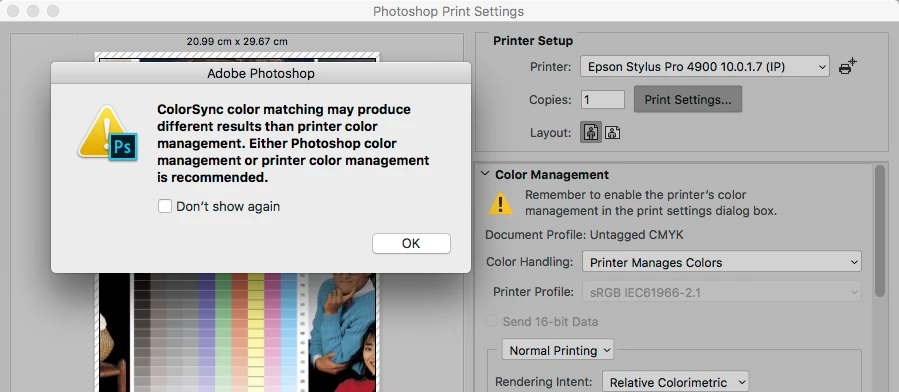
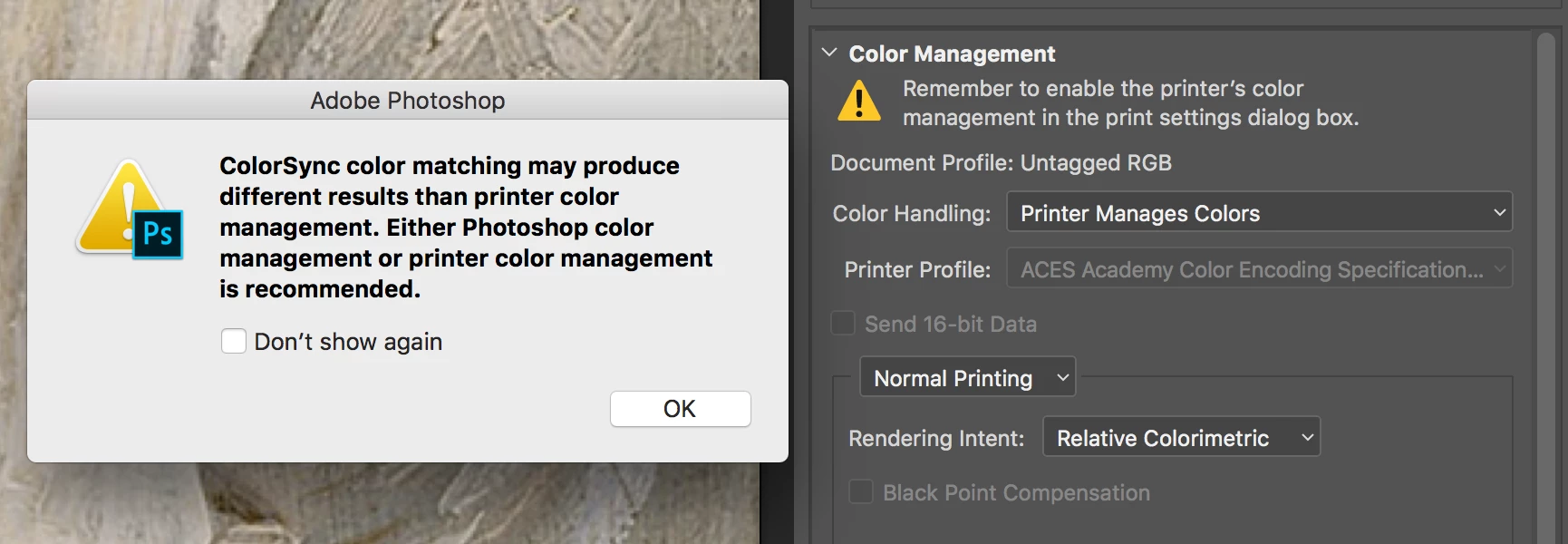
When I go to print from Photoshop, I'm hounded with dialogs saying, "ColorSync color matching may produce different results than printer color management. Either Photoshop color management or printer color management is recommended.

But I'm using printer color management:

The panel on the right also says, "Remember to enable the printer's color management in the print settings dialog box." There is no such option on any of that dialog's pages.

I printed anyway and the colors are highly inaccurate. If I switch to "Photoshop manages colors," it doesn't complain about ColorSync anymore. But I don't have a printer profile for my printer (Epson NX430) and so far can't find one online.

What action are we expected to take in this situation?

Thanks for any insight!

This topic has been closed for replies.
Correct answer NB, colourmanagement

And what are we supposed to do about this:
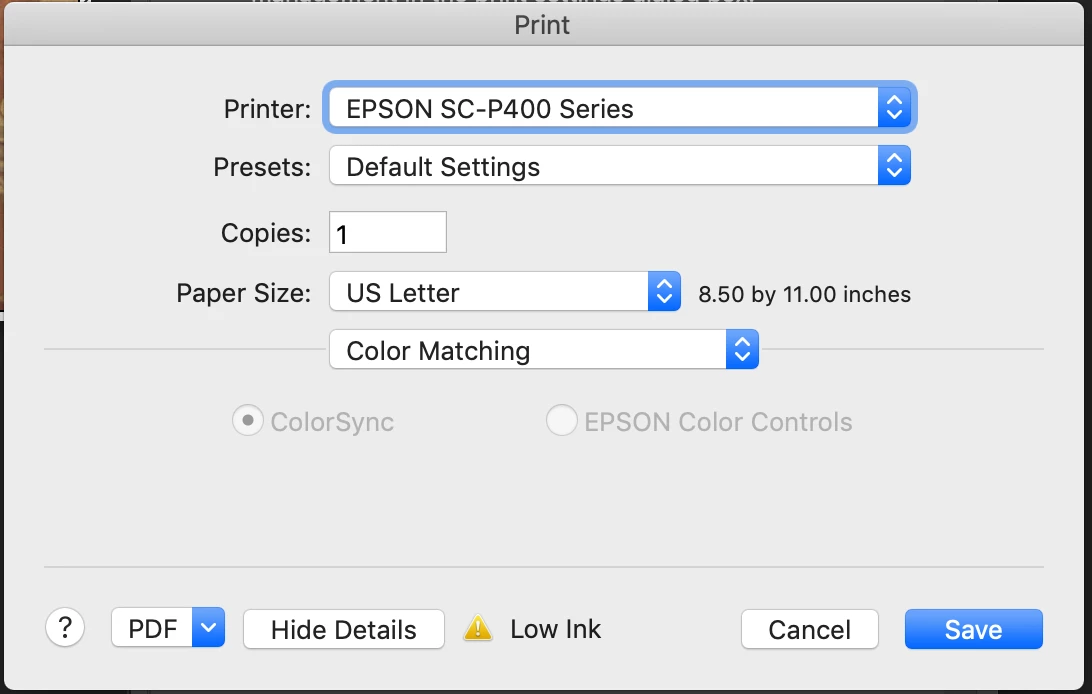
ColorSync is selected, greyed out, and there's no option for "no color management" in the printer driver.


Hi Mobius strip and Gerry Mander,

OK printing from Photoshop:

In Mobius original post it showed that they were using printer color management

which is why they were seeing that warning about avoiding colorsync colour matching -

it's referring to the printer driver options, NOT the Adobe print window. Adobe don't know what settings you selected

there in the driver.

if I select EPSON color controls under color matching as shown below -

I should not see the warning about the dangers of colorsync when clicking save:
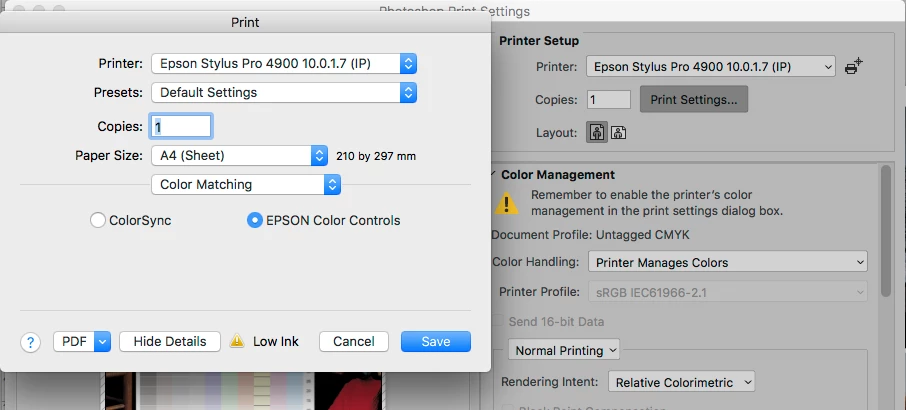
BUT if I select colorsync under color matching in the driver as shown below,

I see the warning, also shown below, after I click save
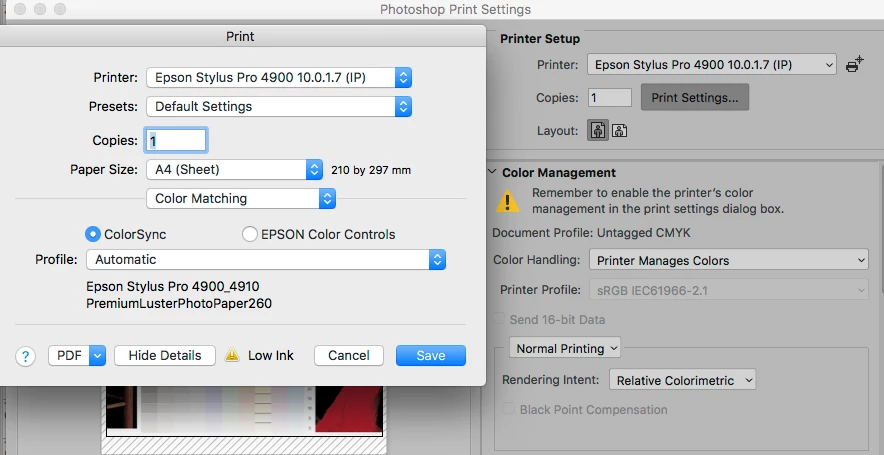
If you hate seeing the warning, you can always click the "don't show this again" box!

but it's there to protect you from wasting ink and paper should you inadvertantly leave it set to colorsync as above.

[Gerry Mander - I can see looking at your conversation with Adobe that the helper didn't truly grasp your situation. Frustrating for you]

Mobius - posted again Jan 24, with a new screenshot and asked:

"ColorSync is selected, greyed out, and there's no option for "no color management" in the printer driver.
- to get that greyed out dialog you must have now selected Photoshop manages color (see below)

so, your situation is different to your original question, to explain:

When Photoshop manages color [and, I hope, a good printer profile] is selected,

then Photoshop can take over & grey out the Colorsync and PRINTER color controls options inside some print drivers

with some printer drivers it doesn’t manage this

So this is pretty much what you are currently seeing, right?
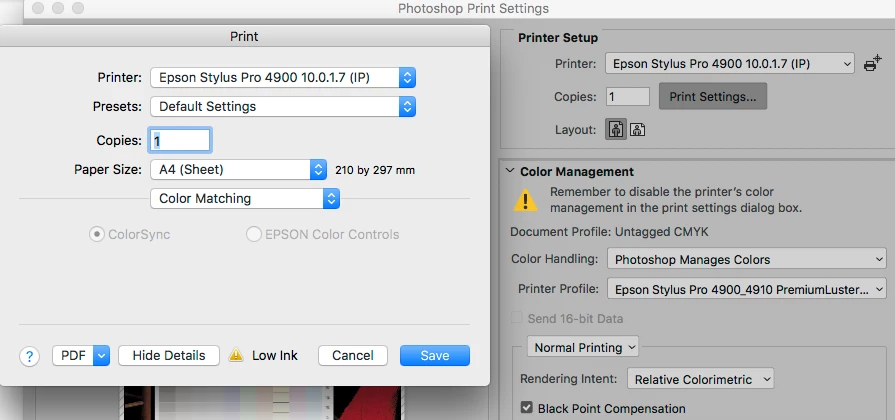
So, with some printers, but not all,  those 2 color matching options showed (as above) are greyed out -

which means that if you select Photoshop manages colour Photoshop's making the choice there for you -

to save confusion, its done greyed out the options

that appearance is based on your choice between Photoshop manages colour & printer manages colour

however, you may see a warning about disabling colourmanagement in the printer software -

because there is another place where colourmanagement can go wrong in the printer software -

it's under the printer settings tab (see screenshot below)

hence the warning you may see about switching off colourmanagement in the driver

Please see Epson driver screenshot below, as you can see, Photoshop was set to Photoshop manages color

In the case of my Epson 4900 printer driver, Photoshop has done this important step for me too

- under Color Mode here, the correct option of "Off (no color management)" has been selected

(and the dialog is greyed so I can't get change it and get it wrong,  meaning I can ignore the warning).
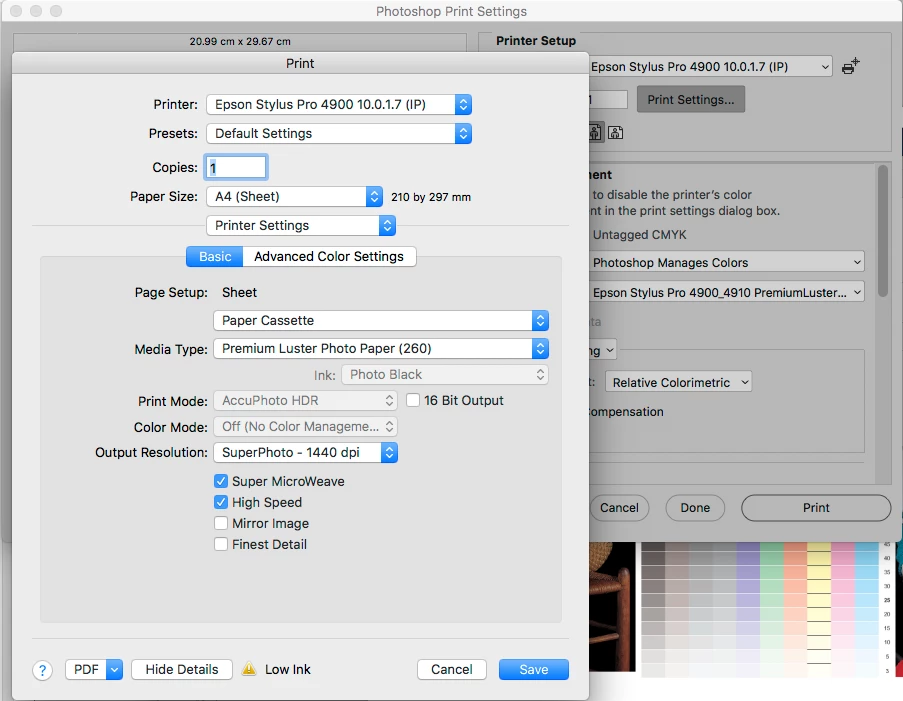
BUT not ALL printer drivers behave so well, with some machines you have to track down and turn off any reference to colourmanagement / ICC profiles etc. Which is why Adobe may give the warning about printer color management when using photoshop manages color.

Photoshop's warnings are by necessity somewhat generic. There are a LOT of different printer drivers out there.

I hope that explains?

BTW

If you want decent printing from that Epson I'd get a good custom printer profile made.

Using the printer colourmanagement isn't always successful, especially for those not using a paper that’s listed in the driver's media options.

I hope this helps

if so, please do mark my reply as "helpful" and if you're OK now, please mark it as "correct" below, so others who have similar issues can see the solution

thanks

neil barstow, colourmanagement

2 replies

Conrad_C
Community Expert
Community Expert
April 28, 2017

I don't think it has to do with document profiles. The confusion comes from print color management settings being in not two, but three places.

  1. Photoshop dialog box (Printer vs Photoshop managed)
  2. Epson printer driver, Color Matching options
  3. Epson printer driver, Color Management options

You already know about #1. To get to #2 and #3, you have to click Print Settings in the Photoshop Print dialog box.

It's in #2 that the Epson driver lets you choose whether you want to go through ColorSync or Epson color controls. If you choose ColorSync, you will get the ColorSync warning you saw. If you switch it to Epson Color Controls, you won't get that warning. #3 is where you control printer color management in the Epson printer driver; since you're using Printer Managed Colors then you want to leave color management on (Color Controls).

While I don't have the same exact printer, I chose an Epson office inkjet as an example because it also doesn't have custom profiles, so Printer Manages Colors is a reasonable way to print through it.

Known Participant
April 28, 2017

Thanks everyone, but there's no "color matching" or "color management" option in my printer driver.

Gerry Mander
Participant
January 25, 2019

Still going on. This time it's on a black-&-white laser printer that has no color settings in its driver dialog whatsoever.

Ridiculous.


Just got off a chat with Adobe "support" about this (now-confirmed) defect:

me: I'm being badgered over and over by a dialog that talks about ColorSync and tells 
me to let the printer manage color... but I'm already doing that

Adobe rep: Change the printer manage color to  photoshop manage color


me: OK, I didn't get the warning in that case.

Adobe rep: Yes in the photoshop manage color it does not give you the error 
message.


me: That's right.

Adobe rep: Okay I do understand.

Adobe rep: Know please do let 
me the  issue with printing ?


me: I don't understand that question.

Adobe rep: So is there any issue now you are facing issue?


me: Yes. I am repeatedly badgered with a dialog when I'm printing and letting the printer manage color.


me: The dialog tells 
me to let the printer manage color... but I'm already doing that.


me: And it shows the dialog twice, every ti
me I print.


me: It complains about ColorSync, which I'm not using.

Adobe rep: It was showing because it was printer manage color.


me: Yes, which is what the dialog says to do.


me: The dialog is warning about ColorSync, which I am NOT using.


me: So it doesn't make sense.


me: The dialog tells 
me to do so
mething that I"m already doing

Adobe rep: So when you make photohsop manage color the pop up 
message is not there.


me: Right. The dialog recom
mends TWO options: Let Photoshop manage, or let the printer manage.


me: It says do not use ColorSync, but I'm not.

Adobe rep: https://helpx.adobe.com/in/photoshop/using/printing-color-manage
ment-photoshop1.html

Adobe rep: Please follow the link


me: OK, I did.

Adobe rep: Okay so now I hope the issue is fixed ?


me: No, of course it is not fixed!


me: How has this fixed it?


me: Photoshop is complaining that I'm doing what it told 
me to.


me: It is warning 
me over and over about so
mething that I'm NOT doing.

Adobe rep: I believe when you make it Phoothsop manage color there is no error 
message ?


me: Look at the picture: The dialog says "printer color manage
ment is recom
mended," and right next to that you can see that I am using printer color manage
ment


me: Your file was successfully uploaded.


me: Is that more clear?

Adobe rep: So see this pop will always co
me as and when you select printer manage color as photoshop is not able to detect the color and it display because there may be a color miss match while printing


me: Then why is it talking about ColorSync and telling 
me to use printer color manage
ment? And showing up TWICE every ti
me I try to print?

Adobe rep: This is because the photoshop is not displaying the color and printing may produce different results


me: It's telling 
me to use printer color manage
ment. I am already using printer color manage
ment. Why is it telling 
me to do so
mething I'm already doing?

Adobe rep: Okay so that is because when ever you are using the printer color manage
ment, photohsop does not detect the color profile and the error 
message shows and ask to use printer color manage
ment but it will show as color is not sync so we recom
mend to use the printer manage color.


me: I am letting the printer manage color. So why am I being told this over and over and over?

Adobe rep: So see this is an error of the application so recom
mend to use the Photoshop manage color.


me: OK, it is a bug in Photoshop, I see. How can we make sure this bug gets reported?

Adobe rep: We have already reported and concern team is working on fix that issue.


me: OK, I'll look forward to that. Thanks.

D Fosse
Community Expert
Community Expert
April 27, 2017

You have an untagged file - there is no document color profile. Assign the correct profile and never work with untagged material. If there is no profile, the document RGB values are undefined.

For any color management to work, wherever it resides, there has to be both a source profile and a destination profile.