

_scott__
Legend
June 21, 2013
Answered

Why am I not getting icon previews? (Mac OS)

  • June 21, 2013
  • 2 replies
  • 21400 views

Mac OS 10.7.5. Photoshop CC.

Everything is set accordingly:
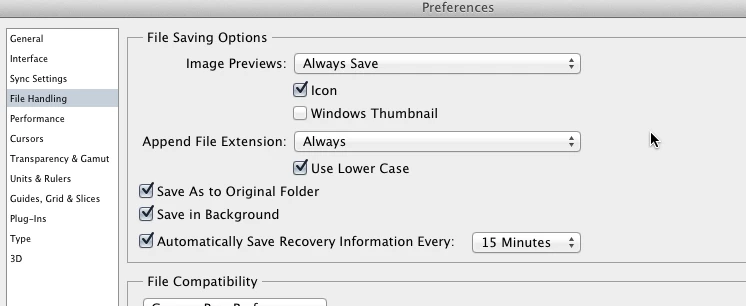
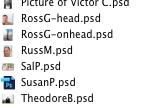
Yet I get only generic file icons. No previews. Why?

Can you find the only Photoshop CC file in this folder, all others are Photoshop CS6 files?
This topic has been closed for replies.
Correct answer Chris Cox

MacOS has some bugs that sometimes prevent it from building thumbnails correctly.

Sometimes rebooting will solve it, sometimes clearing the OS directory caches, and sometimes doing a clean install of the OS.

We've notified Apple of the problem, but haven't heard any results from them yet.

2 replies

Participant
February 24, 2020

I'm using Mac OS Majave. Here's what fixed my missing finder icons:

"Reset NVRAM or PRAM on your Mac"  https://support.apple.com/en-us/HT204063

Chris Cox
Chris CoxCorrect answer
Legend
June 21, 2013

MacOS has some bugs that sometimes prevent it from building thumbnails correctly.

Sometimes rebooting will solve it, sometimes clearing the OS directory caches, and sometimes doing a clean install of the OS.

We've notified Apple of the problem, but haven't heard any results from them yet.

paulburd
Participating Frequently
June 28, 2013

This doesn't appear to be an OS issue since I've seen it reported across many versions of OS X. It seems more like a CC issue, and is very reproducable. If you open and re-save the same file over and over again alternating between Photoshop CS6 an CC, the file's icon will always be the generic file-type icon when saved from CC and the small picture type icon when saved from CS6.

Chris Cox
Legend
June 29, 2013

And yet when I save from CC, I always get icons and previews. (even coverflow works just fine)

There's still some other factor involved (and my guess is it's the same OS metadata extraction bug that we've been trying to figure out for a while).