
XKEG4
Participant
February 4, 2023
Answered

Why are my circles not circular ?

  • February 4, 2023
  • 4 replies
  • 1040 views

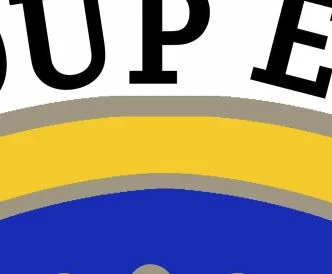
I have been drawing a large logo for a club which has several concentric circles in it. However when I look at it the circle is not smooth as you can see under the P. Is there any way of making it smooth - or should I be using a vector program ?
 

This topic has been closed for replies.
Correct answer Semaphoric
  • A vector program would be preferable, but for your current version, could you post a screenshot of your Layers panel?

4 replies

Jumpenjax
Community Expert
Community Expert
February 6, 2023

I agree with Semaphoric, vector would be best. But it makes no sense why Photoshop is not giving you circular shapes not completely round.

Lee- Graphic Designer, Print Specialist, Photographer
PECourtejoie
Community Expert
Community Expert
February 6, 2023

Hello, it all depends how the selection was made, and how the scaling was performed.

XKEG4
XKEG4Author
Participant
February 6, 2023

Hi / I drew at the scale/size I wanted. So did not expand the shape. The photoshop shapes give me a correct circle so I'll use those. Thanks for the response. 

PECourtejoie
Community Expert
Community Expert
February 4, 2023

Hi, @XKEG4 @which method was used to create the concentric circles? Some (multiple strokes, IIRC) might create artefacts, such as the one displayed here, but do show your layers panel as well!

Imaginerie
Community Expert
Community Expert
February 4, 2023

In addition with what @Semaphoric said, does it look the same if you hide the text (or indeed any other layer that appears on top of the circle layer in the layer stack). That's because I think a white shape (maybe a text stroke) seems to be hiding the top of the circle...

Semaphoric
Community Expert
SemaphoricCommunity ExpertCorrect answer
Community Expert
February 4, 2023
  • A vector program would be preferable, but for your current version, could you post a screenshot of your Layers panel?
XKEG4
XKEG4Author
Participant
February 4, 2023

Thanks for the suggestions - here is the layer panel. When I hide the text the shaps of the circles do not change. I created the circles using the ALT/Shift.


Semaphoric
Community Expert
Community Expert
February 4, 2023

Are the circles just plain (raster) layers, copied and resized? The text appears to be rasterized; does it have a transparent background?

No need for a separate vector app; just use PS's Shapes an text on a path.