
scottmosher
Inspiring
April 17, 2018
Answered

Why are the ruler marks so hard to see? [2018]

  • April 17, 2018
  • 6 replies
  • 5869 views

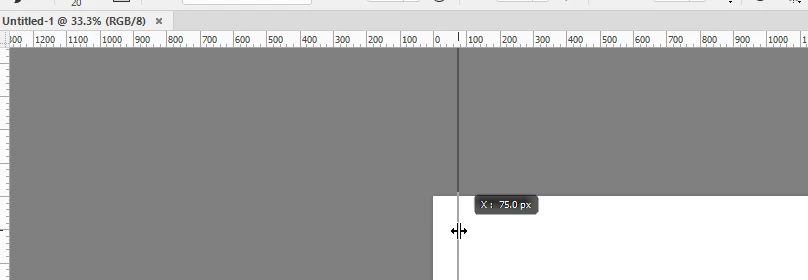
My eye sight is good, by why are the ruler marks so hard to discern in Photoshop now? Dragging out my guides once was effortless and easy - now I can barely see the location markers in the ruler (that light color on the dark gray - seems like the markers are small or very thin.) Anyone else have a problem with this and is there any way to adjust this?
Correct answer scottmosher

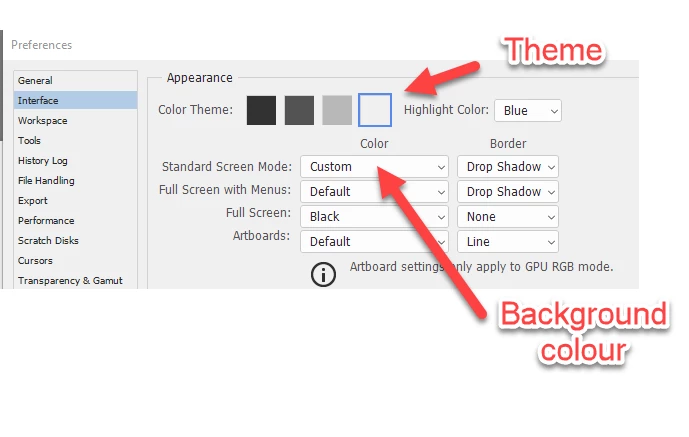
+1 for using the lightest colour theme. It means your eyes are not misled into adjusting the image too dark and has the added benefit of making the ruler very clear. I also set the background to 50% grey.

Dave


I was trying to stick with a middle to darker theme with easier to read ruler marks, but it seems its just not possible. Thanks!

6 replies

Participant
September 4, 2025

It's late 2025 and I'm Googling this because I went to turn on the rulers because I couldn't see rulers at all. Lo and behold, I already had rulers on! I'm squinting, blocking window light, leaning forward putting my nose on the screen. Ohhh yeahhhh, they are BARELY there, just like my sanity.


Thanks for the help here. Now I have light mode for the perimeter and dark mode for the background. I can see the ruler marks. But the combo of light and dark modes is visually annoying. I'd just like to have the option to make the ruler lines actually visible. There's numerous related conversations in the sidebar asking for this. I've used Photoshop since the 90s. This is going backwards in usability (including text getting maddeningly small) and no updates based on user requests, while Adobe keeps charging more. I couldn't get away with this with the software we build. 

Trevor.Dennis
Community Expert
Community Expert
September 4, 2025

Something I do is make sure the rules and grid are set to the same unit.  That way you can turn on the grid which align to the rulers.  I also like to drag the grid zero, zero origin to a convenient point, usually after placing intersecting guides at that position, (usually the center of the canvas).


A trick you can do to make the grid more easy to use is to adjust Image size with Resample disabled.  It was set to 300 in the above screen shot.  This is what the same view looks like at 100.

I find it useful to have a number of Guide layouts saved for easy use.  It has always seem strange to me that 2x2 (columns/rows) is not one of the defaults, that giving you intersecting guides at the center of the canvas.  The grid origin will snap to a guide intersection giving you a spot on reference point for an illustration.

Participant
August 23, 2024

I'm convinced that whoever programmed photoshop's rulers never had to actually use them. A lot of what has happened to photoshop since the old days has me convinced that no one who does the actual programing of photoshop ever had to actually use the program to do any serious graphic design work on a consistent basis. The best thing Adobe could have done after CS-7 would have been to just leave well enough alone. It was great! And hey, get this...... you could even read the rulers! Holy smokes! What a concept!

leslis455806
Participant
August 12, 2023

well, 5 years later and in illustrator, i am having the same problem.... i am using the dark background, but it is so hard to see the ruler incraments... what can i do to make it more visible


Participating Frequently
July 27, 2024

SIX years later and this obvious interface FLAW has never been changed. Way easier to read for example in InDesign. That is the nature of Adobe, sadly. And then they have the nerve to have pop ups asking if you would recommend their software! I have lists of DOZENS of PERMANENT bugs in InDesign, none ever fixed.

Participant
August 1, 2023

So tired of not being able to see the markings on the rulers ant help to see bigger and darker markings is appreciated. 

PECourtejoie
Community Expert
Community Expert
February 17, 2023

Hi @scottmosher you say "now" the main change that recently happened was the addition of natively GPU rendered rulers, you can try to disable that option in Photoshop /preferences (settings in the latest OS)/ technology preview https://helpx.adobe.com/photoshop/using/technology-previews.html

Sandra Delgado
Participating Frequently
July 16, 2023

At last! You have helped me a lot: in my case the ruler marks almost completely disappeared when zooming in my file, and now they look better, just enough to return to work at ease.

¡Mil gracias, @PECourtejoie! 🙂

Sandra Delgado
Participating Frequently
July 19, 2023

Hi, glad to head it was helpful!

May I ask which GPU and driver version you have on your computer (Help>GPU Compatibility)


Hi! Sure, no problem at all:

I'am attaching a screenshot of the GPU data, and also another one where you can clearly see the difference between the ruler marks before and after, just in case it's also useful.


c.pfaffenbichler
Community Expert
Community Expert
April 17, 2018

Please read this (in particular the section titled "Supply pertinent information for quicker answers"):

https://forums.adobe.com/docs/DOC-7044

Could you please post a screenshot taken at View > 100% and with the pertinent Panels (Layers, Channels, Options Bar, …) visible?

scottmosher
Inspiring
April 17, 2018

Just seems like the ruler markers are harder to see than they've been in previous versions of PS.

c.pfaffenbichler
Community Expert
Community Expert
April 17, 2018

Why are you using a dark Color Theme? Are you working for video or film editing?