Participant
March 25, 2014
Answered

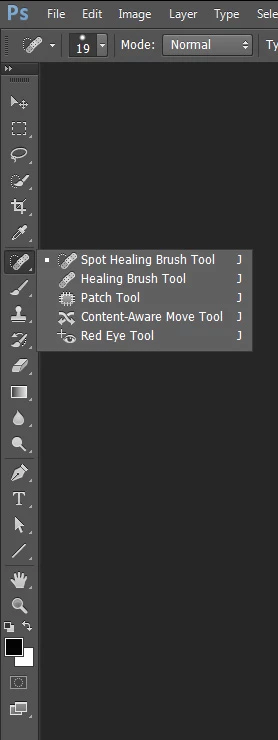
Why can't I find the Spot Healing Brush?

  • March 25, 2014
  • 2 replies
  • 25362 views

Can't find the "Spot Healing Brush" on my PS CS5.

    This topic has been closed for replies.
    Correct answer Trevor.Dennis

    I came in with CS2 so you should have it.  Have you twirled out the flyout?
    2 replies

    jeremyb34879191
    Participant
    September 22, 2017

    I had the same problem, but found a different solution... My workspace was set to 3D...Apparently switching to the Essentials workspace adds the spot healing brush tools...

    Trevor.Dennis
    Community Expert
    Trevor.DennisCommunity ExpertCorrect answer
    Community Expert
    March 26, 2014

    I came in with CS2 so you should have it.  Have you twirled out the flyout?

    randys76917283
    Participant
    October 7, 2017

    Trevor, I saw your screenshot of the tool bar but my tool bar does not look the same.  It does not have the pop out when I click or scroll over the Healing Brush. Are there tools I have to load?

    randys76917283
    Participant
    October 7, 2017

    Hi Randy

    The answer is in the post before yours.

    If you switch workspaces, to one of the presets, Photoshop changes the toolbar to match.

    Switch back to the essentials workspace. To do that, at the top right of the options bar click the down arrow and choose essentials .

    If that does not recover - then reset the essentials workspace  using the same menu

    Note - you can also reset the toolbar from menu Edit - Toolbar

    Dave


    Thanks Dave.  I also just found that clicking and holding makes a whole secondary list appear.  You advice will be helpful for me as a learn PS. 

    One other question. Do you know any reason the healing brush will not work properly?  Perhaps I should look for a new form but if you know a quick answer it would help. When I hover over the area I want to copy and press "option" and click, the cursor changes and appears to copy the content, however when I click and try to paint the area I want changed, nothing happened. The cross hairs appear, but there is no change in color. Am I perhaps in some mode that will not edit?  I am zoomed in very close.